

How to share the hotspot of the Redmi 13C 5G via Ethernet?
If you want to share the Redmi 13C 5G's hotspot via Ethernet, you can use a USB-to-Ethernet adapter, as the phones don't support direct Ethernet sharing.
To share the hotspot of the Redmi 13C 5G via Ethernet, please refer to the following steps:
1. Go to [Settings];
2. Tap [More connectivity options];
3. Select [Portable hotspot];
4. Turn on [Portable hotspot];
5. Plug the USB-to-Ethernet adapter into the USB-C port of your phone. Enable [Share via Ethernet];
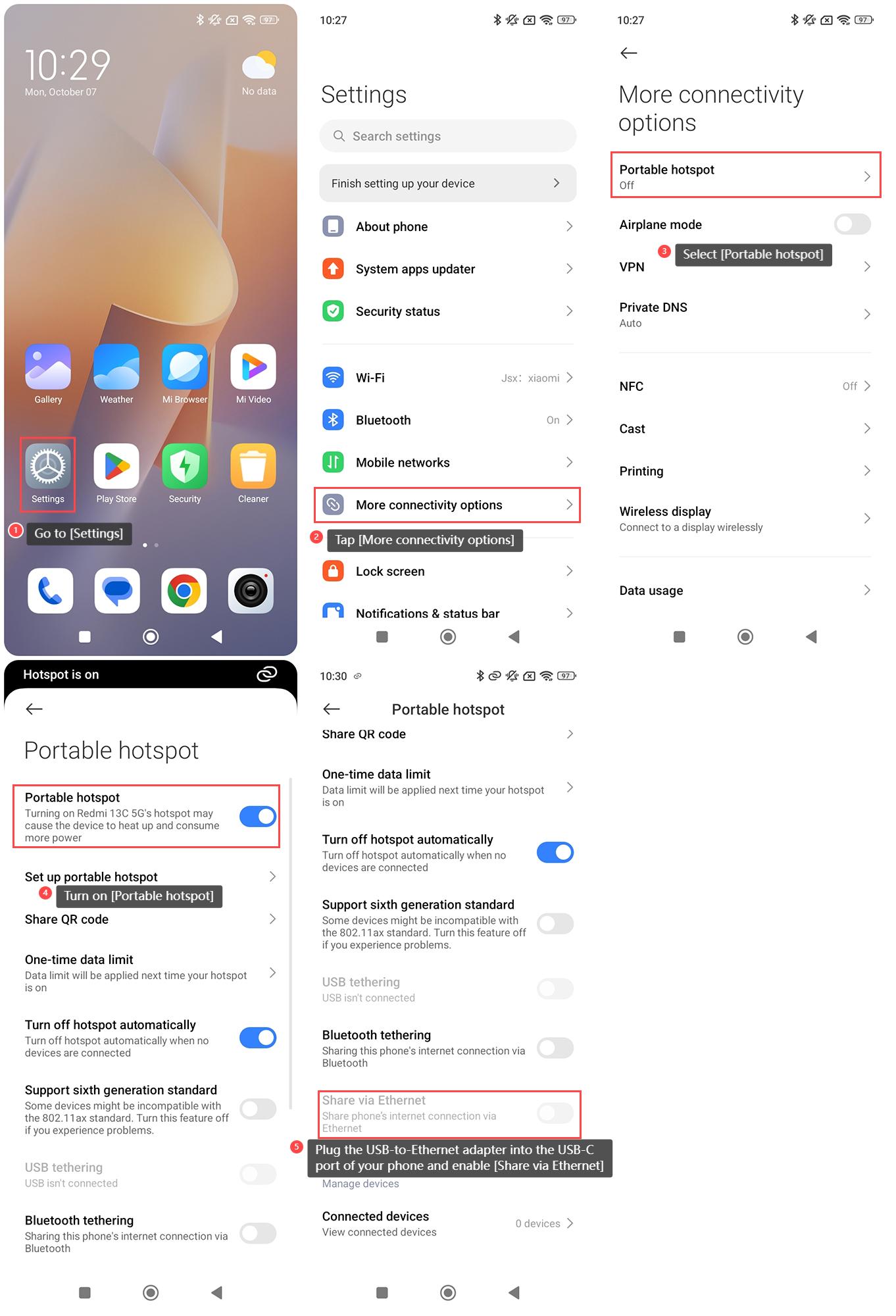
6. Attach one end of the Ethernet cable to the adapter;
7. Connect the other end of the Ethernet cable to the device you want to provide internet access to.
Note:
Please make sure the connected device (e.g., your computer) is set to obtain the IP address automatically (via DHCP).
Does it help?
Yes
No