

Xiaomi Soundbar 2.0ch FAQ
Product introduction
1. Q: What are the selling points of the Xiaomi Soundbar 2.0ch?
A: For your reference, here are some selling points of the Xiaomi Soundbar 2.0ch:
1. The black mesh cover enhances aesthetics while providing a tight seal to prevent dust and improve heat dissipation;
2. The slim design allows for flexible installation options, whether wall-mounted or placed on a base, without obstructing your view;
3. Two-way full-range speakers deliver rich sound quality with a maximum power of 30W, ensuring detailed audio reproduction;
4. Dynamic sound quality creates a cinema-like experience in the comfort of your home;
5. Low-latency Bluetooth 5.3 ensures low power consumption and easy connectivity with a wide range of devices;
6. Equipped with S/PDIF, Optical, and AUX ports, it can provide versatile connection options for seamless audio integration;
7. Intuitive controls allow seamless switching between functions for an enhanced using experience.
2. Q: What does the Xiaomi Soundbar 2.0ch look like?
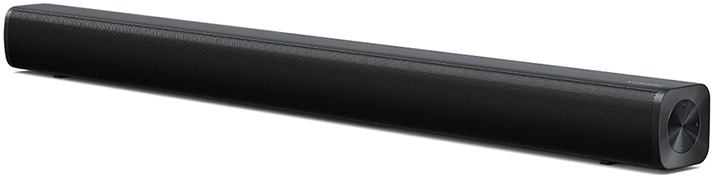
A: 1. The Xiaomi Soundbar 2.0ch is black in color;
2. The dimensions of the Xiaomi Soundbar 2.0ch are 780 × 64 × 63mm;
3. The Xiaomi Soundbar 2.0ch weighs 1.5kg.
3. Q: What buttons does the Xiaomi Soundbar 2.0ch have?
A: There are four buttons on the right side of Xiaomi Soundbar 2.0ch, including Power button, Volume up button, Volume down button, and Source button.
For your reference, the functions of each button are as follows:
1. The power button is used to turn the soundbar on and off;
2. The volume up button allows you to increase the volume by pressing it once, skip to the next track by pressing it twice, or raise the volume to 100% by pressing and holding it;
3. The volume down button enables you to decrease the volume by pressing it once, return to the previous track by pressing it twice, or lower the volume to 0 by pressing and holding it;
4. The source button lets you cycle through different audio sources by pressing it, and you can enter the Bluetooth pairing mode by pressing and holding it for 3 seconds;
5. To clear pairing records, you need to press and hold both the power button and the source button simultaneously.
4. Q: How many indicators does the Xiaomi Soundbar 2.0ch have?
A: The Xiaomi Soundbar 2.0ch has an indicator light located in the upper middle part of the front. The indicator light turns blue for Bluetooth connections, green for S/PDIF input, red for Auxiliary input, and orange for Optical input.
5. Q: How many sockets does the Xiaomi Soundbar 2.0ch have?
A: The Xiaomi Soundbar 2.0ch features 1 Aux socket, 1 Optical socket, 1 SPDIF socket, and 1 AC socket.
6. Q: What is the Bluetooth version of the Xiaomi Soundbar 2.0ch?
A: The Xiaomi Soundbar 2.0ch adopts Bluetooth 5.3.
7. Q: What is the Bluetooth frequency of the Xiaomi Soundbar 2.0ch?
A: The Bluetooth frequency of the Xiaomi Soundbar 2.0ch is 2402 - 2480MHz.
8. Q: What is the BT IC of the Xiaomi Soundbar 2.0ch?
A: The BT IC of the Xiaomi Soundbar 2.0ch is AC6951B.
9. Q: Does the Xiaomi Soundbar 2.0ch support Low power consumption?
A: No, the Xiaomi Soundbar 2.0ch doesn’t support Low power consumption.
10. Q: Does the Xiaomi Soundbar 2.0ch support Wi-Fi?
A: No, the Xiaomi Soundbar 2.0ch doesn’t support Wi-Fi.
11. Q: Does the Xiaomi Soundbar 2.0ch support NFC?
A: No, the Xiaomi Soundbar 2.0ch doesn’t support NFC.
12. Q: Does the Xiaomi Soundbar 2.0ch support the Mi Home/Xiaomi Home APP?
A: No, the Xiaomi Soundbar 2.0ch doesn’t support the Mi Home/Xiaomi Home APP.
13. Q: What is the speaker type of the Xiaomi Soundbar 2.0ch?
A: The speaker type of the Xiaomi Soundbar 2.0ch is Racetrack full-range speaker.
14. Q: Does the Xiaomi Soundbar 2.0ch support HDMI?
A: No, the Xiaomi Soundbar 2.0ch doesn’t support HDMI.
15. Q: Does the Xiaomi Soundbar 2.0ch support USB?
A: No, the Xiaomi Soundbar 2.0ch doesn’t support USB.
16. Q: What is the maximum environmental temperature for using the Xiaomi Soundbar 2.0ch?
A: The maximum environmental temperature is 45°C.
17. Q: What is contained in the packing of the Xiaomi Soundbar 2.0ch?
A: The package contents include a Xiaomi Soundbar 2.0ch, a Power cord, a User manual, a S/PDIF cable, two Screws, two Expansion tubes, and two EVA pads.
Usage & Troubleshooting
1. Q: What precautions should be taken when using the Xiaomi Soundbar 2.0ch?
A: For your reference, here are some precautions when using the Xiaomi Soundbar 2.0ch:
1. The power plug is used as a device to disconnect the power supply;
2. The power outlet should be installed near the equipment and should be easily accessible;
3. When the equipment is not in use, disconnect the power supply from the equipment and remove the power plug from the power outlet;
4. Do not place exposed sources of ignition, such as lighted candles, on the equipment;
5. Please keep the device away from water. If foreign objects or liquids enter the device, please stop using it immediately and unplug the power plug;
6. Do not place the equipment in an unstable position, otherwise the soundbar can tip over and cause personal injury.
2. Q: How to connect the Xiaomi Soundbar 2.0ch with the TV?
A: To connect the Xiaomi Soundbar 2.0ch with the TV, please refer to the following steps:
1. Plug the Soundbar into a power source via the AC power cable;
2. Press and hold the power button for 2 seconds to turn on the soundbar. When the soundbar is turned on, the LED indicator on the front of the soundbar will light up;
3. Use the S/PDIF or Optical cable to connect the soundbar and the TV, and then set the sound of the soundbar and the TV to S/PDIF output mode.
Note:
Every time you restart the soundbar, it will automatically enter the previous audio input mode.
3. Q: How to connect the Xiaomi Soundbar 2.0ch via Bluetooth?
A: To connect the Xiaomi Soundbar 2.0ch via Bluetooth, please refer to the following steps:
1. Under the power-on state, press and hold the source button for 3 seconds to enter Bluetooth pairing mode, and the LED indicator light will flash;
2. Go to the Bluetooth interface on the device you want to connect, select the Xiaomi Soundbar 2.0ch from the list of available devices, and wait for the connection.
4. Q: How to wall-mount the Xiaomi Soundbar 2.0ch?
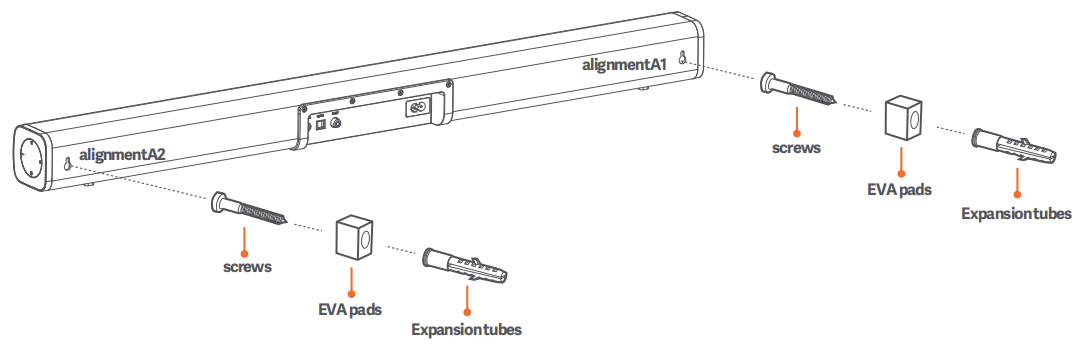
A: To wall-mount the Xiaomi Soundbar 2.0ch, please refer to the following steps:
1. Determine the hole locations, with a distance of 729mm between the two holes;
2. Drill holes according to the determined wall hole locations;
3. Plug the expansion screws into the two wall holes, screw the screws through the EVA foam pads into the expansion screws, and fix the Xiaomi TV Soundbar 2.0 to the screws.
5. Q: How to place the Xiaomi Soundbar 2.0ch?
A: The Xiaomi Soundbar 2.0ch features a rectangular design, and can be mounted on the wall or placed on a base. When placing it, ensure it faces people and minimize any obstructions between the soundbar and people for the best audio experience. Additionally, it is recommended not to place it on the floor.
6. Q: What to do if the phone cannot search for the Bluetooth signal of the Xiaomi Soundbar 2.0ch?
A: If your phone cannot search for the Bluetooth signal of the Xiaomi Soundbar 2.0ch, please refer to the following methods:
1. Bring the phone and soundbar closer together and try searching again;
2. Check if the soundbar is in the pairing mode. You can enter the Bluetooth pairing mode by pressing and holding the source button for 3 seconds;
3. Restart the soundbar and try searching again;
4. Press and hold both the power button and the source button simultaneously to clear the pairing records. At the same time, delete the connection records on the phone, restart the phone, and try searching again;
5. If the phone still cannot search, change the phone and the usage environment and try searching again;
6. If the problem persists, please contact the after-sales service for further assistance.
7. Q: What to do if the phone detects the Bluetooth signal of the Xiaomi Soundbar 2.0ch but fails to connect?
A: If your phone detects the Bluetooth signal of the Xiaomi Soundbar 2.0ch but fails to connect, please refer to the following methods:
1. If the soundbar is connected to other devices, you need to press and hold the source button for 3 seconds to enter the Bluetooth pairing mode, and then reconnect;
2. Bring the phone and soundbar closer together and try connecting again;
3. Restart the soundbar and try connecting again;
4. Press and hold both the power button and the source button simultaneously to clear the pairing records. At the same time, delete the connection records on the phone, restart the phone, and try connecting again;
5. Change the phone and the usage environment and try connecting again;
6. If the problem persists, please contact the after-sales service for further assistance.
8. Q: What to do if the volume of the Xiaomi Soundbar 2.0ch is too low?
A: The Xiaomi Soundbar 2.0ch supports independent volume adjustment, which can be done using the side buttons. If the volume is still low, check if the output volume on the source device (such as a phone or TV) is set too low, and adjust the output volume accordingly.
9. Q: What to do if the Xiaomi Soundbar 2.0ch experiences stuttering when playing music via Bluetooth?
A: If the Xiaomi Soundbar 2.0ch experiences stuttering when playing music via Bluetooth, please refer to the following methods:
1. Restart the soundbar and try again;
2. Check if your phone is too far from the soundbar, bring the phone and soundbar closer and try again;
3. If bringing the phone closer does not resolve the issue, it’s due to poor environmental conditions, where there are too many sources of radio frequency interference. You can check the surrounding environment or use an alternative mode for playback.
10. Q: What to do if there is no sound from the Xiaomi Soundbar 2.0ch when connected to the TV via the S/PDIF cable?
A: If there is no sound from the Xiaomi Soundbar 2.0ch when connected to the TV via the S/PDIF cable, please refer to the following methods:
1. Adjust the volume on both the TV and soundbar to ensure it is not too low to hear;
2. Check the back of the TV for an Optical Out or Digital Audio Out port. If present, the TV supports S/PDIF output; if not, please use another connection method;
3. Check if the S/PDIF cable is correctly connected to both the TV and the soundbar;
4. Access the TV's settings menu and find the Audio Output or Speaker Output options, and set them to S/PDIF and PCM output mode;
5. Ensure the soundbar's input source is switched to S/PDIF; you can do this by pressing the source button on the side of the soundbar, which will turn the indicator light green when switched;
6. Change a different S/PDIF cable and try again;
7. If the problem persists, please contact the after-sales service for further assistance.
1. Q: What are the selling points of the Xiaomi Soundbar 2.0ch?
A: For your reference, here are some selling points of the Xiaomi Soundbar 2.0ch:
1. The black mesh cover enhances aesthetics while providing a tight seal to prevent dust and improve heat dissipation;
2. The slim design allows for flexible installation options, whether wall-mounted or placed on a base, without obstructing your view;
3. Two-way full-range speakers deliver rich sound quality with a maximum power of 30W, ensuring detailed audio reproduction;
4. Dynamic sound quality creates a cinema-like experience in the comfort of your home;
5. Low-latency Bluetooth 5.3 ensures low power consumption and easy connectivity with a wide range of devices;
6. Equipped with S/PDIF, Optical, and AUX ports, it can provide versatile connection options for seamless audio integration;
7. Intuitive controls allow seamless switching between functions for an enhanced using experience.
2. Q: What does the Xiaomi Soundbar 2.0ch look like?
A: 1. The Xiaomi Soundbar 2.0ch is black in color;
2. The dimensions of the Xiaomi Soundbar 2.0ch are 780 × 64 × 63mm;
3. The Xiaomi Soundbar 2.0ch weighs 1.5kg.
3. Q: What buttons does the Xiaomi Soundbar 2.0ch have?
A: There are four buttons on the right side of Xiaomi Soundbar 2.0ch, including Power button, Volume up button, Volume down button, and Source button.
For your reference, the functions of each button are as follows:
1. The power button is used to turn the soundbar on and off;
2. The volume up button allows you to increase the volume by pressing it once, skip to the next track by pressing it twice, or raise the volume to 100% by pressing and holding it;
3. The volume down button enables you to decrease the volume by pressing it once, return to the previous track by pressing it twice, or lower the volume to 0 by pressing and holding it;
4. The source button lets you cycle through different audio sources by pressing it, and you can enter the Bluetooth pairing mode by pressing and holding it for 3 seconds;
5. To clear pairing records, you need to press and hold both the power button and the source button simultaneously.
4. Q: How many indicators does the Xiaomi Soundbar 2.0ch have?
A: The Xiaomi Soundbar 2.0ch has an indicator light located in the upper middle part of the front. The indicator light turns blue for Bluetooth connections, green for S/PDIF input, red for Auxiliary input, and orange for Optical input.
5. Q: How many sockets does the Xiaomi Soundbar 2.0ch have?
A: The Xiaomi Soundbar 2.0ch features 1 Aux socket, 1 Optical socket, 1 SPDIF socket, and 1 AC socket.
6. Q: What is the Bluetooth version of the Xiaomi Soundbar 2.0ch?
A: The Xiaomi Soundbar 2.0ch adopts Bluetooth 5.3.
7. Q: What is the Bluetooth frequency of the Xiaomi Soundbar 2.0ch?
A: The Bluetooth frequency of the Xiaomi Soundbar 2.0ch is 2402 - 2480MHz.
8. Q: What is the BT IC of the Xiaomi Soundbar 2.0ch?
A: The BT IC of the Xiaomi Soundbar 2.0ch is AC6951B.
9. Q: Does the Xiaomi Soundbar 2.0ch support Low power consumption?
A: No, the Xiaomi Soundbar 2.0ch doesn’t support Low power consumption.
10. Q: Does the Xiaomi Soundbar 2.0ch support Wi-Fi?
A: No, the Xiaomi Soundbar 2.0ch doesn’t support Wi-Fi.
11. Q: Does the Xiaomi Soundbar 2.0ch support NFC?
A: No, the Xiaomi Soundbar 2.0ch doesn’t support NFC.
12. Q: Does the Xiaomi Soundbar 2.0ch support the Mi Home/Xiaomi Home APP?
A: No, the Xiaomi Soundbar 2.0ch doesn’t support the Mi Home/Xiaomi Home APP.
13. Q: What is the speaker type of the Xiaomi Soundbar 2.0ch?
A: The speaker type of the Xiaomi Soundbar 2.0ch is Racetrack full-range speaker.
14. Q: Does the Xiaomi Soundbar 2.0ch support HDMI?
A: No, the Xiaomi Soundbar 2.0ch doesn’t support HDMI.
15. Q: Does the Xiaomi Soundbar 2.0ch support USB?
A: No, the Xiaomi Soundbar 2.0ch doesn’t support USB.
16. Q: What is the maximum environmental temperature for using the Xiaomi Soundbar 2.0ch?
A: The maximum environmental temperature is 45°C.
17. Q: What is contained in the packing of the Xiaomi Soundbar 2.0ch?
A: The package contents include a Xiaomi Soundbar 2.0ch, a Power cord, a User manual, a S/PDIF cable, two Screws, two Expansion tubes, and two EVA pads.
Usage & Troubleshooting
1. Q: What precautions should be taken when using the Xiaomi Soundbar 2.0ch?
A: For your reference, here are some precautions when using the Xiaomi Soundbar 2.0ch:
1. The power plug is used as a device to disconnect the power supply;
2. The power outlet should be installed near the equipment and should be easily accessible;
3. When the equipment is not in use, disconnect the power supply from the equipment and remove the power plug from the power outlet;
4. Do not place exposed sources of ignition, such as lighted candles, on the equipment;
5. Please keep the device away from water. If foreign objects or liquids enter the device, please stop using it immediately and unplug the power plug;
6. Do not place the equipment in an unstable position, otherwise the soundbar can tip over and cause personal injury.
2. Q: How to connect the Xiaomi Soundbar 2.0ch with the TV?
A: To connect the Xiaomi Soundbar 2.0ch with the TV, please refer to the following steps:
1. Plug the Soundbar into a power source via the AC power cable;
2. Press and hold the power button for 2 seconds to turn on the soundbar. When the soundbar is turned on, the LED indicator on the front of the soundbar will light up;
3. Use the S/PDIF or Optical cable to connect the soundbar and the TV, and then set the sound of the soundbar and the TV to S/PDIF output mode.
Note:
Every time you restart the soundbar, it will automatically enter the previous audio input mode.
3. Q: How to connect the Xiaomi Soundbar 2.0ch via Bluetooth?
A: To connect the Xiaomi Soundbar 2.0ch via Bluetooth, please refer to the following steps:
1. Under the power-on state, press and hold the source button for 3 seconds to enter Bluetooth pairing mode, and the LED indicator light will flash;
2. Go to the Bluetooth interface on the device you want to connect, select the Xiaomi Soundbar 2.0ch from the list of available devices, and wait for the connection.
4. Q: How to wall-mount the Xiaomi Soundbar 2.0ch?
A: To wall-mount the Xiaomi Soundbar 2.0ch, please refer to the following steps:
1. Determine the hole locations, with a distance of 729mm between the two holes;
2. Drill holes according to the determined wall hole locations;
3. Plug the expansion screws into the two wall holes, screw the screws through the EVA foam pads into the expansion screws, and fix the Xiaomi TV Soundbar 2.0 to the screws.
5. Q: How to place the Xiaomi Soundbar 2.0ch?
A: The Xiaomi Soundbar 2.0ch features a rectangular design, and can be mounted on the wall or placed on a base. When placing it, ensure it faces people and minimize any obstructions between the soundbar and people for the best audio experience. Additionally, it is recommended not to place it on the floor.
6. Q: What to do if the phone cannot search for the Bluetooth signal of the Xiaomi Soundbar 2.0ch?
A: If your phone cannot search for the Bluetooth signal of the Xiaomi Soundbar 2.0ch, please refer to the following methods:
1. Bring the phone and soundbar closer together and try searching again;
2. Check if the soundbar is in the pairing mode. You can enter the Bluetooth pairing mode by pressing and holding the source button for 3 seconds;
3. Restart the soundbar and try searching again;
4. Press and hold both the power button and the source button simultaneously to clear the pairing records. At the same time, delete the connection records on the phone, restart the phone, and try searching again;
5. If the phone still cannot search, change the phone and the usage environment and try searching again;
6. If the problem persists, please contact the after-sales service for further assistance.
7. Q: What to do if the phone detects the Bluetooth signal of the Xiaomi Soundbar 2.0ch but fails to connect?
A: If your phone detects the Bluetooth signal of the Xiaomi Soundbar 2.0ch but fails to connect, please refer to the following methods:
1. If the soundbar is connected to other devices, you need to press and hold the source button for 3 seconds to enter the Bluetooth pairing mode, and then reconnect;
2. Bring the phone and soundbar closer together and try connecting again;
3. Restart the soundbar and try connecting again;
4. Press and hold both the power button and the source button simultaneously to clear the pairing records. At the same time, delete the connection records on the phone, restart the phone, and try connecting again;
5. Change the phone and the usage environment and try connecting again;
6. If the problem persists, please contact the after-sales service for further assistance.
8. Q: What to do if the volume of the Xiaomi Soundbar 2.0ch is too low?
A: The Xiaomi Soundbar 2.0ch supports independent volume adjustment, which can be done using the side buttons. If the volume is still low, check if the output volume on the source device (such as a phone or TV) is set too low, and adjust the output volume accordingly.
9. Q: What to do if the Xiaomi Soundbar 2.0ch experiences stuttering when playing music via Bluetooth?
A: If the Xiaomi Soundbar 2.0ch experiences stuttering when playing music via Bluetooth, please refer to the following methods:
1. Restart the soundbar and try again;
2. Check if your phone is too far from the soundbar, bring the phone and soundbar closer and try again;
3. If bringing the phone closer does not resolve the issue, it’s due to poor environmental conditions, where there are too many sources of radio frequency interference. You can check the surrounding environment or use an alternative mode for playback.
10. Q: What to do if there is no sound from the Xiaomi Soundbar 2.0ch when connected to the TV via the S/PDIF cable?
A: If there is no sound from the Xiaomi Soundbar 2.0ch when connected to the TV via the S/PDIF cable, please refer to the following methods:
1. Adjust the volume on both the TV and soundbar to ensure it is not too low to hear;
2. Check the back of the TV for an Optical Out or Digital Audio Out port. If present, the TV supports S/PDIF output; if not, please use another connection method;
3. Check if the S/PDIF cable is correctly connected to both the TV and the soundbar;
4. Access the TV's settings menu and find the Audio Output or Speaker Output options, and set them to S/PDIF and PCM output mode;
5. Ensure the soundbar's input source is switched to S/PDIF; you can do this by pressing the source button on the side of the soundbar, which will turn the indicator light green when switched;
6. Change a different S/PDIF cable and try again;
7. If the problem persists, please contact the after-sales service for further assistance.
Does it help?
Yes
No