

How to check and schedule how long the screen lights up per day on the Redmi 13C?
Checking and scheduling screen time on the Redmi 13C helps manage daily usage, promoting healthier habits by avoiding excessive screen exposure. It also conserves battery life and aids in maintaining the phone’s performance over time.
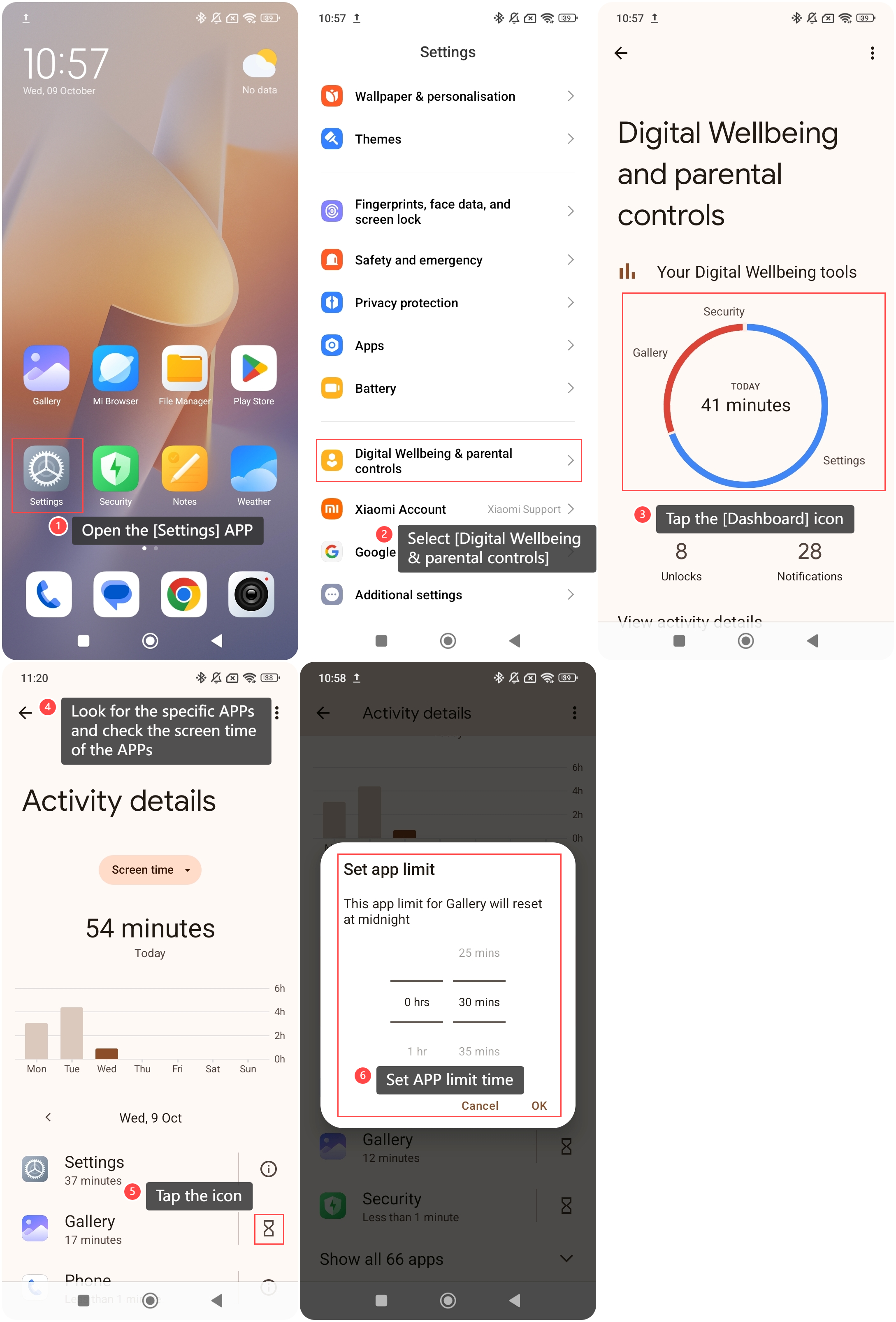
To check and schedule how long the screen lights up per day on the phone, please refer to the following steps:
1. Open the [Settings] APP on your phone;
2. Scroll down and select an option called [Digital Wellbeing & parental controls];
3. Tap the [Dashboard] icon, you can check how long the screen lights up per day on your phone;
4. Look for the specific APPs and check the screen time of the APPs;
5. Additionally, tap the icon on the right of the specific APP;
6. You can set APP limit time.
To check and schedule how long the screen lights up per day on the phone, please refer to the following steps:
1. Open the [Settings] APP on your phone;
2. Scroll down and select an option called [Digital Wellbeing & parental controls];
3. Tap the [Dashboard] icon, you can check how long the screen lights up per day on your phone;
4. Look for the specific APPs and check the screen time of the APPs;
5. Additionally, tap the icon on the right of the specific APP;
6. You can set APP limit time.
Note:
Some important system APPs aren’t available to set a time limit.
Does it help?
Yes
No