

How to set up screen lock on the Redmi 13C 5G?
The Redmi 13C 5G supports setting up screen lock, which serves to secure your device by preventing unauthorized access. Besides, it allows you to set up various unlocking methods, such as PIN, pattern, or password, for quick and convenient access. Additionally, it prevents unintentional inputs or actions when the phone is in a bag or pocket.
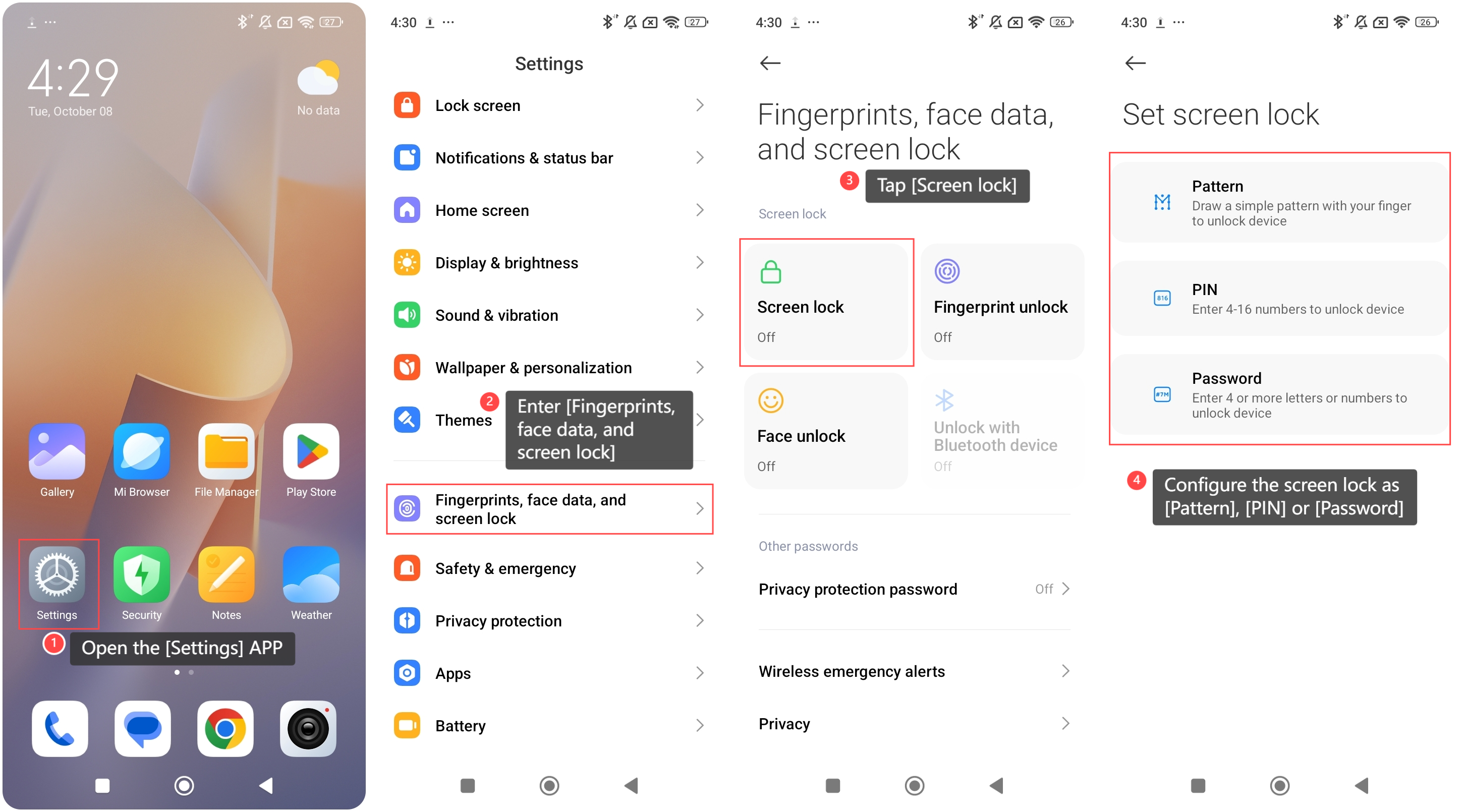
To set up screen lock on your phone, please refer to the following steps:
1. Open the [Settings] APP on your phone;
2. Enter [Fingerprints, face data, and screen lock];
3. Tap [Screen lock];
4. Configure the screen lock as [Pattern], [PIN] or [Password].
To set up screen lock on your phone, please refer to the following steps:
1. Open the [Settings] APP on your phone;
2. Enter [Fingerprints, face data, and screen lock];
3. Tap [Screen lock];
4. Configure the screen lock as [Pattern], [PIN] or [Password].
Does it help?
Yes
No