

How to make the Redmi 13C play sound when deleting items?
Making the Redmi 13C play sound when deleting items can make you more aware of the deletion action. This could potentially help prevent accidental deletions by providing an additional layer of feedback.
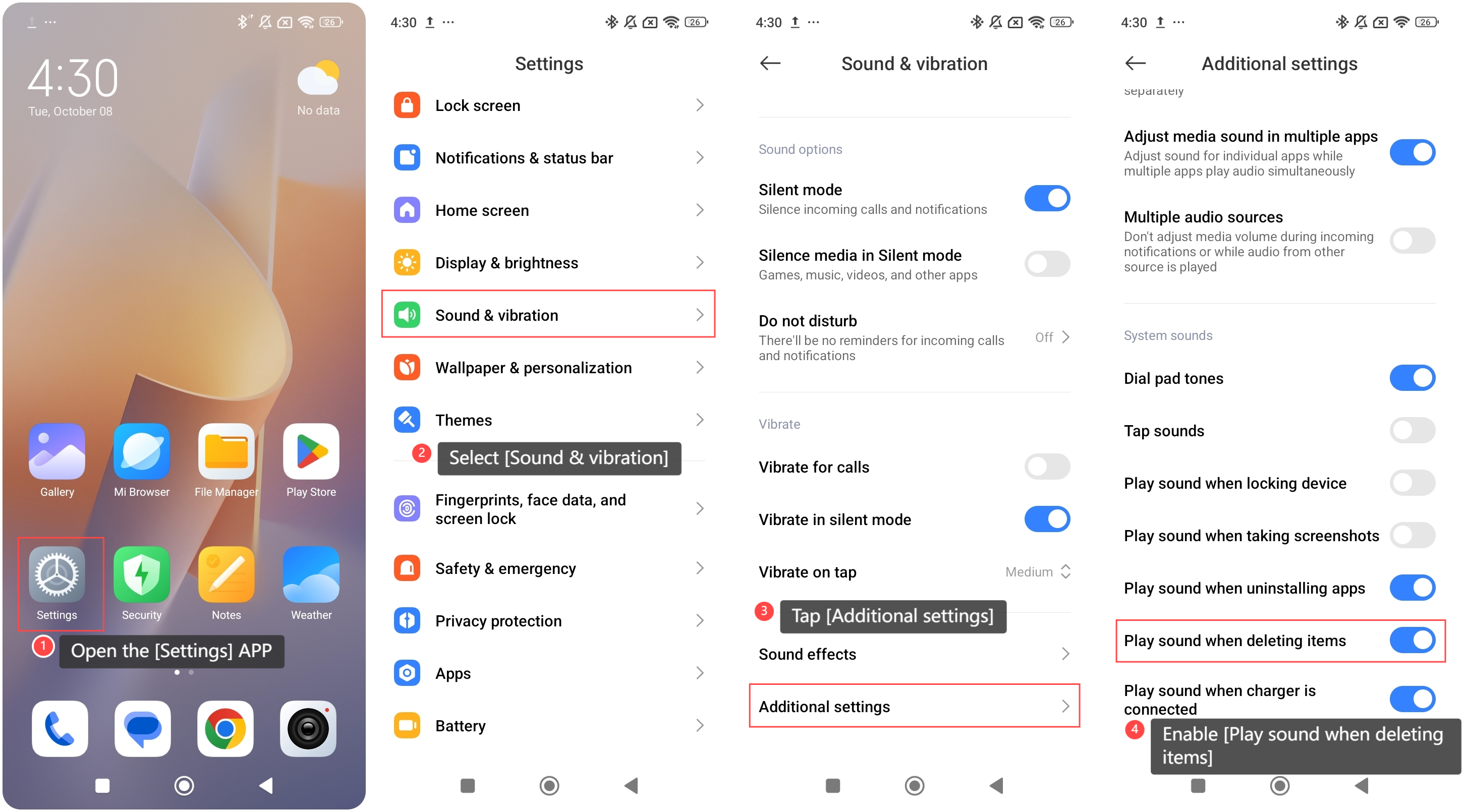
To make your phone play sound when deleting items, please refer to the following steps:
1. Open the [Settings] APP on your phone;
2. Select [Sound & vibration];
3. Tap [Additional settings];
4. Enable [Play sound when deleting items].
Note:
1. Ensure that Do Not Disturb mode is turned off, as this can mute system sounds, including the sound for deleting items;
2. Check the system or notification volume to make sure it's not muted or set too low. The delete sound is part of system audio, so it needs an audible volume level.
To make your phone play sound when deleting items, please refer to the following steps:
1. Open the [Settings] APP on your phone;
2. Select [Sound & vibration];
3. Tap [Additional settings];
4. Enable [Play sound when deleting items].
Note:
1. Ensure that Do Not Disturb mode is turned off, as this can mute system sounds, including the sound for deleting items;
2. Check the system or notification volume to make sure it's not muted or set too low. The delete sound is part of system audio, so it needs an audible volume level.
Does it help?
Yes
No