

How to set vibration in silent mode on the Redmi 13C?
Setting vibration in silent mode on the Redmi 13C ensures you receive notifications discreetly without disturbing others. This feature allows you to stay informed about notifications while in meetings or quiet environments, helping you maintain connectivity without compromising your surroundings or attracting unwanted attention.
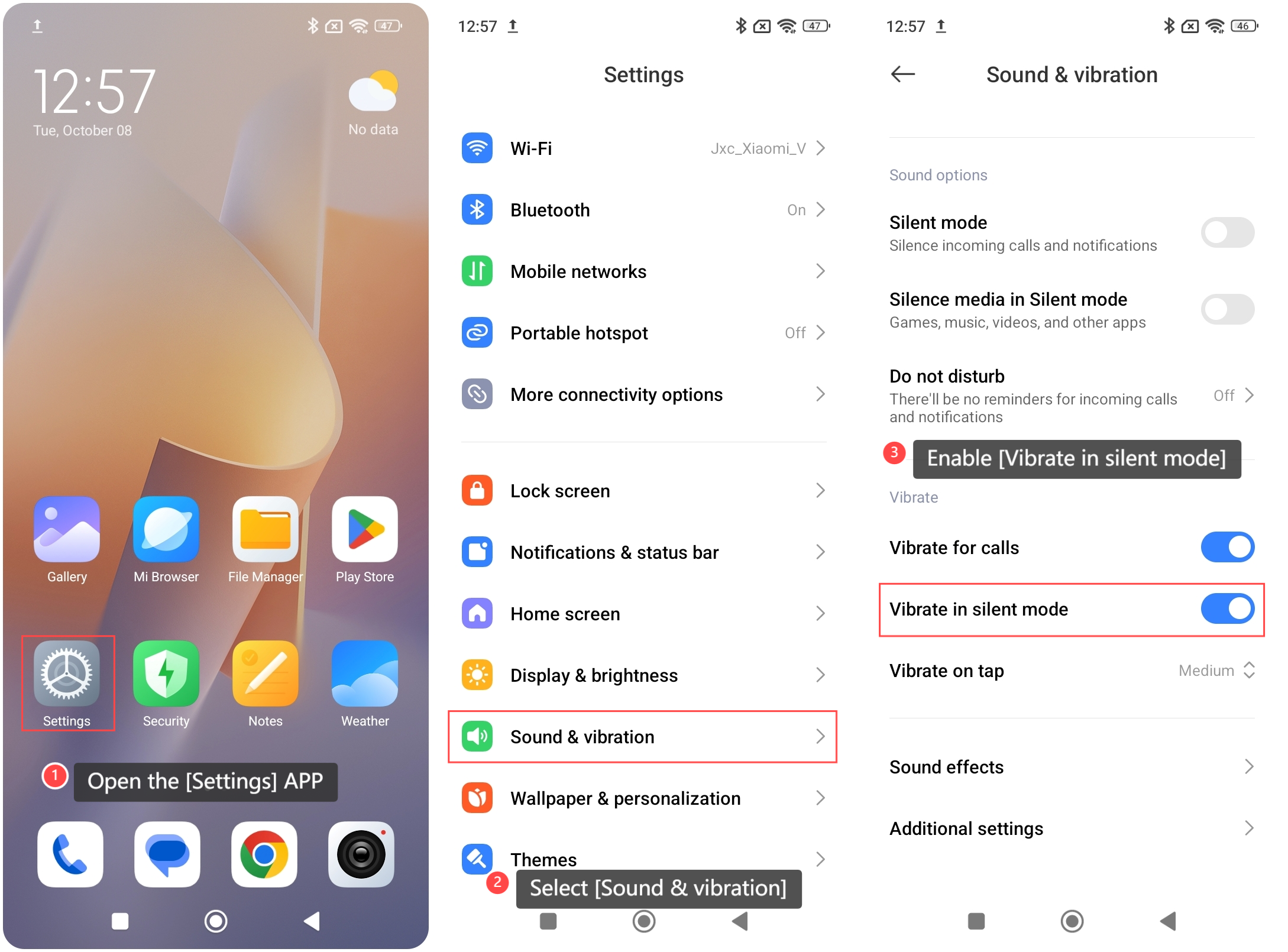
To set vibration in silent mode on your phone, please refer to the following steps:
1. Open the [Settings] APP on your phone;
2. Select [Sound & vibration];
3. Enable [Vibrate in silent mode]. Once enabled, your phone will vibrate for notifications even when it is set to silent.
Note:
On some formal occasions, you still need to set the device to completely silent to avoid distraction or disruption.
To set vibration in silent mode on your phone, please refer to the following steps:
1. Open the [Settings] APP on your phone;
2. Select [Sound & vibration];
3. Enable [Vibrate in silent mode]. Once enabled, your phone will vibrate for notifications even when it is set to silent.
Note:
On some formal occasions, you still need to set the device to completely silent to avoid distraction or disruption.
Does it help?
Yes
No