

How to select a ringtone for the phone call on the Redmi 13C?
The Redmi 13C supports selecting a ringtone for the phone call, which can make you express your individuality and preferences through custom ringtones. A unique ringtone helps identify incoming calls quickly, allowing you to distinguish between personal and work calls or different contacts.
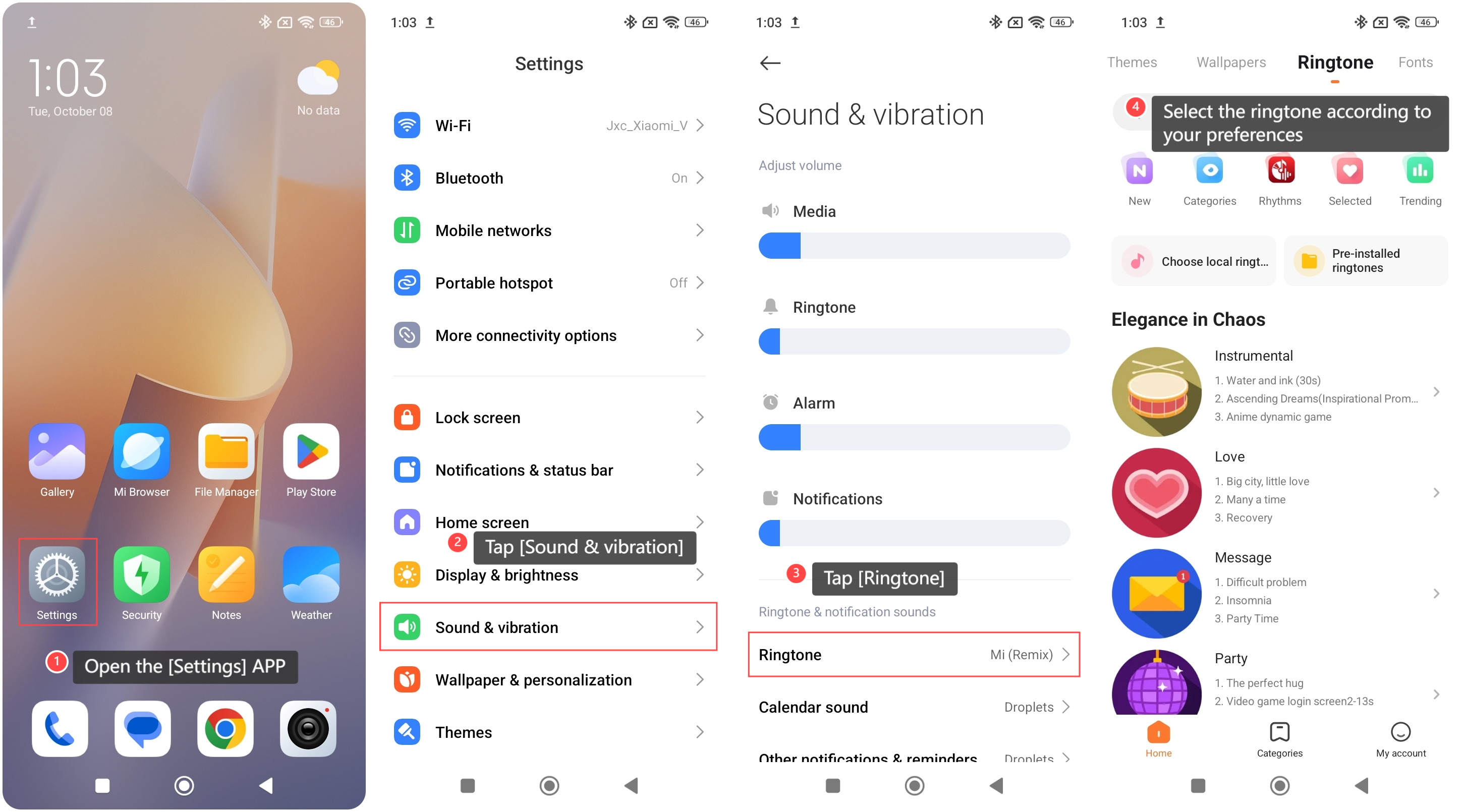
To select a ringtone for the phone call, please refer to the following steps:
1. Open the [Settings] APP on your phone;
2. Tap [Sound & vibration];
3. Tap [Ringtone];
4. Select the ringtone according to your preferences. There are various ringtones available for you to choose from, including local ringtones, pre-installed ringtones, and online ringtones.
Note:
It's advisable to choose a ringtone with a suitable tone and style to avoid disturbing others in public or quiet settings.
To select a ringtone for the phone call, please refer to the following steps:
1. Open the [Settings] APP on your phone;
2. Tap [Sound & vibration];
3. Tap [Ringtone];
4. Select the ringtone according to your preferences. There are various ringtones available for you to choose from, including local ringtones, pre-installed ringtones, and online ringtones.
Note:
It's advisable to choose a ringtone with a suitable tone and style to avoid disturbing others in public or quiet settings.
Does it help?
Yes
No