

How to enable the Wireless emergency alerts on the Redmi 13C?
Wireless emergency alerts (WEA) on the Redmi 13C are short emergency messages sent by authorized government authorities to alert you about critical situations. These alerts can include extreme threats, severe threat, AMBER alerts, and test alerts.
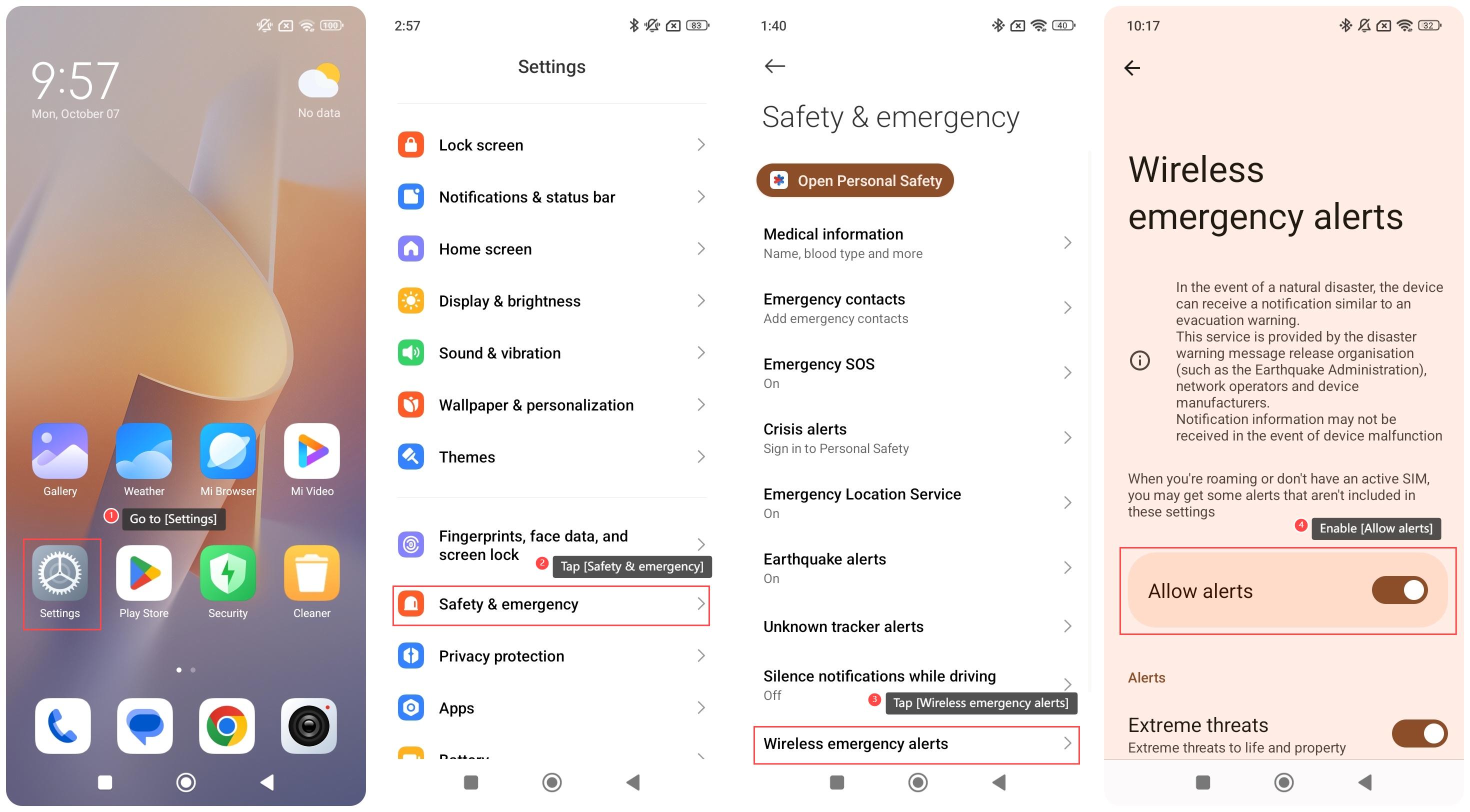
To enable the Wireless emergency alerts, please refer to the following steps:
1. Go to [Settings];
2. Tap [Safety & emergency];
3. Tap [Wireless emergency alerts];
4. Enable [Allow alerts], and your device will enable the wireless emergency alerts. You can select what alert you want to turn on, and select what time you want to turn on.
Note:
If your internet or network connection is poor, you will not receive alerts in a timely manner.
To enable the Wireless emergency alerts, please refer to the following steps:
1. Go to [Settings];
2. Tap [Safety & emergency];
3. Tap [Wireless emergency alerts];
4. Enable [Allow alerts], and your device will enable the wireless emergency alerts. You can select what alert you want to turn on, and select what time you want to turn on.
Note:
If your internet or network connection is poor, you will not receive alerts in a timely manner.
Does it help?
Yes
No