

How to enable the Crisis alerts on the Redmi 13C?
The Redmi 13C supports the function of crisis alerts, which will get notified about natural disasters and public emergencies affecting your area. Through this function, you will be reminded of the ongoing dangers and you can make sufficient preparation for the imminent emergencies and disasters, to avoid the unnecessary losses.
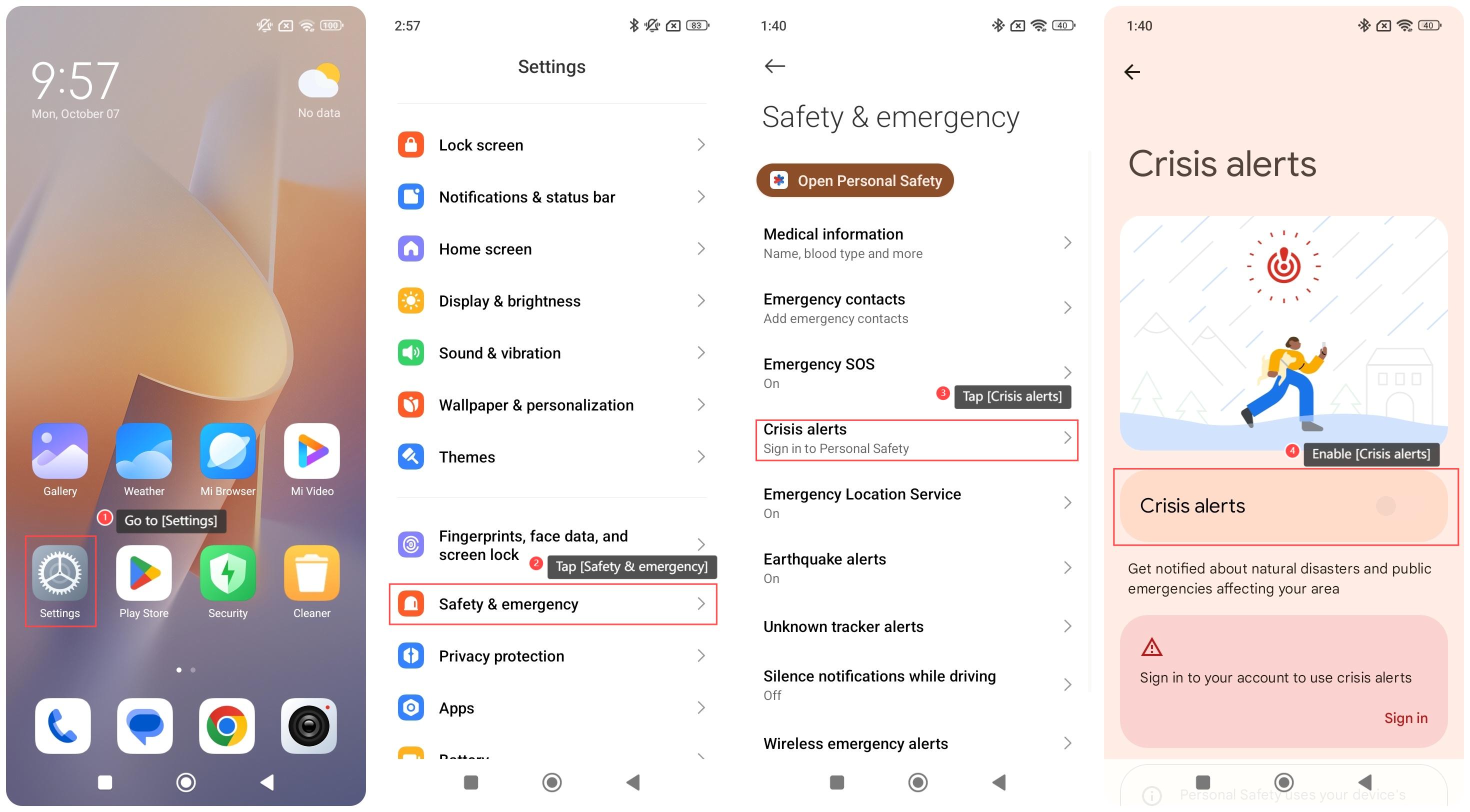
To enable the Crisis alerts on your phone, please refer to the following steps:
1. Go to [Settings];
2. Tap [Safety & emergency];
3. Tap [Crisis alerts];
4. Enable [Crisis alerts].
Note:
1. Sign in to your Google account to use crisis alerts;
2. Personal Safety uses your device’s location to find information about crises affecting your area, even when the APP is closed or not in use.
To enable the Crisis alerts on your phone, please refer to the following steps:
1. Go to [Settings];
2. Tap [Safety & emergency];
3. Tap [Crisis alerts];
4. Enable [Crisis alerts].
Note:
1. Sign in to your Google account to use crisis alerts;
2. Personal Safety uses your device’s location to find information about crises affecting your area, even when the APP is closed or not in use.
Does it help?
Yes
No