

How to share the hotspot QR code on the Redmi 13C 5G?
The Redmi 13C 5G supports the built-in feature of enabling a portable hotspot that allows you to turn your phone into a mobile Wi-Fi hotspot, enabling other devices to connect to the internet. Aimed to bring your convenience and improve your using experience, you can select to share the hotspot QR code to help other devices connect to the network quickly without manually searching the Wi-Fi and entering the password.
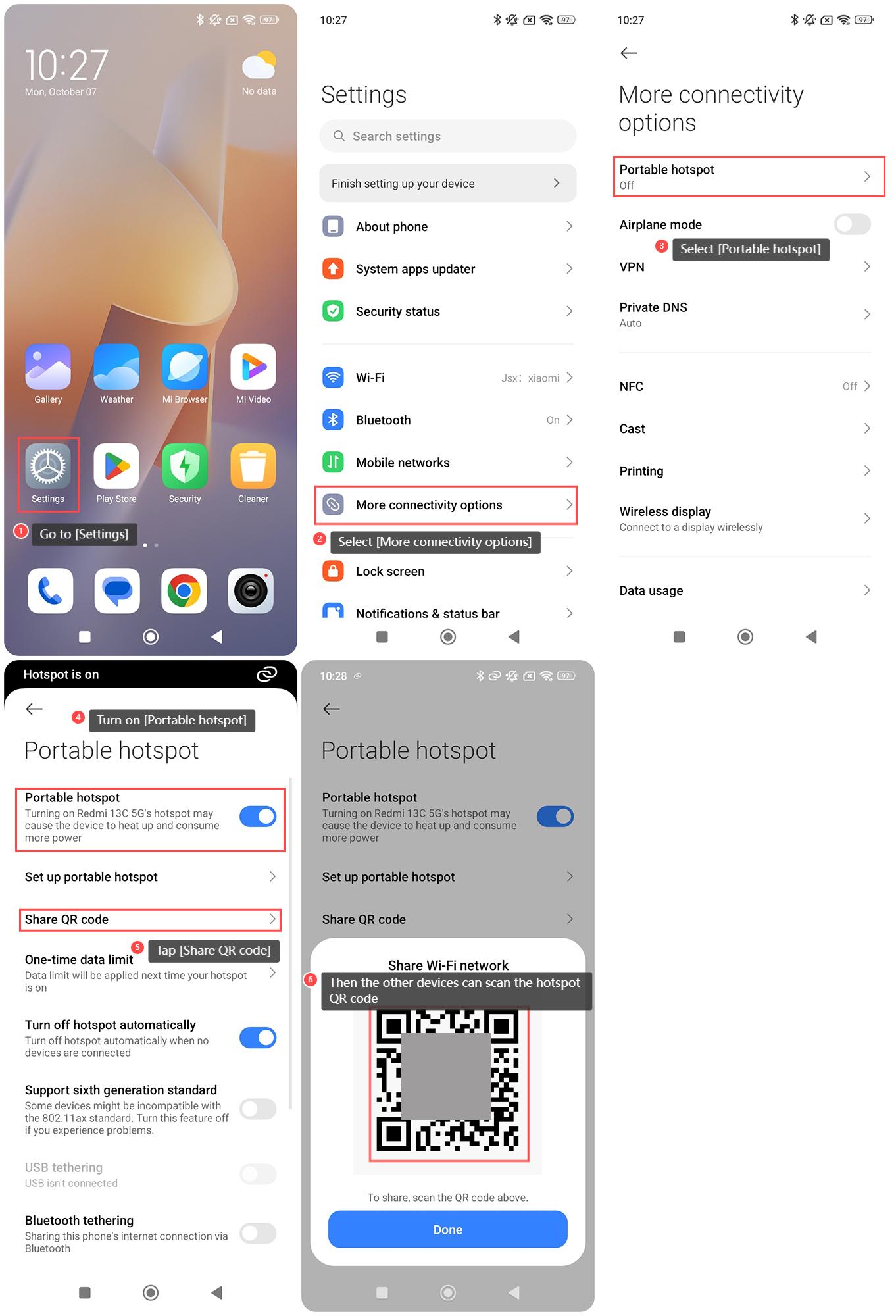
To share the hotspot QR code on the Redmi 13C 5G, please refer to the following steps:
1. Go to [Settings];
2. Select [More connectivity options];
3. Select [Portable hotspot];
4. Turn on [Portable hotspot];
5. Tap [Share QR code];
6. Then the other devices can scan the hotspot QR code of your device and tap [Done].
To share the hotspot QR code on the Redmi 13C 5G, please refer to the following steps:
1. Go to [Settings];
2. Select [More connectivity options];
3. Select [Portable hotspot];
4. Turn on [Portable hotspot];
5. Tap [Share QR code];
6. Then the other devices can scan the hotspot QR code of your device and tap [Done].
Does it help?
Yes
No