

How to check the special permissions of APPs on the Redmi 13C 5G?
The Redmi 13C 5G supports checking the special permissions of APPs, which allows you to see which APPs have access to sensitive data, such as location, contacts, or camera, helping you safeguard your privacy. Identifying APPs that request unusual permissions can alert you to potential security risks or malicious behavior. You can grant or revoke permissions, ensuring that APPs only access what they truly need to function.
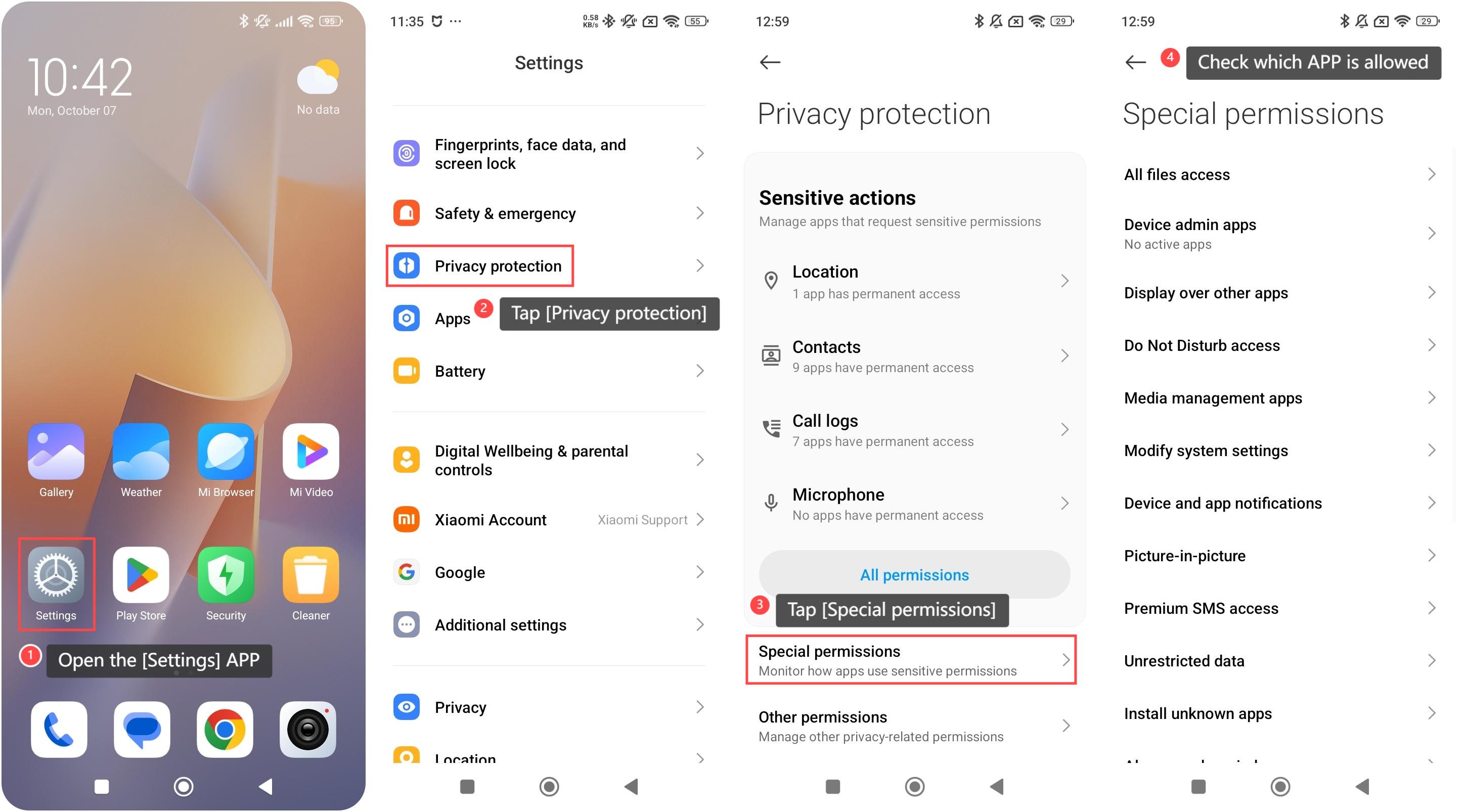
To check the special permissions of APPs on your phone, please refer to the following steps:
1. Open the [Settings] APP on your device. You can find the gear icon on your home screen or in your APP drawer;
2. Swipe down to find and tap [Privacy protection];
3. Tap [Special permissions];
4. You can select from the special permissions to check which APP is allowed.
To check the special permissions of APPs on your phone, please refer to the following steps:
1. Open the [Settings] APP on your device. You can find the gear icon on your home screen or in your APP drawer;
2. Swipe down to find and tap [Privacy protection];
3. Tap [Special permissions];
4. You can select from the special permissions to check which APP is allowed.
Does it help?
Yes
No