

How to fill in medical information on the Redmi 13C?
Filling in medical information on the Redmi 13C ensures that critical health details, such as allergies, medical conditions, and emergency contacts, are readily available to first responders. This enhances safety in emergencies, providing quick access to vital information even if the device is locked.
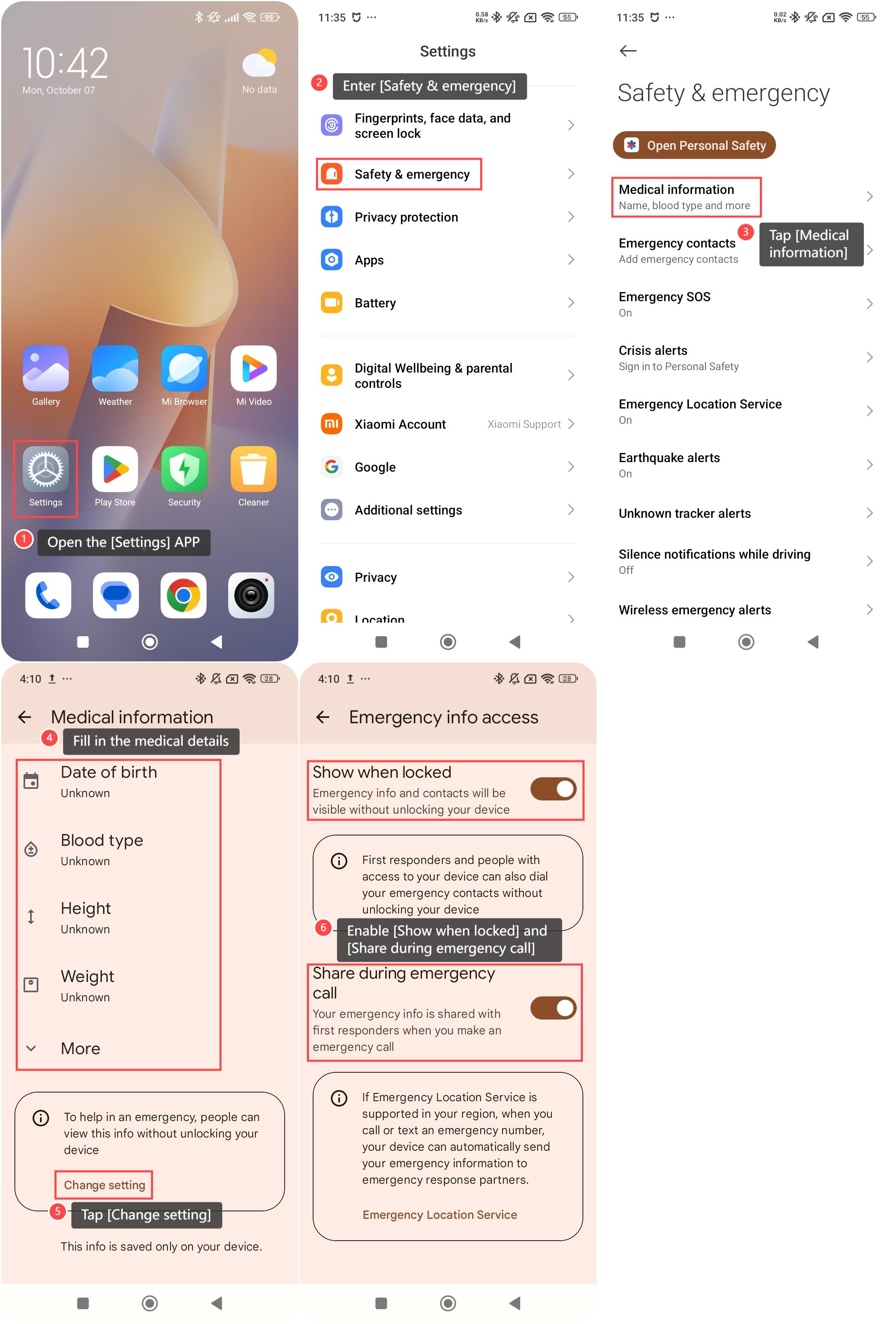
To fill in medical information on the phone, please refer to the following steps:
1. Open the [Settings] APP on your phone;
2. Enter [Safety & emergency];
3. Tap [Medical information];
4. Fill in the medical details, such as [Blood type] and more;
5. Tap [Change setting];
6. Enable [Show when locked] and [Share during emergency call], allowing emergency information and contacts to be viewed without unlocking your phone or shared with first responders when you make an emergency call.
To fill in medical information on the phone, please refer to the following steps:
1. Open the [Settings] APP on your phone;
2. Enter [Safety & emergency];
3. Tap [Medical information];
4. Fill in the medical details, such as [Blood type] and more;
5. Tap [Change setting];
6. Enable [Show when locked] and [Share during emergency call], allowing emergency information and contacts to be viewed without unlocking your phone or shared with first responders when you make an emergency call.
Does it help?
Yes
No