

How to set the fingerprint unlock on the Redmi 13C 5G?
The fingerprint unlock feature on the Redmi 13C 5G allows you to unlock your phone quickly and securely using your registered fingerprints. This biometric authentication method provides an additional layer of security beyond traditional PIN codes, passwords, or pattern locks.
To set the fingerprint unlock on the Redmi 13C 5G, please refer to the following steps:
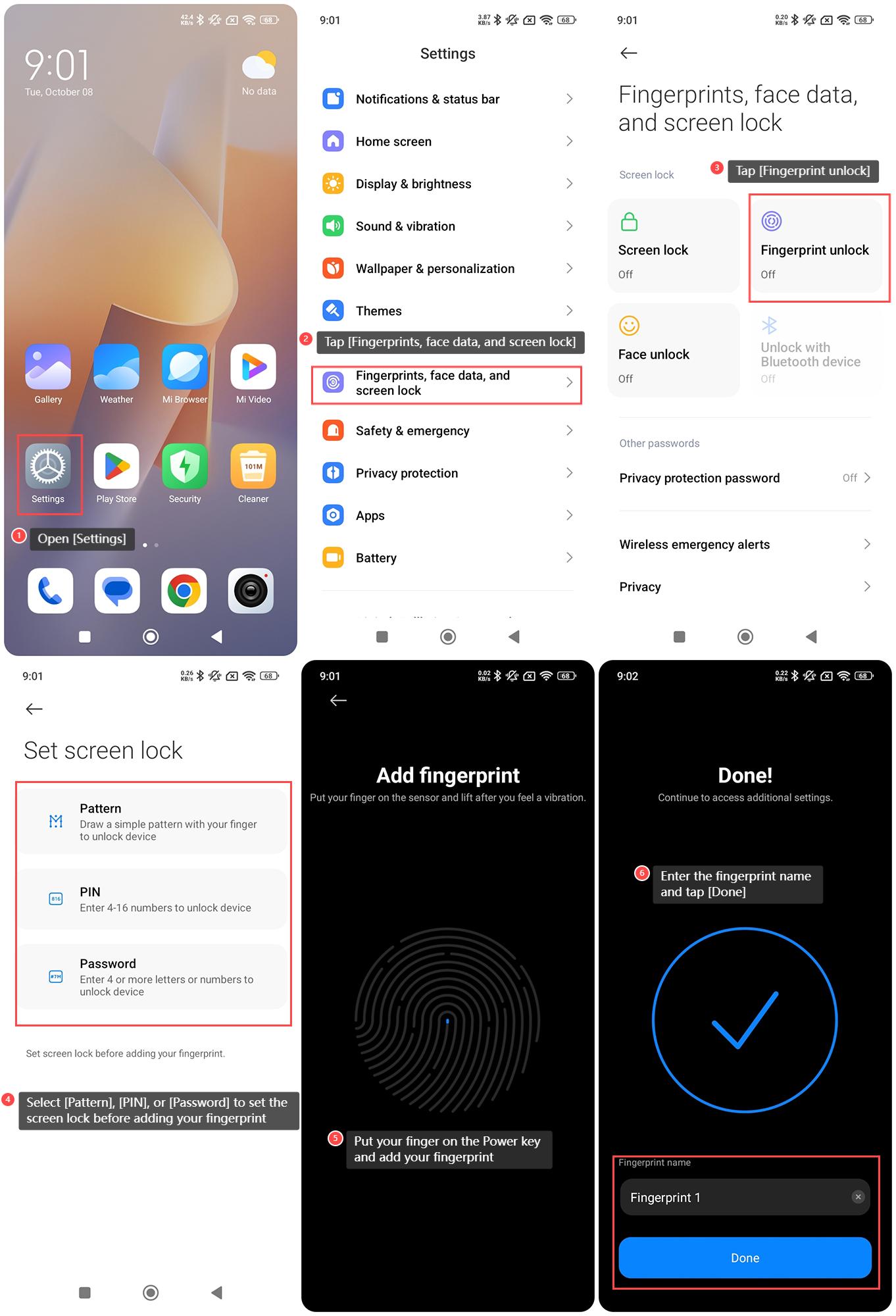
1. Open [Settings] on your phone;
2. Tap [Fingerprints, face data, and screen lock];
3. Tap [Fingerprint unlock];
4. Select [Pattern], [PIN], or [Password] to set the screen lock before adding your fingerprint;
5. Put your finger on the Power key and add your fingerprint;
6. Enter the fingerprint name and tap [Done].
Note:
During the setup process, make sure to properly position your finger on the fingerprint sensor to ensure accurate fingerprint recognition. Register your fingerprints in various positions and angles for better accuracy.
To set the fingerprint unlock on the Redmi 13C 5G, please refer to the following steps:
1. Open [Settings] on your phone;
2. Tap [Fingerprints, face data, and screen lock];
3. Tap [Fingerprint unlock];
4. Select [Pattern], [PIN], or [Password] to set the screen lock before adding your fingerprint;
5. Put your finger on the Power key and add your fingerprint;
6. Enter the fingerprint name and tap [Done].
Note:
During the setup process, make sure to properly position your finger on the fingerprint sensor to ensure accurate fingerprint recognition. Register your fingerprints in various positions and angles for better accuracy.
Does it help?
Yes
No