

How to adjust the media volume on the Redmi 13C?
Adjusting the media volume on the Redmi 13C offers several functions. You can manage the audio level of music, videos, and games according to your surroundings, ensuring an optimal listening experience. You can also customize volume levels to suit personal preferences for different types of media. Lowering media volume can help prevent disturbing others in shared spaces, enhancing social etiquette.
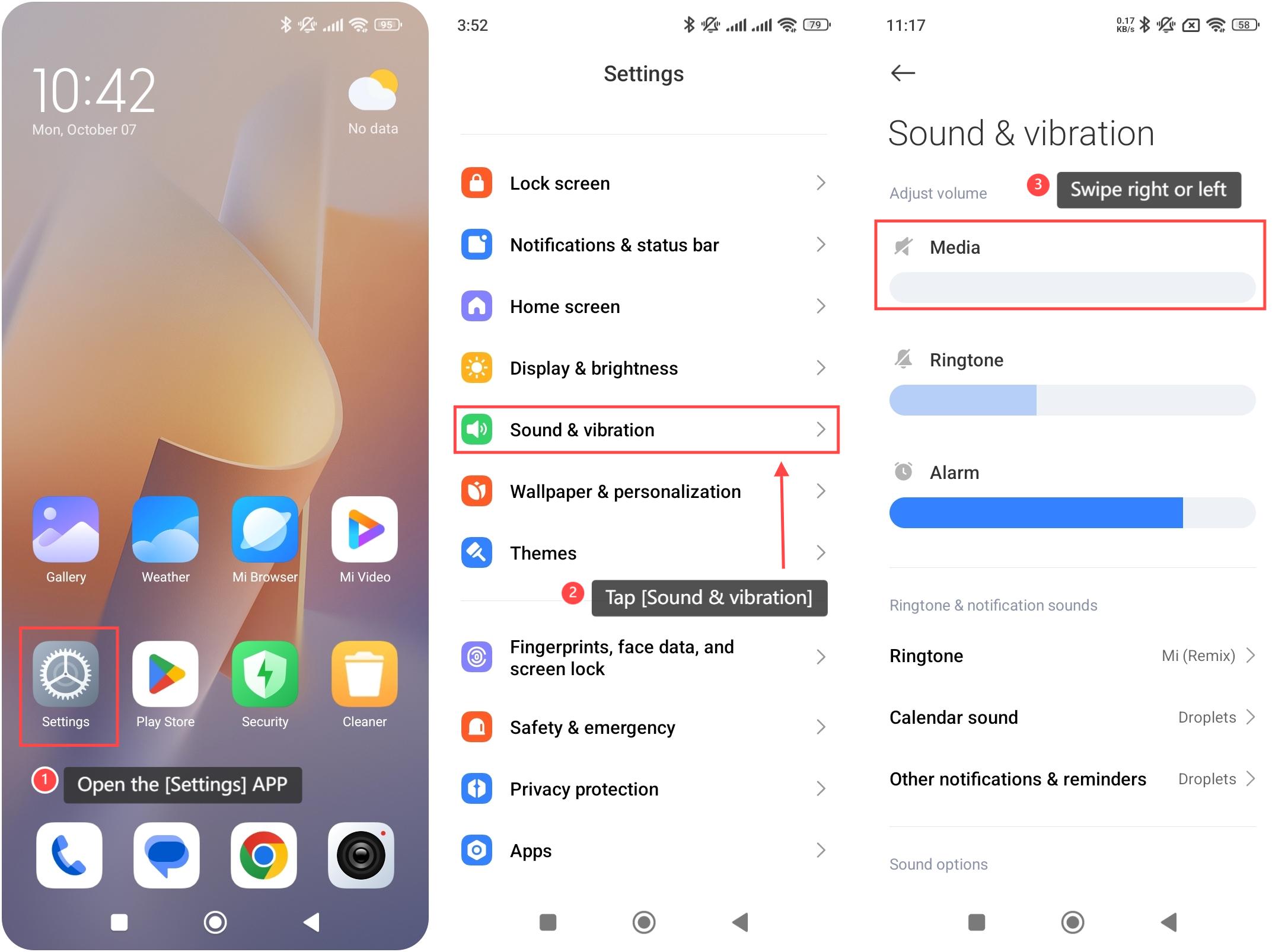
To adjust the media volume on your phone, please refer to the following steps:
1. Open the [Settings] APP on your device. You can find the gear icon on your home screen or in your APP drawer;
2. Tap [Sound & vibration];
3. Swipe right or left on the media volume bar to increase or decrease it.
Note:
You can also adjust the media volume by pressing the volume buttons.
To adjust the media volume on your phone, please refer to the following steps:
1. Open the [Settings] APP on your device. You can find the gear icon on your home screen or in your APP drawer;
2. Tap [Sound & vibration];
3. Swipe right or left on the media volume bar to increase or decrease it.
Note:
You can also adjust the media volume by pressing the volume buttons.
Does it help?
Yes
No