

How to silence media in Silent mode on the Redmi 13C 5G?
The Redmi 13C 5G supports silencing media in silent mode, which can minimize interruptions from notifications, calls, and media playback, allowing you to focus on tasks or conversations. In work or formal settings, silencing media helps maintain a respectful atmosphere. It prevents audible notifications in public or shared spaces, protecting sensitive information and personal privacy. This feature is particularly useful during meetings or presentations where silence is essential. Additionally, it ensures that your media playback doesn't accidentally disturb those around you.
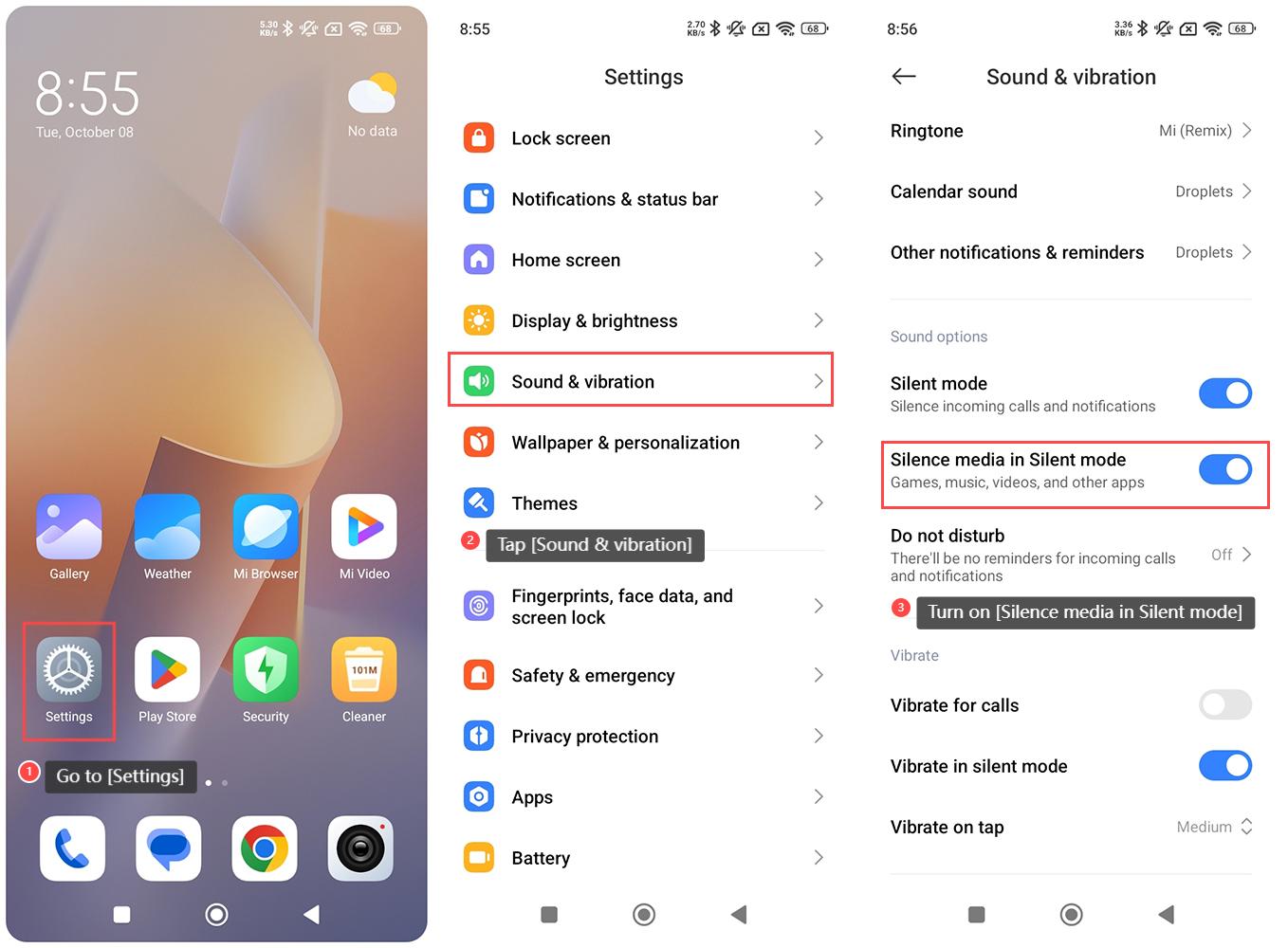
To silence media in Silent mode on the Redmi 13C 5G, please refer to the following steps:
1. Go to [Settings] on your phone;
2. Tap [Sound & vibration];
3. Swipe down to find and turn on [Silence media in Silent mode].
To silence media in Silent mode on the Redmi 13C 5G, please refer to the following steps:
1. Go to [Settings] on your phone;
2. Tap [Sound & vibration];
3. Swipe down to find and turn on [Silence media in Silent mode].
Does it help?
Yes
No