

How to add widgets on the Redmi 13C 5G?
Widgets on the Redmi Pad 13C 5G are interactive elements that provide quick access to information and functions directly from the home screen. They can include a variety of features and can be resized and moved around the home screen for personalization, making it easier for you to access essential information at a glance.
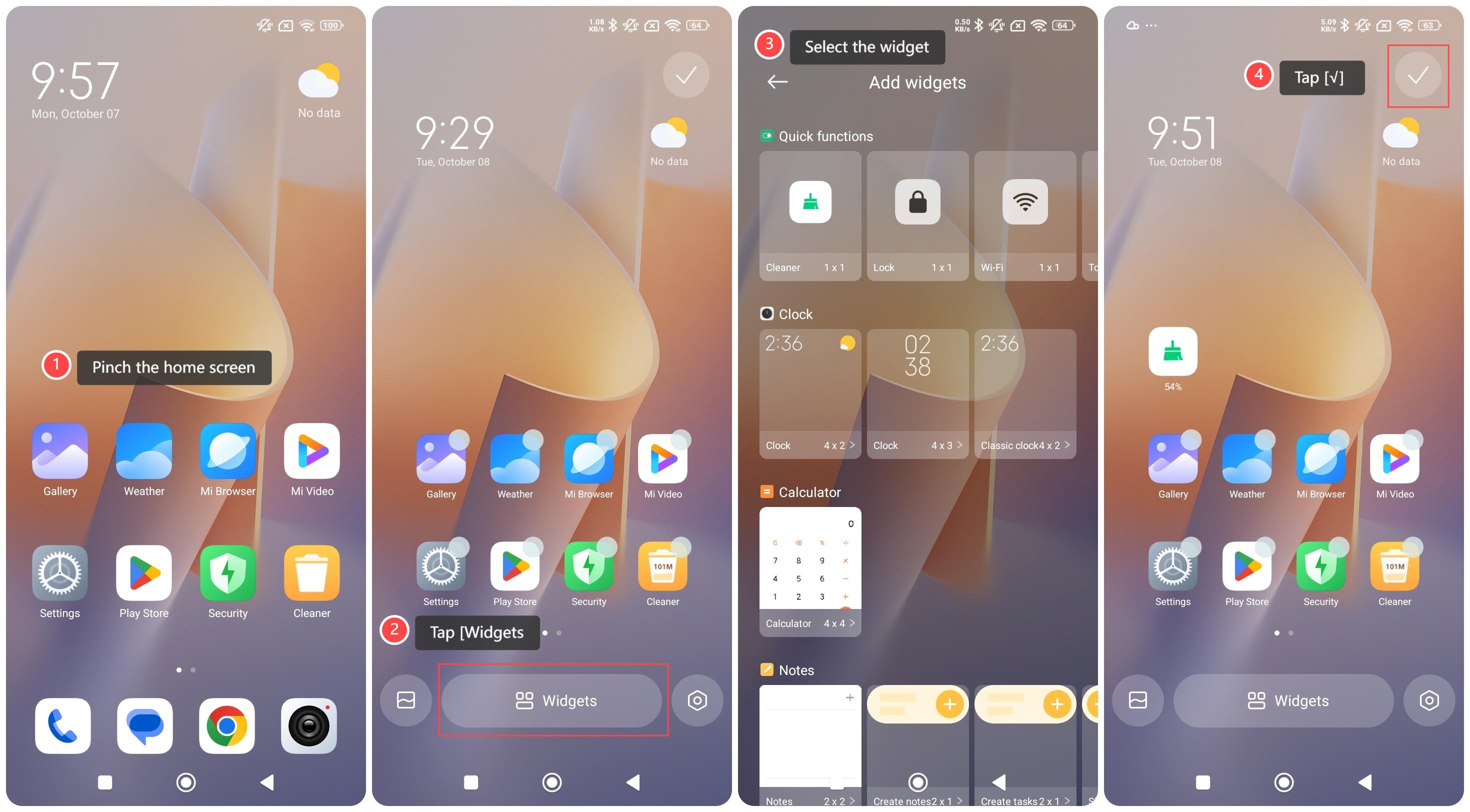
To add widgets on your phone, please refer to the following steps:
1. Pinch the home screen;
2. Tap [Widgets] at the bottom center of the screen;
3. Select the widget you want to add and adjust its position to where you want it;
4. Tap [√] on the right top of the screen to apply it.
To add widgets on your phone, please refer to the following steps:
1. Pinch the home screen;
2. Tap [Widgets] at the bottom center of the screen;
3. Select the widget you want to add and adjust its position to where you want it;
4. Tap [√] on the right top of the screen to apply it.
Does it help?
Yes
No