

How to set Private DNS on the Redmi 13C 5G?
The Redmi 13C 5G supports setting Private DNS (Domain Name System), which is a feature that allows you to set a custom DNS carrier for the internet connection instead of using the default DNS. Using a private DNS can improve privacy by preventing ISPs (Internet Service Providers) from tracking your browsing habits since the DNS queries are sent to a different carrier.
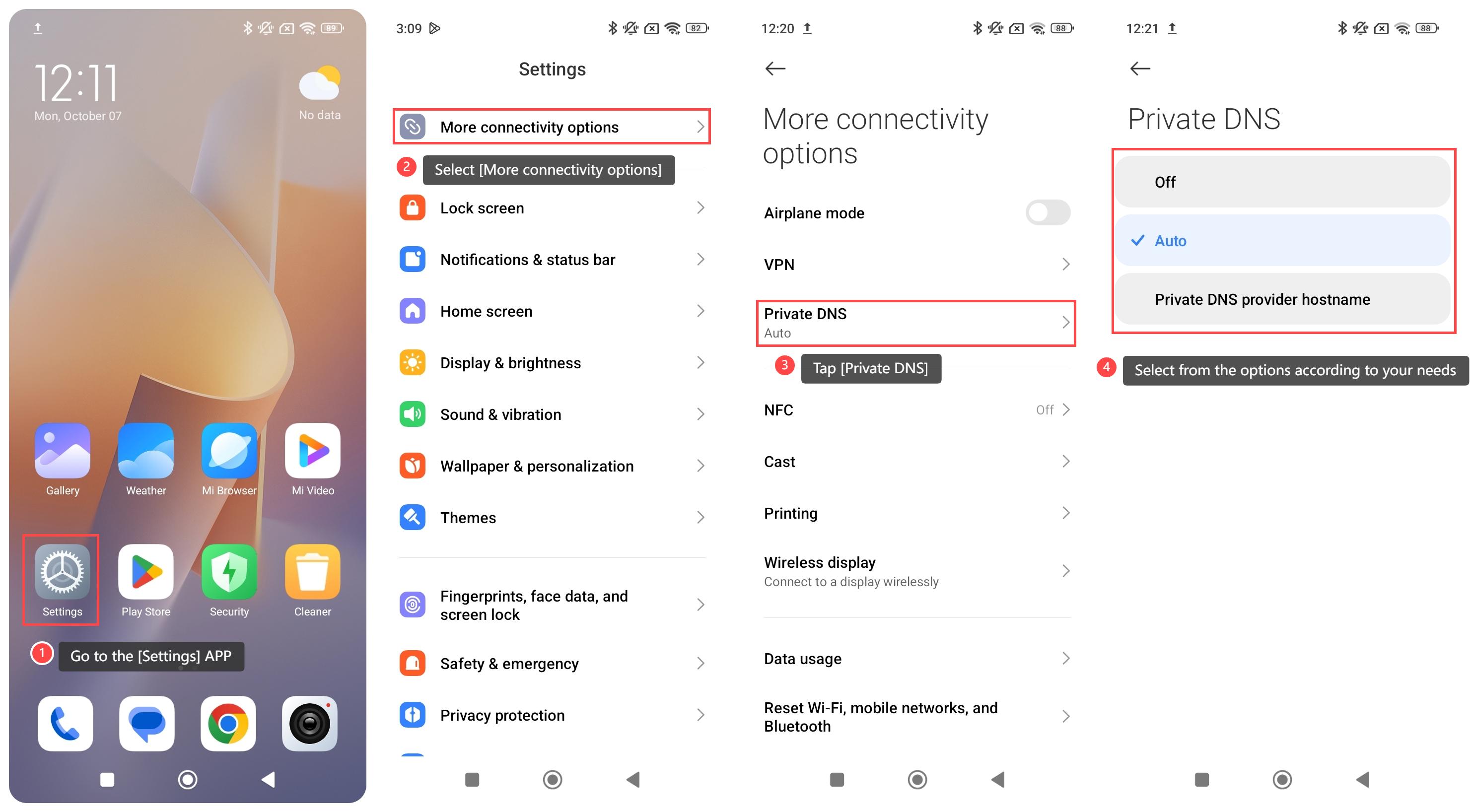
To set Private DNS on your phone, please refer to the following steps:
1. Go to the [Settings] APP on your phone;
2. Select [More connectivity options];
3. Tap [Private DNS];
4. Select from the options according to your needs.
Note:
When you select the Private DNS provider hostname, you need to enter hostname of DNS provider.
To set Private DNS on your phone, please refer to the following steps:
1. Go to the [Settings] APP on your phone;
2. Select [More connectivity options];
3. Tap [Private DNS];
4. Select from the options according to your needs.
Note:
When you select the Private DNS provider hostname, you need to enter hostname of DNS provider.
Does it help?
Yes
No