

How to hide notch on the Redmi 13C?
The Redmi 13C supports hiding notch. The function of notch involves enhancing use experience, which allows for a more immersive viewing experience when watching videos, browsing the web, or multitasking, as you can enjoy a larger display area. You can also hide the notch according to your preferences.
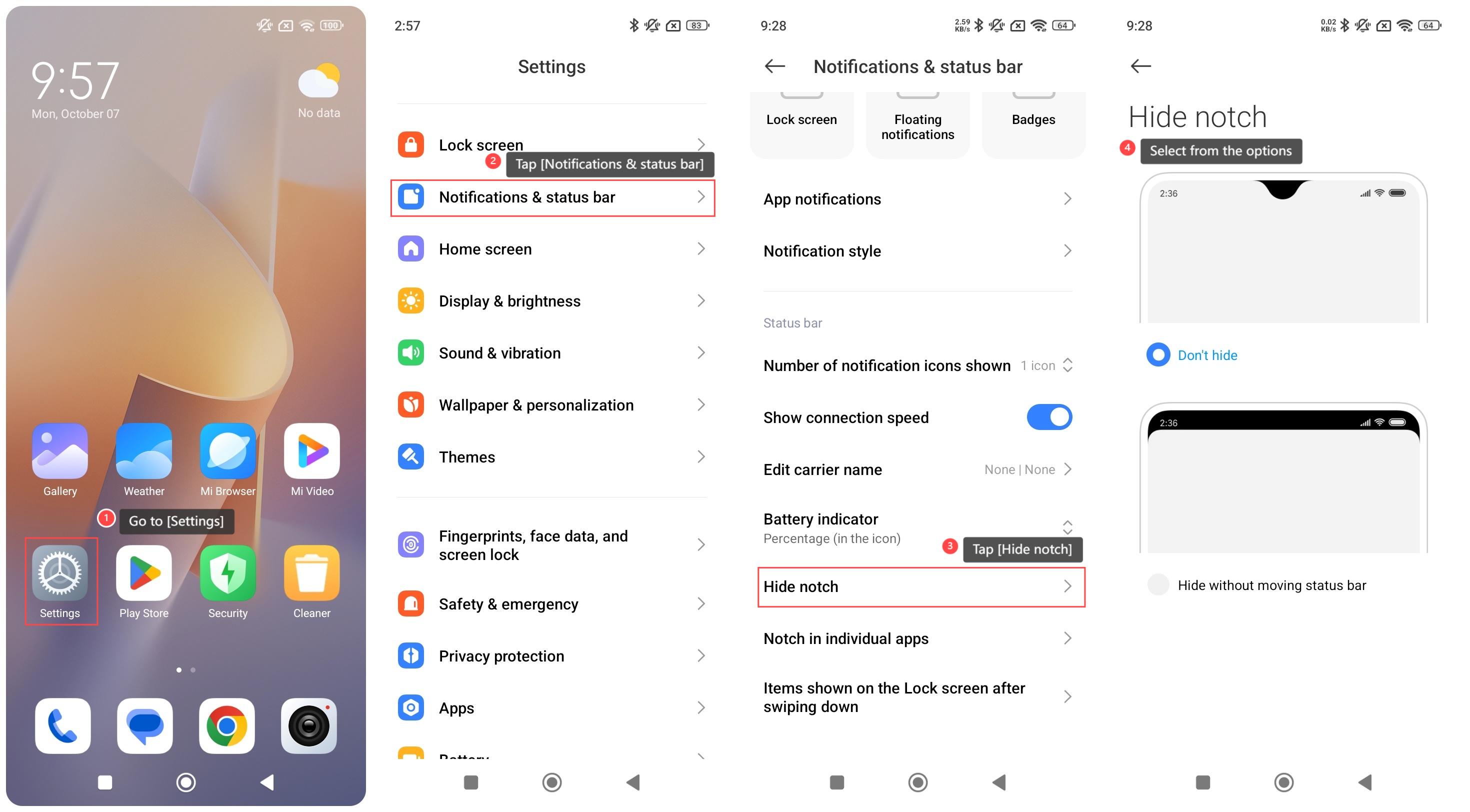
To hide notch on your phone, please refer to the following steps:
1. Go to [Settings];
2. Swipe down to find and tap [Notifications & status bar];
3. Swipe down to find and tap [Hide notch];
4. Select from [Don’t hide] and [Hide without moving status bar] according to your preferences.
To hide notch on your phone, please refer to the following steps:
1. Go to [Settings];
2. Swipe down to find and tap [Notifications & status bar];
3. Swipe down to find and tap [Hide notch];
4. Select from [Don’t hide] and [Hide without moving status bar] according to your preferences.
Does it help?
Yes
No