

How to edit the carrier name on the Redmi 13C?
The feature of editing the carrier name on the Redmi 13C allows you to customize the displayed carrier name that appears in the status bar. While it doesn’t affect the phone’s actual network settings or functionality.
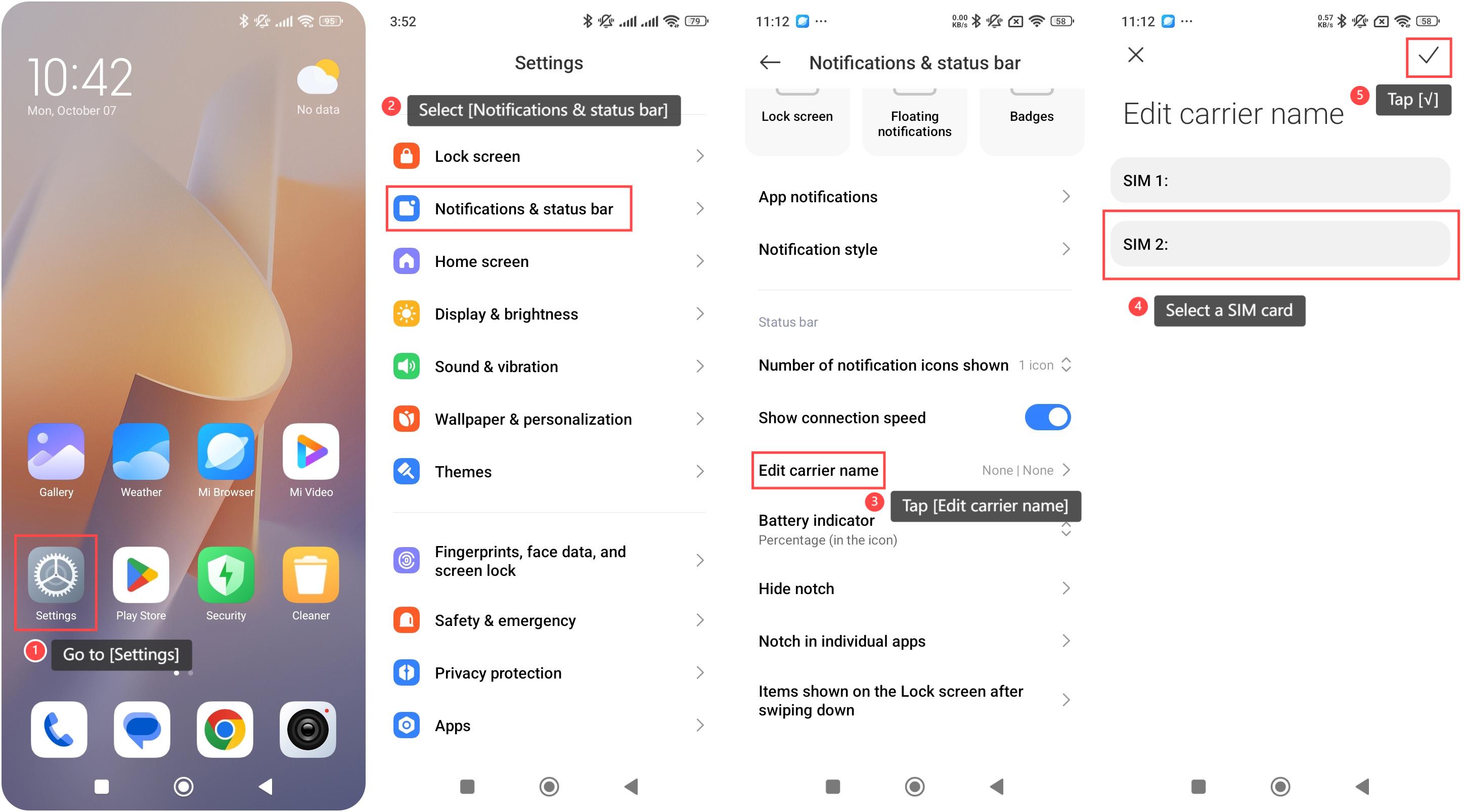
To edit the carrier name on your phone, please refer to the following steps:
1. Go to [Settings] on your phone;
2. Select [Notifications & status bar];
3. Tap [Edit carrier name];
4. Select a SIM card to enter the new carrier name;
5. Tap [√] to save it.
Note:
1. Editing the carrier name can easily distinguish between different carriers if using multiple SIM cards;
2. This feature can clarify the network connection, especially with generic or virtual network names.
To edit the carrier name on your phone, please refer to the following steps:
1. Go to [Settings] on your phone;
2. Select [Notifications & status bar];
3. Tap [Edit carrier name];
4. Select a SIM card to enter the new carrier name;
5. Tap [√] to save it.
Note:
1. Editing the carrier name can easily distinguish between different carriers if using multiple SIM cards;
2. This feature can clarify the network connection, especially with generic or virtual network names.
Does it help?
Yes
No