

How to set the items shown on the lock screen of the Redmi 13C 5G after swiping down?
The Redmi 13C 5G supports configuring the items that are displayed on the lock screen when you swipe down. The items that can be displayed on the lock screen include notification shade and use device controls.
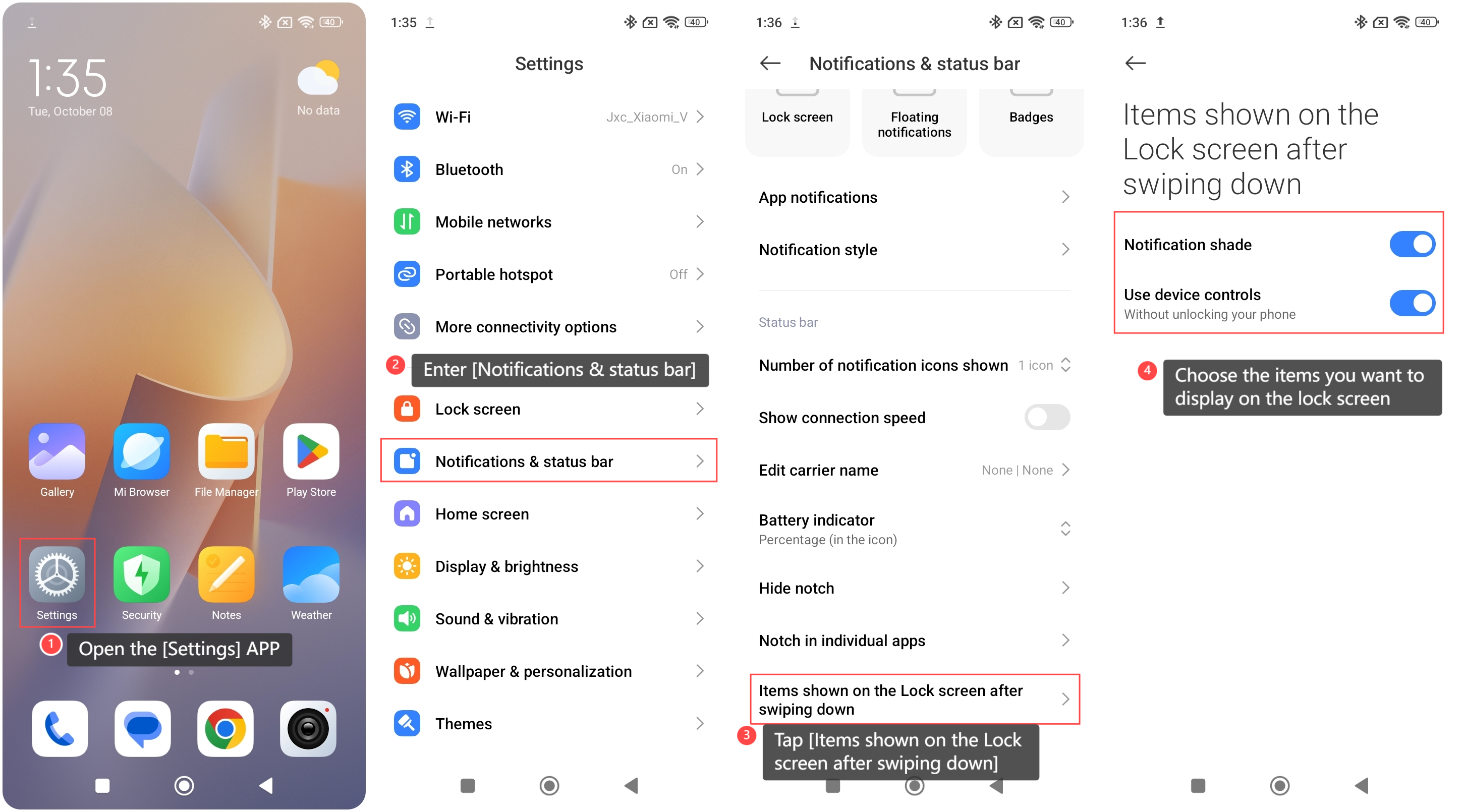
To set the items shown on the lock screen of the phone after swiping down, please refer to the following steps:
1. Open the [Settings] APP on your phone;
2. Enter [Notifications & status bar];
3. Tap [Items shown on the Lock screen after swiping down];
4. Choose the items you want to display on the lock screen.
To set the items shown on the lock screen of the phone after swiping down, please refer to the following steps:
1. Open the [Settings] APP on your phone;
2. Enter [Notifications & status bar];
3. Tap [Items shown on the Lock screen after swiping down];
4. Choose the items you want to display on the lock screen.
Note:
It's recommended to be cautious of sensitive information in notifications that can be visible on the lock screen, especially in public places.
It's recommended to be cautious of sensitive information in notifications that can be visible on the lock screen, especially in public places.
Does it help?
Yes
No