

How to check the Android version on the Redmi 13C?
Android is an open-source mobile operating system developed by Google, and it is designed primarily for touchscreen mobile devices such as smartphones and tablets. The Redmi 13C runs on a customized version based on the Android operating system, featuring the Xiaomi HyperOS system interface.
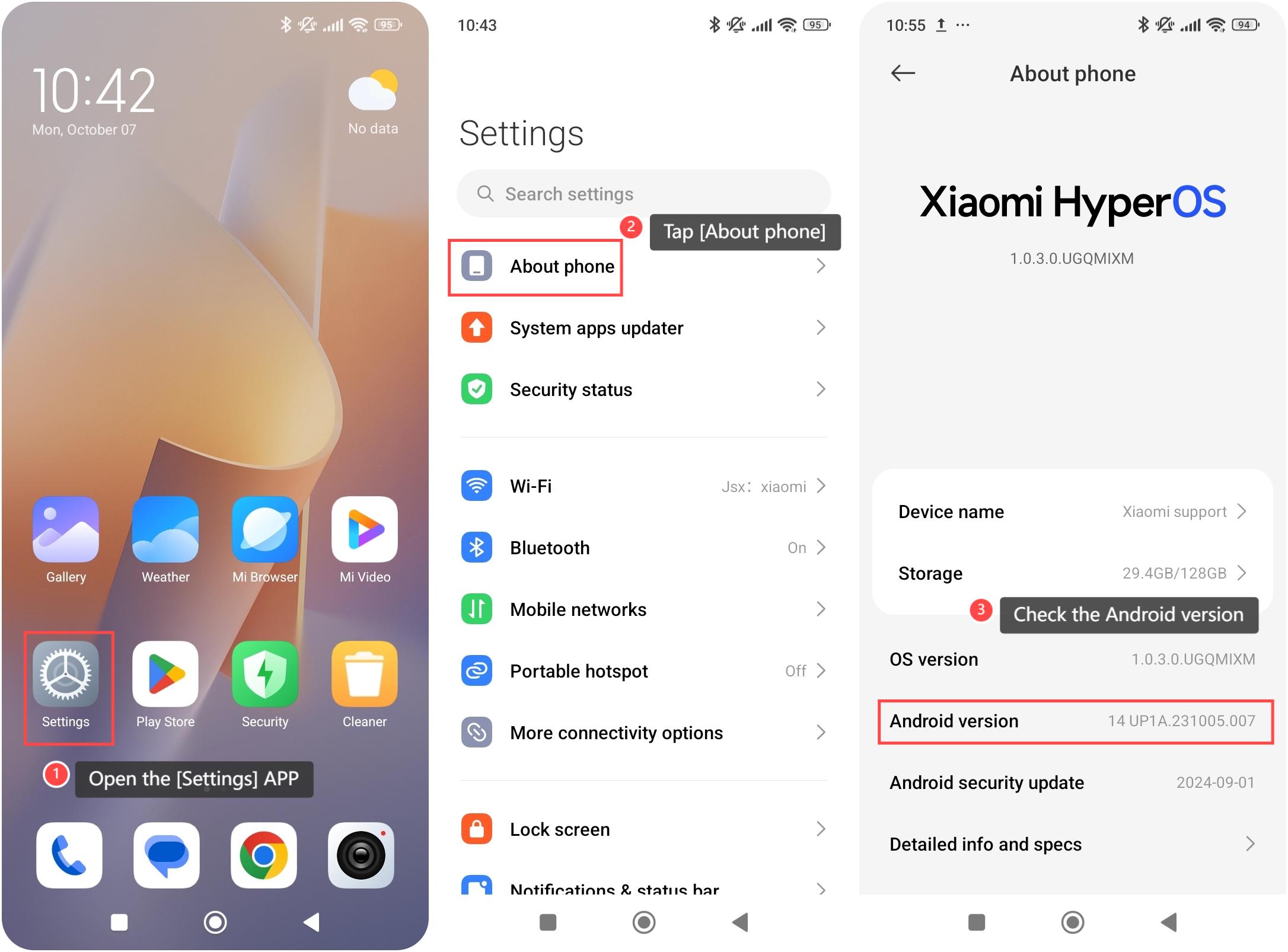
To check the Android version on your phone, please refer to the following steps:
1. Open the [Settings] APP on your device. You can find the gear icon on your home screen or in your APP drawer;
2. Navigate to the [About phone] option and tap it;
3. Scroll down and you can check the Android version here.
Note:
Each new Android version introduces new features, improvements, security patches, and optimizations to the operating system.
To check the Android version on your phone, please refer to the following steps:
1. Open the [Settings] APP on your device. You can find the gear icon on your home screen or in your APP drawer;
2. Navigate to the [About phone] option and tap it;
3. Scroll down and you can check the Android version here.
Note:
Each new Android version introduces new features, improvements, security patches, and optimizations to the operating system.
Does it help?
Yes
No