

Xiaomi smartphones have intermittent charging or can’t charge when using wireless charging
If you encounter issues with wireless charging not functioning properly, please follow these troubleshooting steps:
1. Some devices have compatibility issues with certain wireless chargers, which require additional spacers or are not compatible at all. Please verify if the wireless charger and phone are compatible;
2. Ensure that both the charging base and adapter are functioning correctly. It is recommended to use the original charging adapter for both the wireless charger and the phone;
Note:
Some wireless chargers have specific requirements for the adapter and cable.
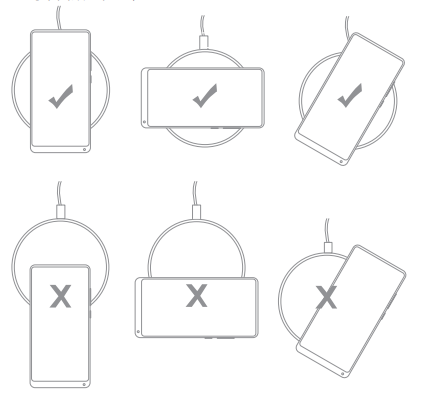
3. Ensure the phone is correctly positioned on the wireless charging base. If you see messages like “Position off, please reposition” or “Place in the center for better charging”, lift the phone and reposition it (as shown in the image);
4. Check if using a protective case, it is recommended to use a non-metallic case with a thickness not exceeding 3mm for optimal charging experience;
5. Check if there are metal objects or decorations on the middle part of the back of the phone. Metal decorations can interfere with wireless charging signals or prevent charging. Remove any metal objects or decorations and try charging again;
6. If the above steps do not resolve the issue, please bring the phone and charging base to an after-sales service center for further inspection.
1. Some devices have compatibility issues with certain wireless chargers, which require additional spacers or are not compatible at all. Please verify if the wireless charger and phone are compatible;
2. Ensure that both the charging base and adapter are functioning correctly. It is recommended to use the original charging adapter for both the wireless charger and the phone;
Note:
Some wireless chargers have specific requirements for the adapter and cable.
3. Ensure the phone is correctly positioned on the wireless charging base. If you see messages like “Position off, please reposition” or “Place in the center for better charging”, lift the phone and reposition it (as shown in the image);
4. Check if using a protective case, it is recommended to use a non-metallic case with a thickness not exceeding 3mm for optimal charging experience;
5. Check if there are metal objects or decorations on the middle part of the back of the phone. Metal decorations can interfere with wireless charging signals or prevent charging. Remove any metal objects or decorations and try charging again;
6. If the above steps do not resolve the issue, please bring the phone and charging base to an after-sales service center for further inspection.
Does it help?
Yes
No