

How to turn on or off Location access on the Redmi Pad SE 8.7?
The Redmi Pad SE 8.7 supports configuring location access, which offers several functions. APPs like Google Maps use location data for turn-by-turn directions. Location access enables APPs to pinpoint your geographical location, facilitating features like navigation, location-based recommendations, and real-time tracking for services like food delivery. Fitness APPs can track your routes, distance, and speed for activities like running or cycling.
To turn on or off Location access on your tablet, please refer to the following steps:
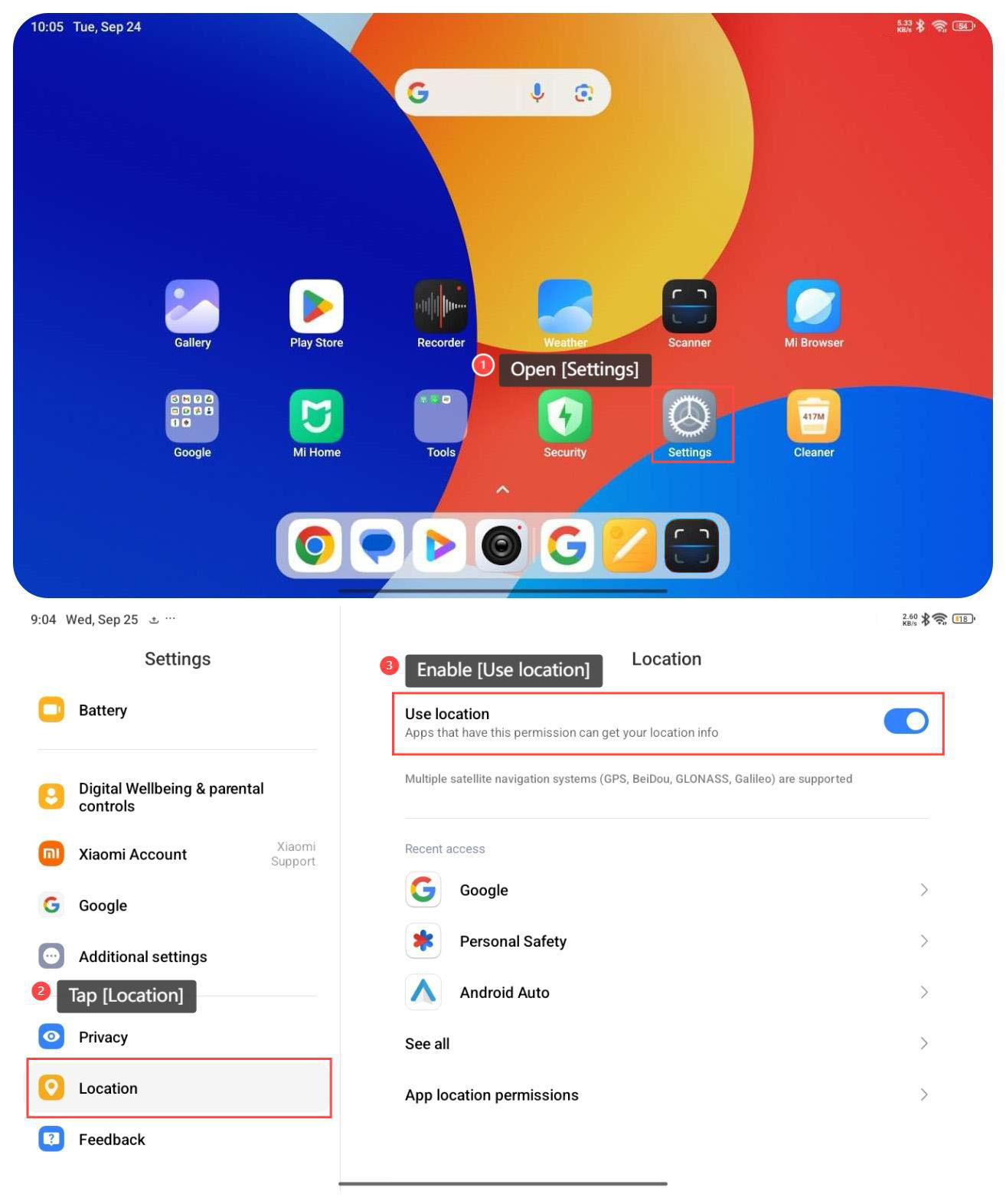
1. Open [Settings];
2. Swipe down to find and tap [Location];
3. Enable [Use location] and APPs that have this permission can get your location information.
To turn on or off Location access on your tablet, please refer to the following steps:
1. Open [Settings];
2. Swipe down to find and tap [Location];
3. Enable [Use location] and APPs that have this permission can get your location information.
Does it help?
Yes
No