

How to use Game Turbo on the Redmi Pad SE 8.7?
Game Turbo enhances gaming performance on the Redmi Pad SE 8.7 by optimizing resources. It boosts CPU and GPU usage, improves frame rates, reduces lag, and provides a smoother gaming experience. Additionally, it offers features like screen recording, performance monitoring, and customizable controls, ensuring a more immersive gaming environment.
To use Game Turbo on your tablet, please refer to the following methods:
Method 1:
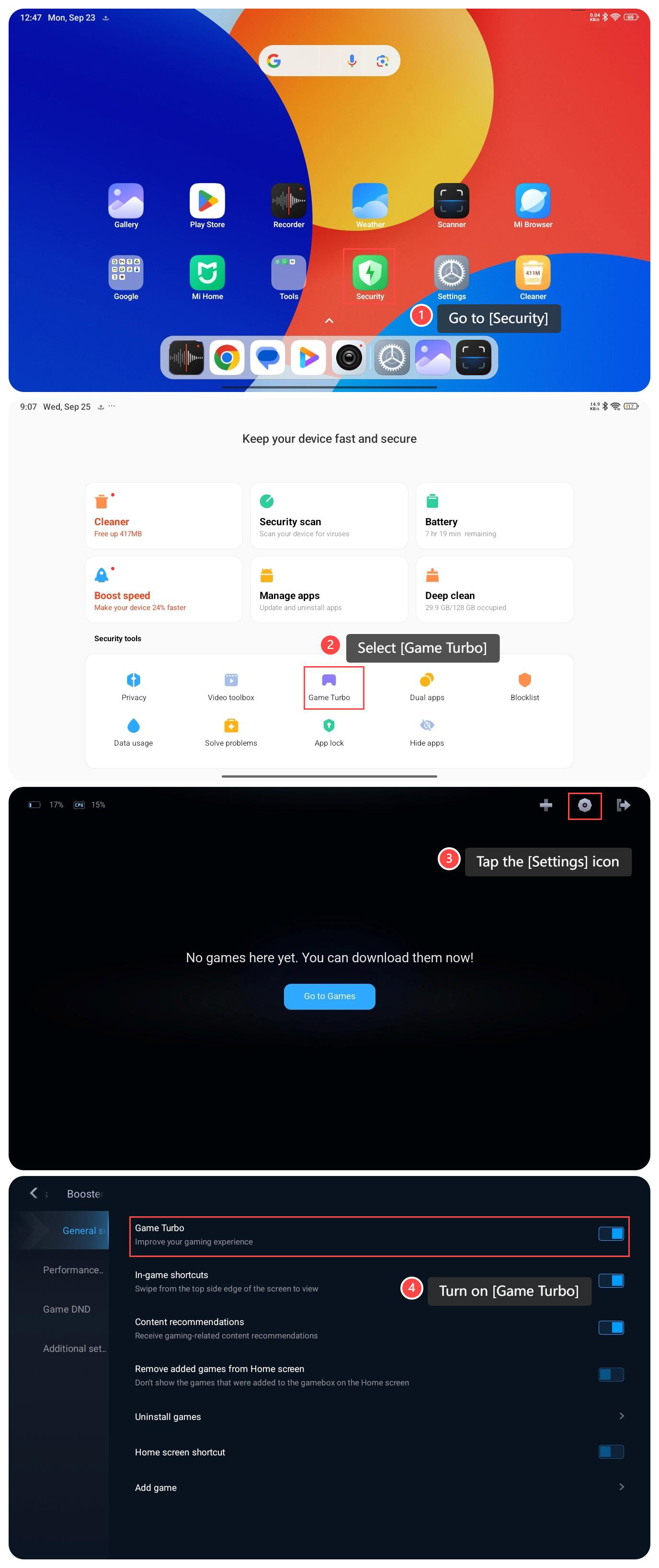
1. Go to [Security];
2. Scroll down and select [Game Turbo];
3. Tap the [Settings] icon at the upper right corner;
4. Turn on [Game Turbo].
Method 2:
1. Go to [Settings];
2. Select [Additional settings];
3. Tap [Game Turbo];
4. Tap the [Settings] icon at the upper right corner;
5. Turn on [Game Turbo].

Note:
1. Long-term high-performance operation will cause the device to overheat, so pay attention to monitoring the temperature;
2. Optimizing game performance will increase battery consumption, so make sure there is enough power;
3. Make sure the added games are compatible with Game Turbo for the best results.
To use Game Turbo on your tablet, please refer to the following methods:
Method 1:
1. Go to [Security];
2. Scroll down and select [Game Turbo];
3. Tap the [Settings] icon at the upper right corner;
4. Turn on [Game Turbo].
Method 2:
1. Go to [Settings];
2. Select [Additional settings];
3. Tap [Game Turbo];
4. Tap the [Settings] icon at the upper right corner;
5. Turn on [Game Turbo].
Note:
1. Long-term high-performance operation will cause the device to overheat, so pay attention to monitoring the temperature;
2. Optimizing game performance will increase battery consumption, so make sure there is enough power;
3. Make sure the added games are compatible with Game Turbo for the best results.
Does it help?
Yes
No