

How to add a contact number to the home screen?
This feature on the phone allows you to add frequently used contacts directly to the home screen of the phone as shortcuts. You can quickly make calls, send text messages or perform other communication operations without having to open the address book to search. In addition, by placing contacts on the home screen, you can stay in touch with important contacts more efficiently, improving the convenience and efficiency of daily use.
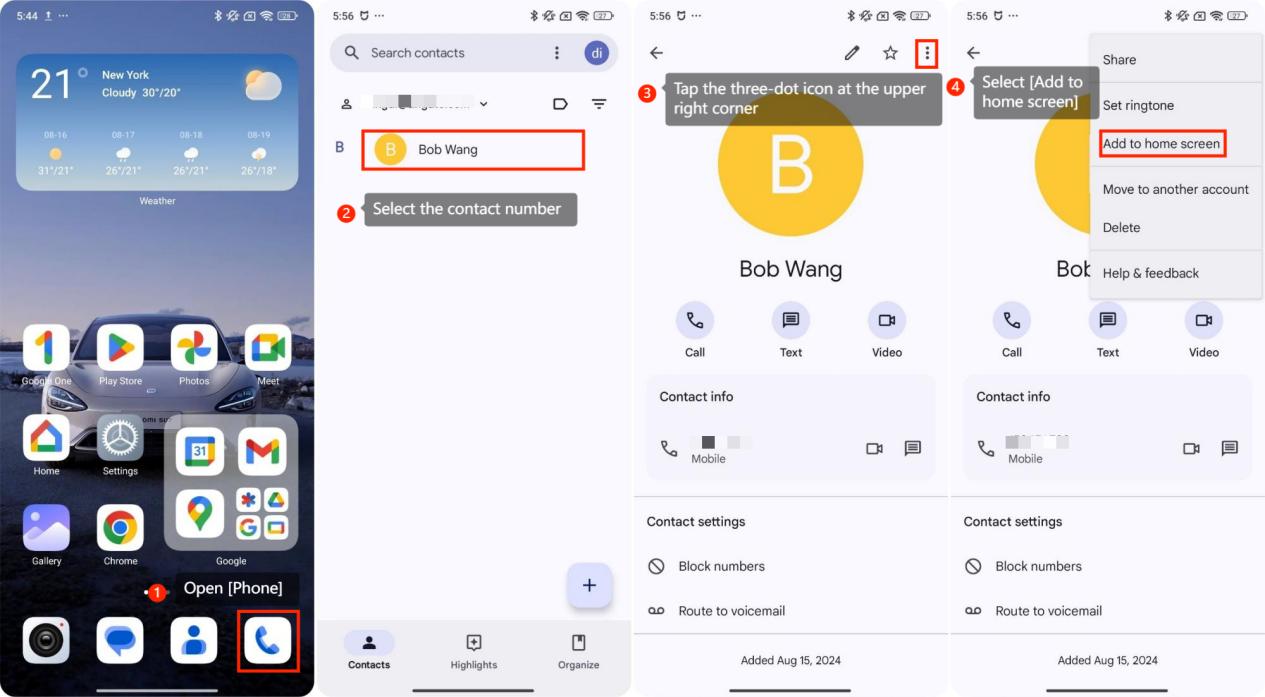
To add a contact number to the home screen, please refer to the following methods:
1. Open [Phone];
2. Select the contact number;
3. Tap the three-dot icon at the upper right corner;
4. Select [Add to home screen].
To add a contact number to the home screen, please refer to the following methods:
1. Open [Phone];
2. Select the contact number;
3. Tap the three-dot icon at the upper right corner;
4. Select [Add to home screen].
Does it help?
Yes
No