

How to deactivate the Google Assistant pop-up window when pressing and holding the power button?
Deactivating the Google Assistant pop-up window when pressing and holding the power button can enhance device control and make it easier to manage power options. It also can save power and avoid unnecessary waste of resources.
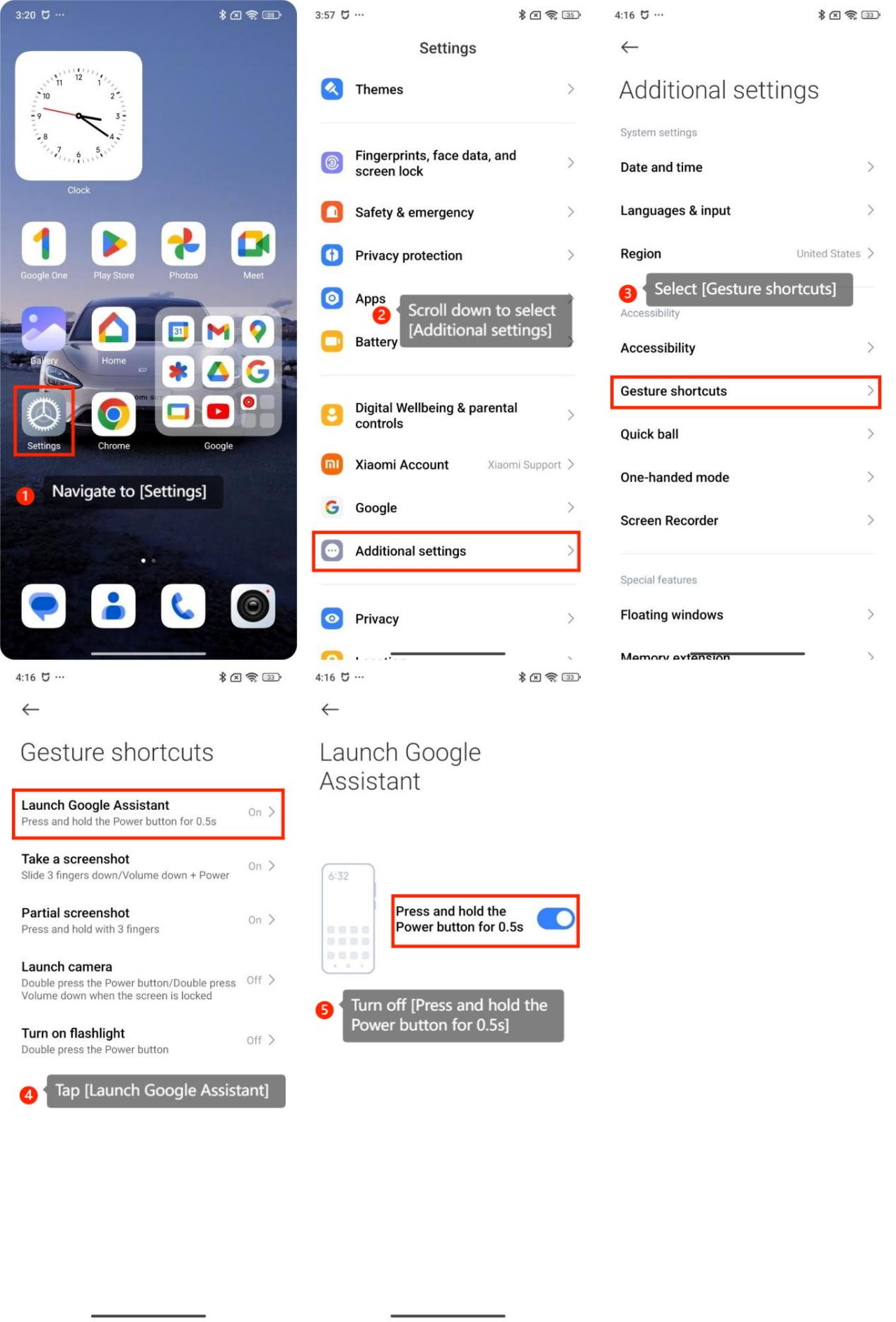
To deactivate the Google Assistant pop-up window, please refer to the following methods:
1. Navigate to [Settings];
2. Scroll down to select [Additional settings];
3. Select [Gesture shortcuts];
4. Tap [Launch Google Assistant];
5. Turn off [Press and hold the Power button for 0.5s].
Note:
Make sure you have set up other methods of accessing Google Assistant, such as through screen gestures or voice activation.
To deactivate the Google Assistant pop-up window, please refer to the following methods:
1. Navigate to [Settings];
2. Scroll down to select [Additional settings];
3. Select [Gesture shortcuts];
4. Tap [Launch Google Assistant];
5. Turn off [Press and hold the Power button for 0.5s].
Note:
Make sure you have set up other methods of accessing Google Assistant, such as through screen gestures or voice activation.
Does it help?
Yes
No