

How to clear cache when the Redmi Pad SE 8.7 is locked?
Clearing cache when the Redmi Pad SE 8.7 is locked helps free up storage space, improve performance, and enhance security. It ensures that temporary files do not accumulate, which can slow down the system or lead to potential data privacy issues.
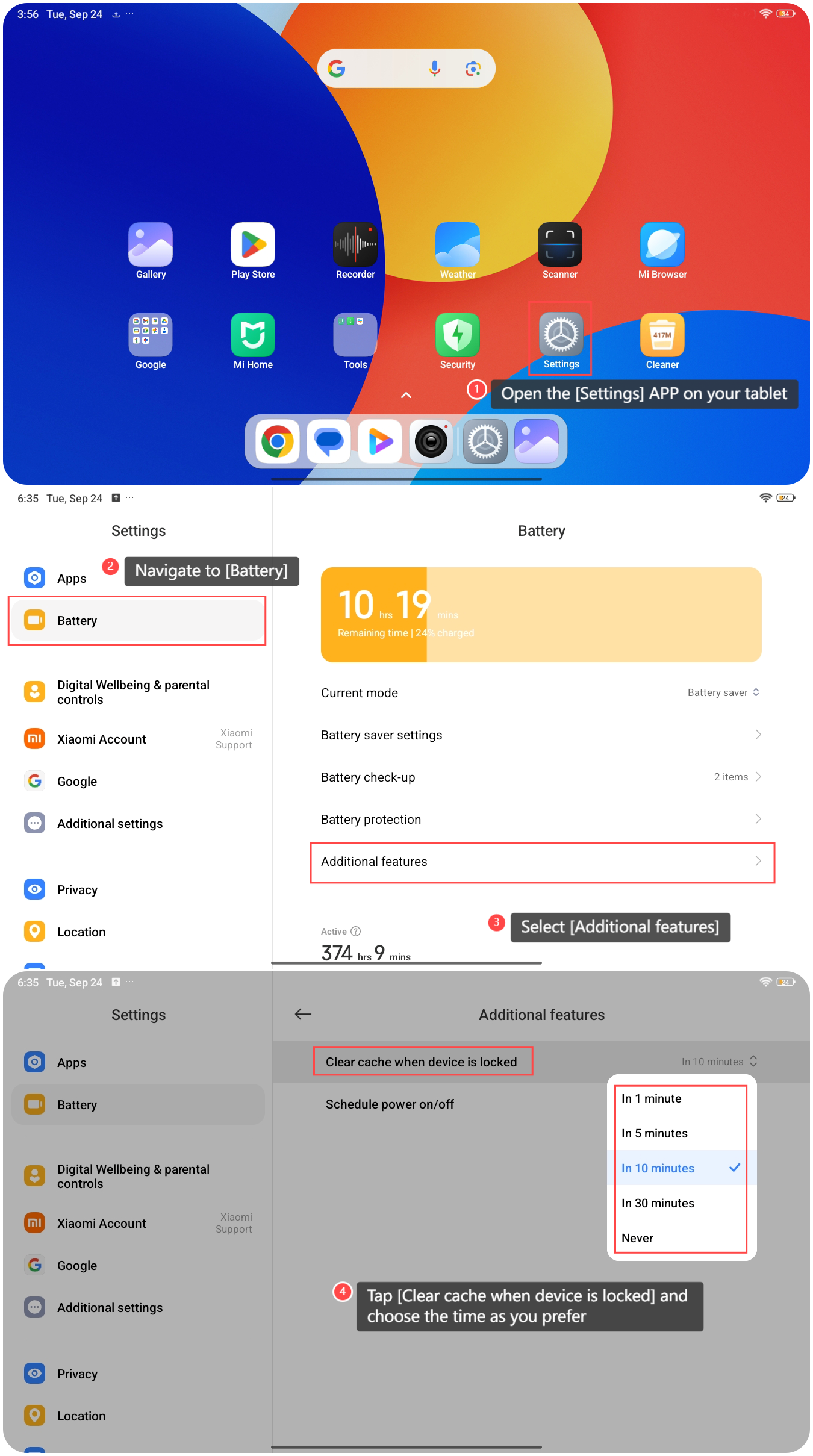
To clear cache when the Redmi Pad SE 8.7 is locked, please refer to the following steps:
1. Open the [Settings] APP on your tablet;
2. Navigate to [Battery];
3. Select [Additional features];
4. Tap [Clear cache when device is locked] and choose the time as you prefer.
Note:
1. This feature can consume less power during operation, which can improve overall battery life during usage;
2. It is advisable to regularly clear the cache for optimal performance.
To clear cache when the Redmi Pad SE 8.7 is locked, please refer to the following steps:
1. Open the [Settings] APP on your tablet;
2. Navigate to [Battery];
3. Select [Additional features];
4. Tap [Clear cache when device is locked] and choose the time as you prefer.
Note:
1. This feature can consume less power during operation, which can improve overall battery life during usage;
2. It is advisable to regularly clear the cache for optimal performance.
Does it help?
Yes
No