

How to set the transition effect on the Redmi Pad SE 8.7?
The transition effects on the Redmi Pad SE 8.7 offer several advantages, which enhance the overall aesthetic of the using interface, making navigation feel smoother and more engaging. They can act as visual feedback when opening or closing APPs, indicating that an action has been successfully completed. By softening the change from one screen to another, transition effects can prevent the interface from feeling jarring or disjointed.
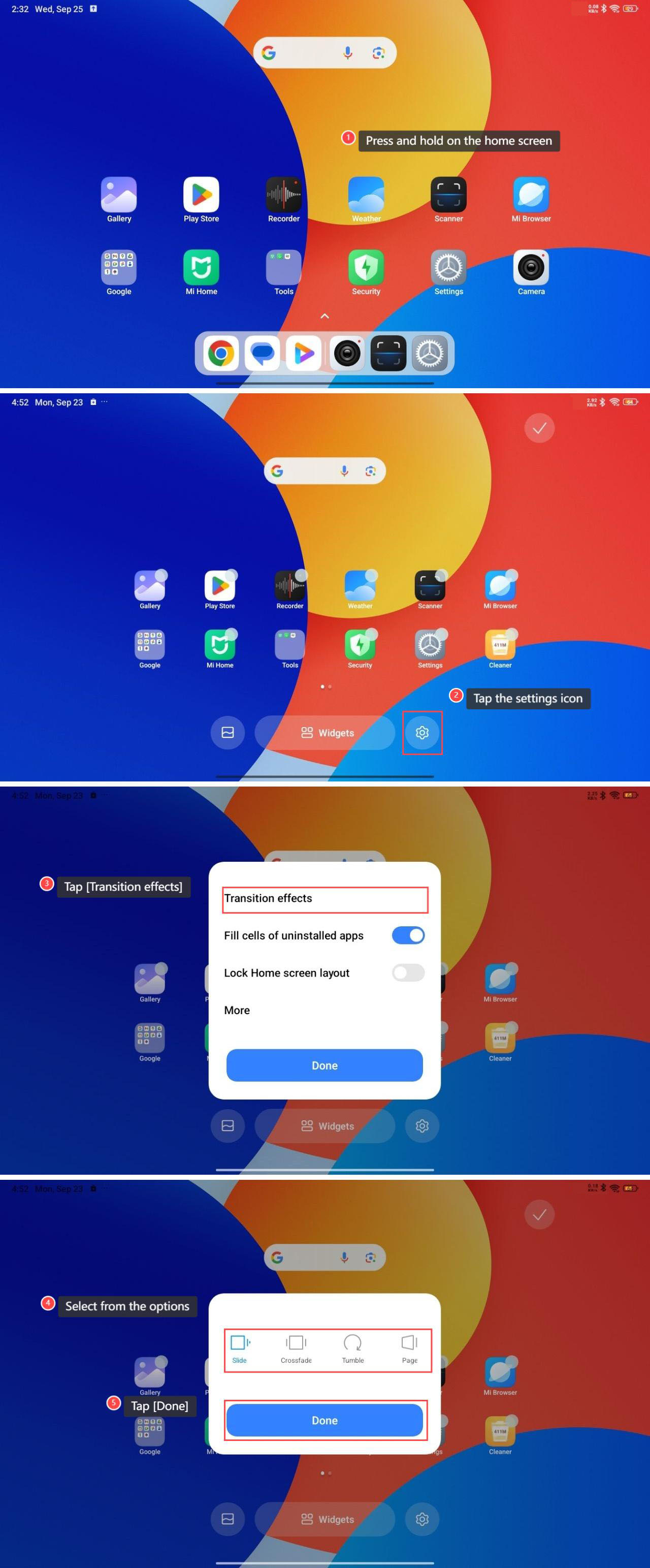
To set the transition effects, please refer to the following steps:
1. Press and hold on the home screen;
2. Tap the settings icon;
3. Tap [Transition effects];
4. Select from the options according to your preference;
5. Tap [Done] to accomplish the settings.
To set the transition effects, please refer to the following steps:
1. Press and hold on the home screen;
2. Tap the settings icon;
3. Tap [Transition effects];
4. Select from the options according to your preference;
5. Tap [Done] to accomplish the settings.
Does it help?
Yes
No