

How to share the hotspot of the Redmi Pad SE 8.7 4G via Bluetooth?
The hotspot feature on the Redmi Pad SE 8.7 4G via Bluetooth allows you to share your Internet connection with other devices using Bluetooth. This functionality ensures that you can stay connected even in situations where Wi-Fi is unavailable or unreliable. Additionally, by using Bluetooth for tethering, you can maintain a more energy-efficient connection, prolonging the battery life of both the pad and the connected devices.
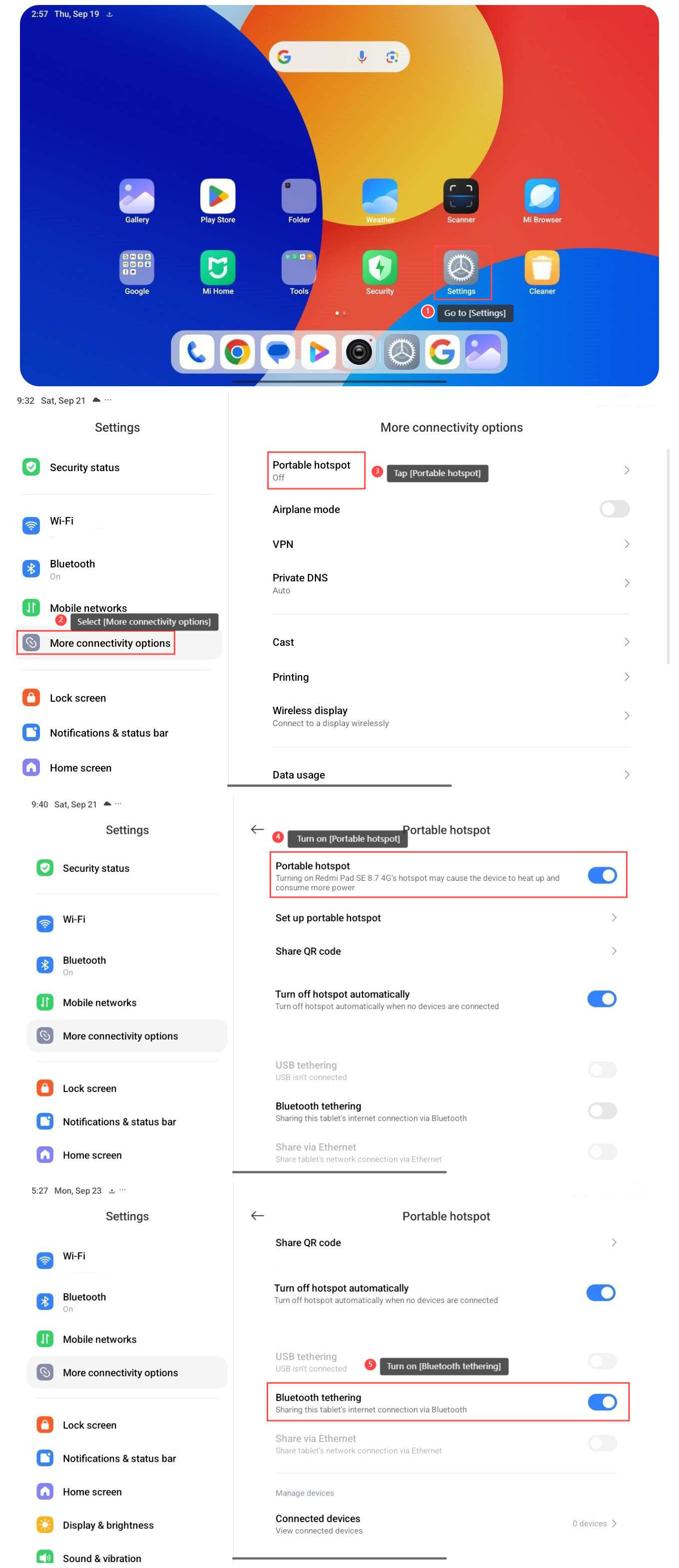
To share the hotspot, please refer to the following steps:
1. Go to [Settings];
2. Select [More connectivity options];
3. Tap [Portable hotspot];
4. Turn on [Portable hotspot];
5. Turn on [Bluetooth tethering].
Note:
Turning on the hotspot can cause the device to heat up and consume more power.
To share the hotspot, please refer to the following steps:
1. Go to [Settings];
2. Select [More connectivity options];
3. Tap [Portable hotspot];
4. Turn on [Portable hotspot];
5. Turn on [Bluetooth tethering].
Note:
Turning on the hotspot can cause the device to heat up and consume more power.
Does it help?
Yes
No