

How to set the Text-to-speech output on the Redmi Pad SE 8.7?
Text-to-speech output on the Redmi Pad SE 8.7 converts written text into spoken words, enhancing accessibility for you. It can read aloud text from various applications, such as books, messages, or web pages, allowing for a hands-free experience.
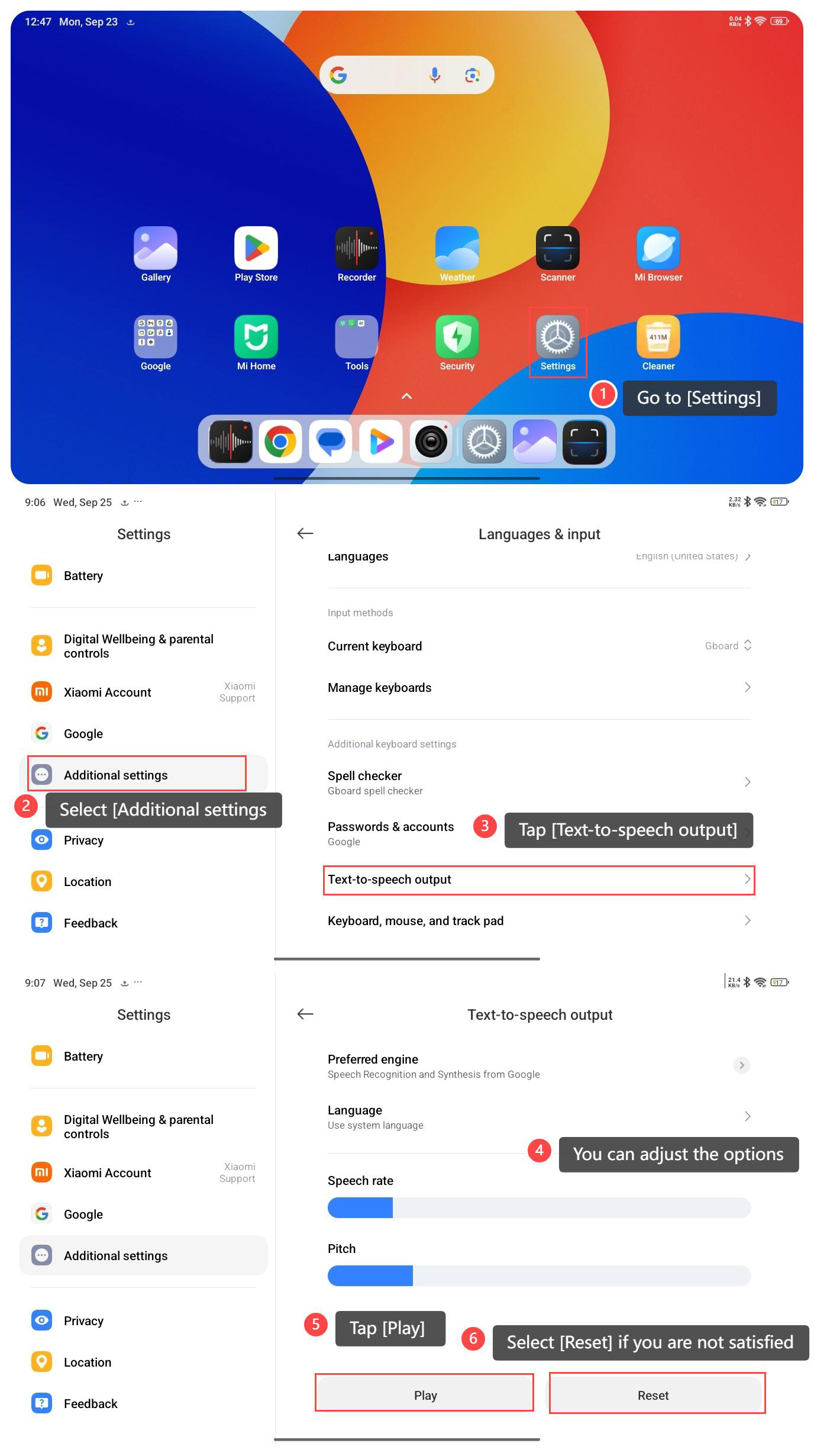
To set the Text-to-speech output on your tablet, please refer to the following steps:
1. Go to [Settings];
2. Select [Additional settings];
3. Tap [Text-to-speech output];
4. In this interface, you can adjust the options: language, speech rate and pitch as you prefer;
5. Tap [Play] to listen to the voice effect;
6. Select [Reset] if you are not satisfied.
To set the Text-to-speech output on your tablet, please refer to the following steps:
1. Go to [Settings];
2. Select [Additional settings];
3. Tap [Text-to-speech output];
4. In this interface, you can adjust the options: language, speech rate and pitch as you prefer;
5. Tap [Play] to listen to the voice effect;
6. Select [Reset] if you are not satisfied.
Does it help?
Yes
No