

How to select a ringtone for the alarm on the Redmi Pad SE 8.7 4G?
The ringtone for alarms on the Redmi Pad SE 8.7 4G can be selected from a variety of pre-installed tones. These tones are designed to be loud and clear to ensure they effectively wake you up. Additionally, you can customize the alarm sound by choosing from available options or adding your own audio files. This flexibility allows for a more personalized alarm experience tailored to individual preferences.
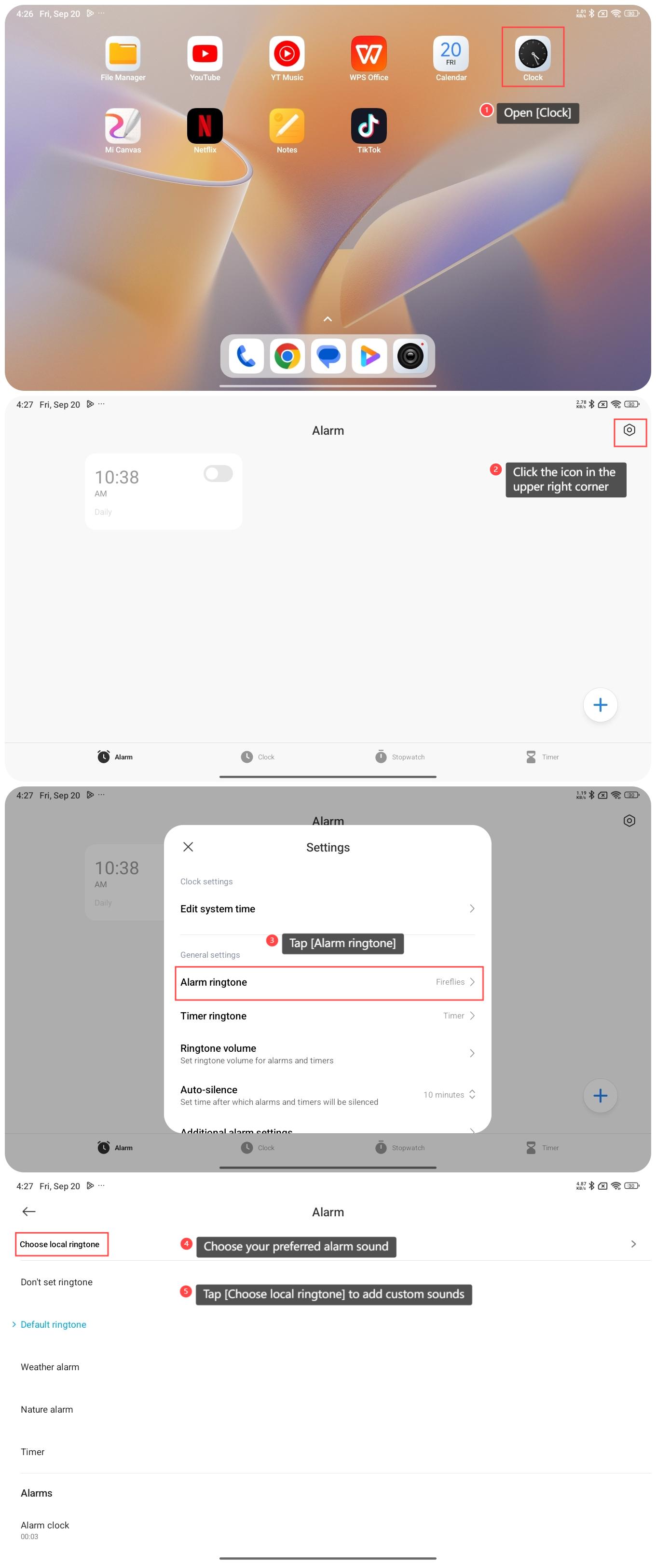
To select a ringtone for the alarm on the Redmi Pad SE 8.7 4G, please refer to the following steps:
1. Open [Clock];
2. Click the icon in the upper right corner to enter the settings interface;
3. Tap [Alarm ringtone];
4. Choose your preferred alarm sound;
5. You can also tap [Choose local ringtone] to add custom sounds from your recorder, audio files, and music.
To select a ringtone for the alarm on the Redmi Pad SE 8.7 4G, please refer to the following steps:
1. Open [Clock];
2. Click the icon in the upper right corner to enter the settings interface;
3. Tap [Alarm ringtone];
4. Choose your preferred alarm sound;
5. You can also tap [Choose local ringtone] to add custom sounds from your recorder, audio files, and music.
Does it help?
Yes
No