

How to adjust the battery indicator type on the Redmi Pad SE 8.7?
The battery indicator on the Redmi Pad SE 8.7 serves as a crucial visual cue, depicting the tablet's remaining charge level. Displayed prominently in the status bar or notification area, it utilizes various colors and symbols to convey important information such as whether the device is charging, the battery is low, or if it is fully charged, ensuring you stay informed about your tablet's power status. By providing this real-time feedback, the battery indicator helps you make informed decisions about when to charge your tablet, enhancing overall usability and convenience.
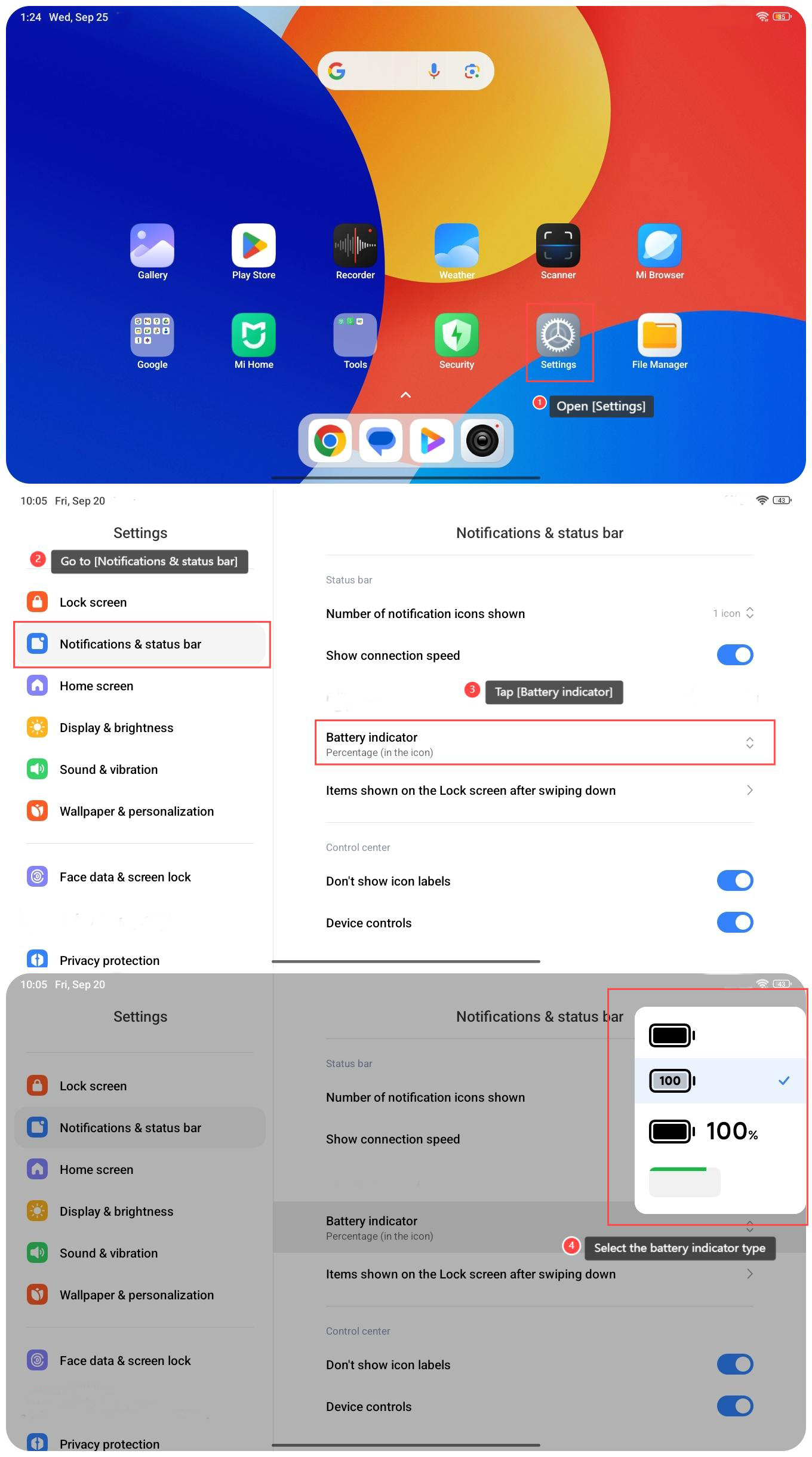
To adjust the battery indicator type on the Redmi Pad SE 8.7, please refer to the following steps:
1. Open [Settings] on your tablet;
2. Go to [Notifications & status bar];
3. Tap [Battery indicator];
4. Select the battery indicator type.
To adjust the battery indicator type on the Redmi Pad SE 8.7, please refer to the following steps:
1. Open [Settings] on your tablet;
2. Go to [Notifications & status bar];
3. Tap [Battery indicator];
4. Select the battery indicator type.
Does it help?
Yes
No