

How to make and check the private photos on the Redmi Pad SE 8.7 4G?
Creating a private album on the Redmi Pad SE 8.7 4G protects sensitive photos from unauthorized access, ensuring privacy. It allows you to organize personal content securely while keeping it separate from public images.
To make and check private photos on the tablet, please refer to the following steps:
1. Open the [Settings] APP on your tablet;
2. Enter [Face data & screen lock];
3. Tap [Privacy protection password];
4. Enable [Use Privacy protection password], then draw an unlock pattern;
5. You can add your Xiaomi Account now or later, in case you forget your password;

To make and check private photos on the tablet, please refer to the following steps:
1. Open the [Settings] APP on your tablet;
2. Enter [Face data & screen lock];
3. Tap [Privacy protection password];
4. Enable [Use Privacy protection password], then draw an unlock pattern;
5. You can add your Xiaomi Account now or later, in case you forget your password;
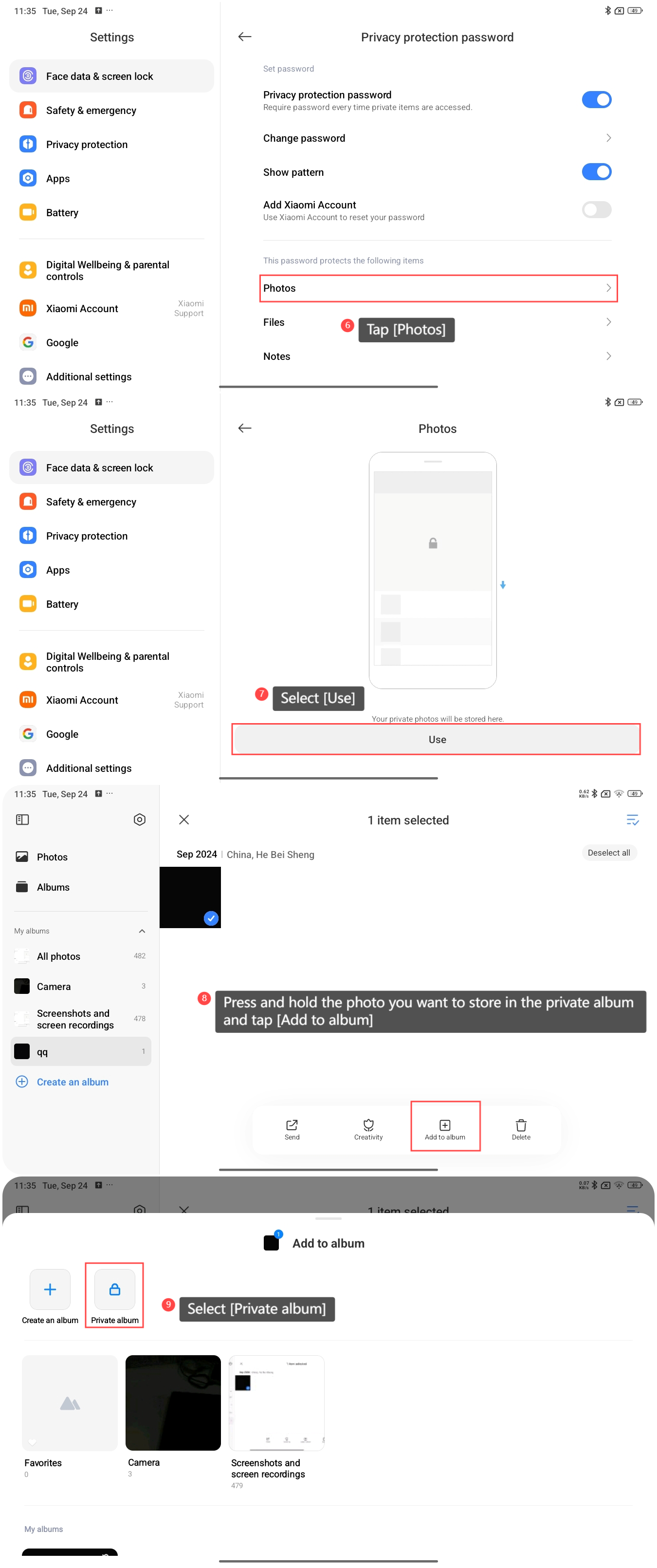
6. Tap [Photos];
7. Select [Use] and your private photos will be stored here;
8. Press and hold the photo you want to store in the private album and tap [Add to album];
9. Select [Private album]. Once the addition is completed, you can swipe down in [Albums] to view the items you made private.
7. Select [Use] and your private photos will be stored here;
8. Press and hold the photo you want to store in the private album and tap [Add to album];
9. Select [Private album]. Once the addition is completed, you can swipe down in [Albums] to view the items you made private.
Does it help?
Yes
No