

How to check the permissions of the applications installed via USB on the Redmi Pad SE 8.7?
Applications installed via USB on the Redmi Pad SE 8.7 will require specific permissions to function properly, similar to those installed from the Google Play Store. These permissions could include access to storage, camera, microphone, location, and other device features. When you install apps via USB, you should manually review and manage these permissions in the settings to ensure they align with your privacy and security preferences.
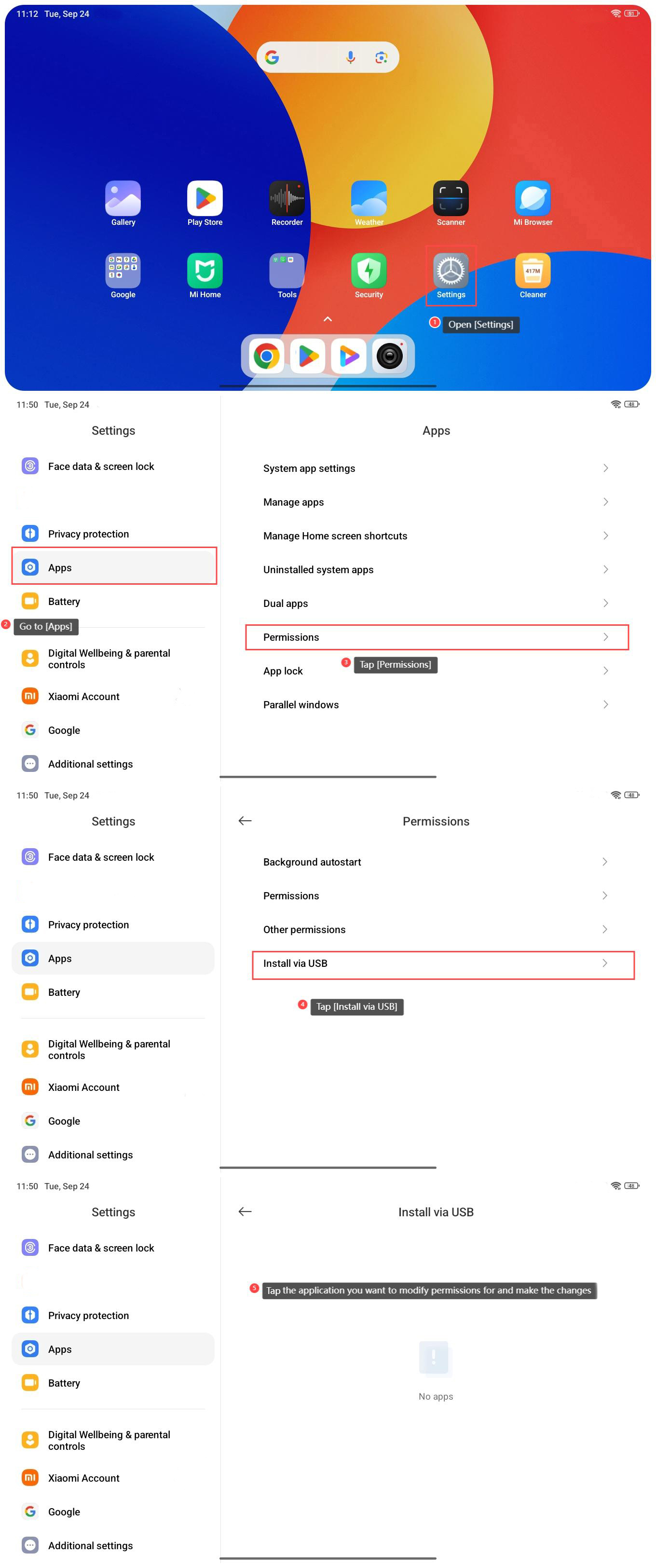
To check the permissions of the applications installed via USB on the Redmi Pad SE 8.7, please refer to the following steps:
1. Open [Settings] on your tablet;
2. Go to [Apps];
3. Tap [Permissions];
4. Tap [Install via USB];
5. Tap the application you want to modify permissions for and make the changes.
To check the permissions of the applications installed via USB on the Redmi Pad SE 8.7, please refer to the following steps:
1. Open [Settings] on your tablet;
2. Go to [Apps];
3. Tap [Permissions];
4. Tap [Install via USB];
5. Tap the application you want to modify permissions for and make the changes.
Does it help?
Yes
No