

How to rename the Redmi Pad SE 8.7?
Renaming your Redmi Pad SE 8.7 offers several benefits. It personalizes the device, making it easier to identify in networks and simplifies network management and permission settings when handling multiple devices. Additionally, it helps organize devices effectively in APPs like Xiaomi Cloud or Mi Home/Xiaomi Home.
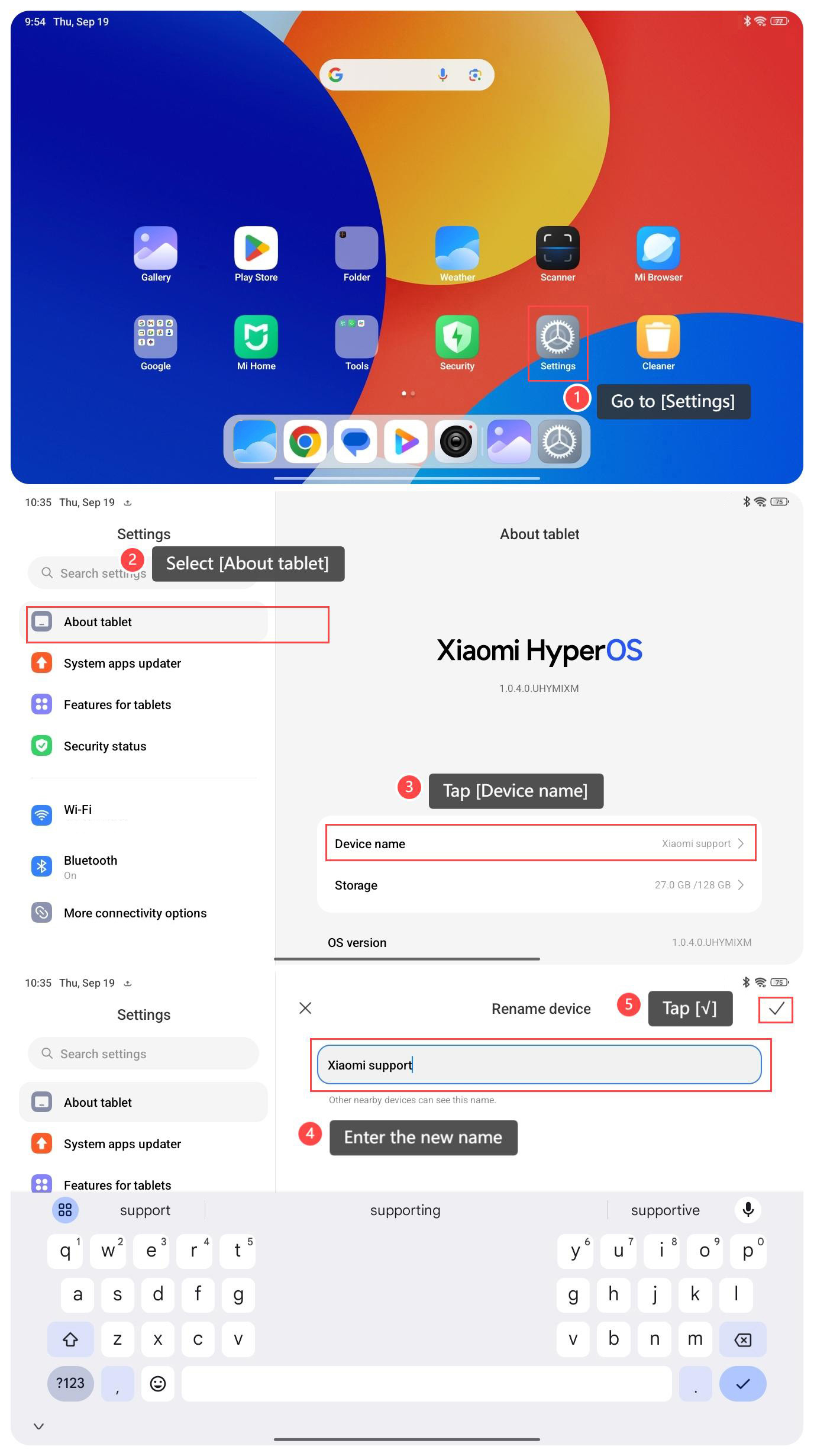
To rename your tablet, please refer to the following steps:
1. Go to [Settings] on your tablet;
2. Select [About tablet];
3. Tap [Device name];
4. You can see a screen that allows you to edit the device name. Enter the new name you want for your tablet;
5. After entering the new name, tap [√] to save the changes.
Note:
Sometimes, changes in device names will require a restart to take effect. You can restart your tablet to ensure the new name is applied.
To rename your tablet, please refer to the following steps:
1. Go to [Settings] on your tablet;
2. Select [About tablet];
3. Tap [Device name];
4. You can see a screen that allows you to edit the device name. Enter the new name you want for your tablet;
5. After entering the new name, tap [√] to save the changes.
Note:
Sometimes, changes in device names will require a restart to take effect. You can restart your tablet to ensure the new name is applied.
Does it help?
Yes
No