

How to rename the photo while backup in Google service?
Before backing up in Google service, you can rename the photo on your phone through the Files APP.
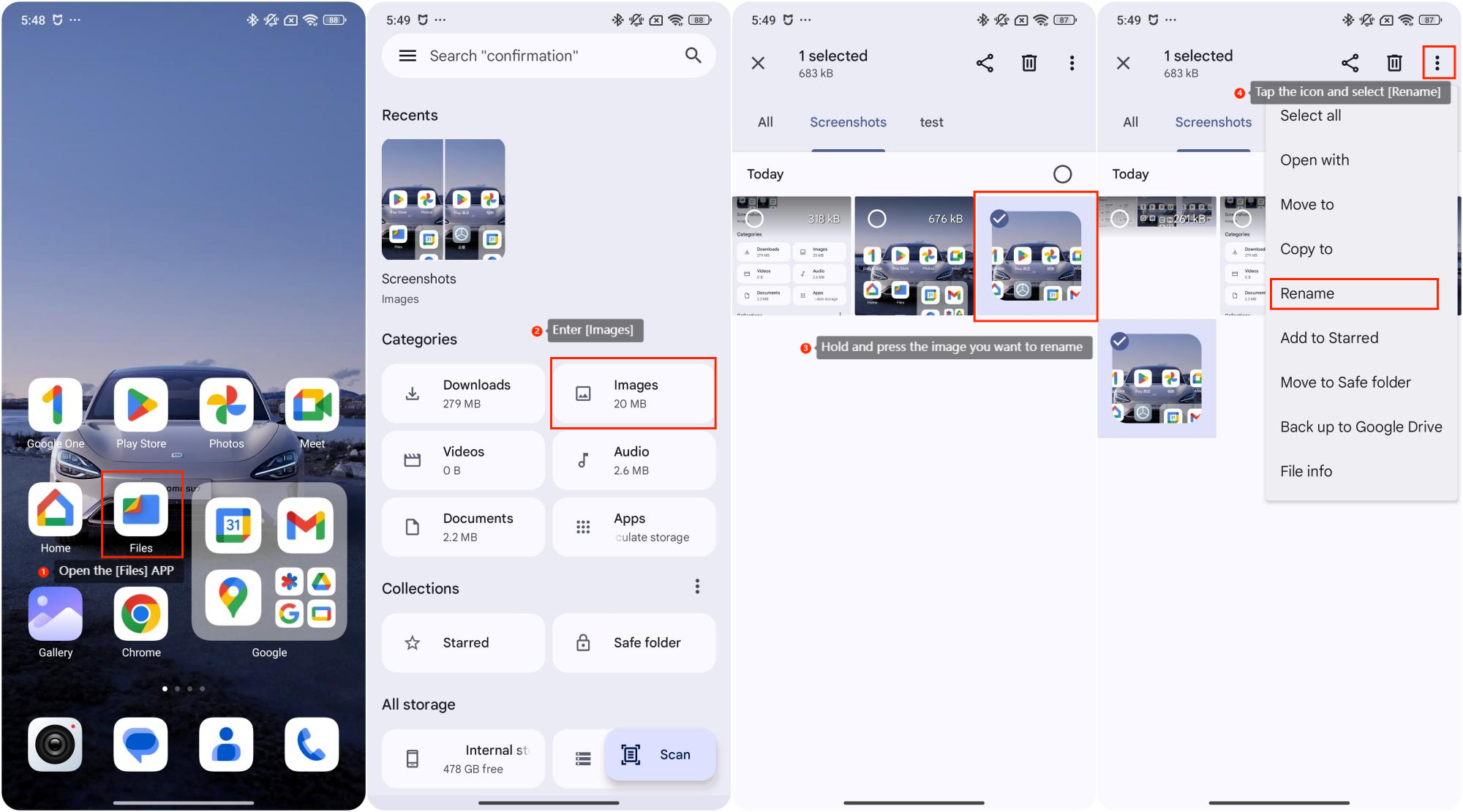
To rename photos, please refer to the following steps:
1. Open the [Files] APP on your phone;
2. Enter [Images];
3. Hold and press the image you want to rename;
4. Tap the three-dot icon at the upper right corner and select [Rename] to modify your photo information. After this, you can back up in Google service.
To rename photos, please refer to the following steps:
1. Open the [Files] APP on your phone;
2. Enter [Images];
3. Hold and press the image you want to rename;
4. Tap the three-dot icon at the upper right corner and select [Rename] to modify your photo information. After this, you can back up in Google service.
Note:
If you are unable to find the Files APP on your phone, visit the Google Play Store, search for Files by Google. Download and install the APP to manage your photos efficiently.
If you are unable to find the Files APP on your phone, visit the Google Play Store, search for Files by Google. Download and install the APP to manage your photos efficiently.
Does it help?
Yes
No