

How to use the sound and light alert feature on the Xiaomi Outdoor Camera CW700S?
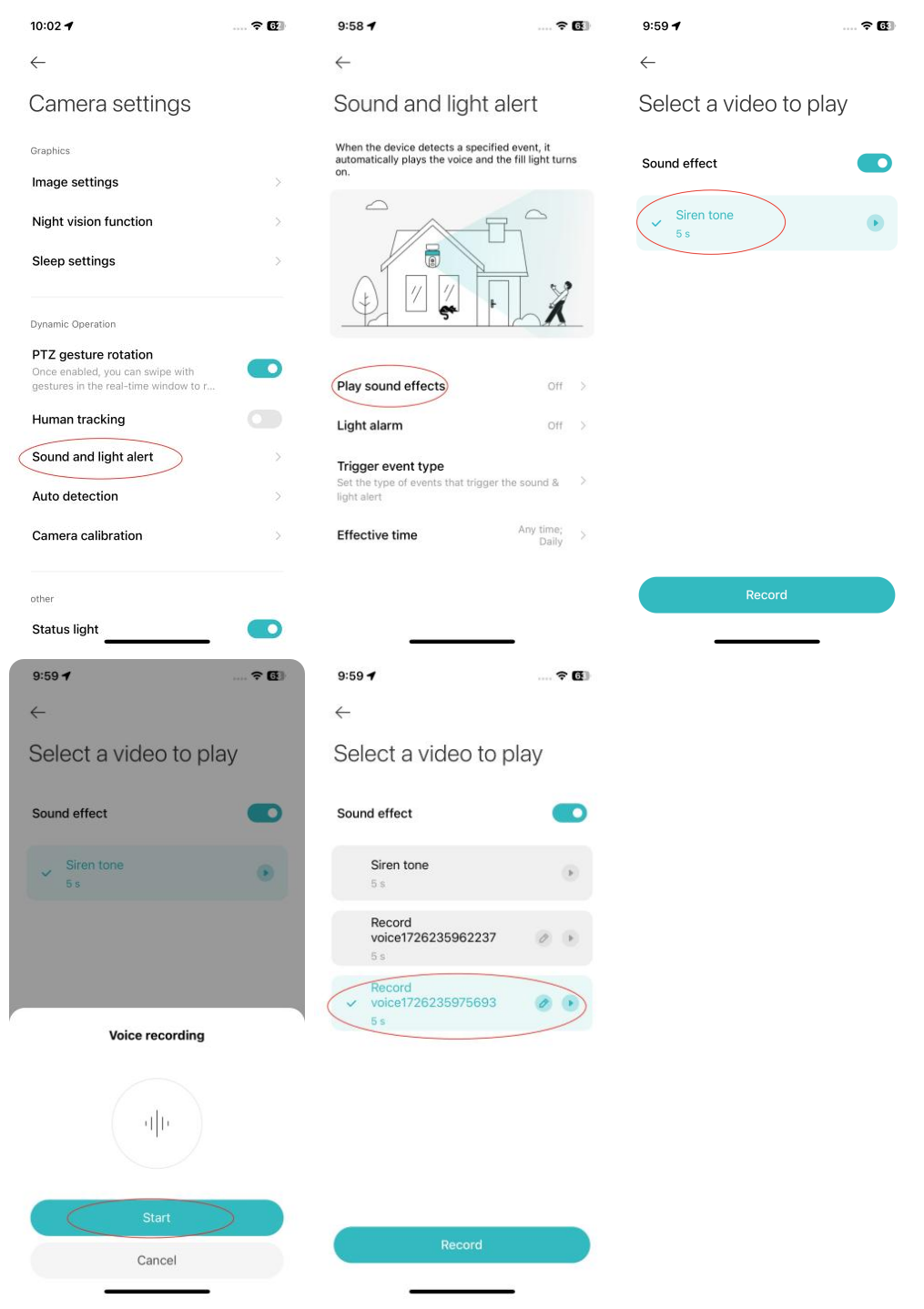
To use the sound alert feature, please refer to the following steps:
1. Open the Mi Home/Xiaomi Home APP;
2. Select the Xiaomi Outdoor Camera CW700S;
3. Tap the three-dot icon at the upper right corner;
4. Go to [Camera settings];
5. Tap [Sound and light alert];
6. Select [Play sound effects] and turn on [Sound effect];
7. Once enabled, the camera will play recorded audio when motion is detected. You can choose from the preset tone or custom-recorded sounds.
To use the light alert feature, please refer to the following steps:
1. Open the Mi Home/Xiaomi Home APP;
2. Select the Xiaomi Outdoor Camera CW700S;
3. Tap the three-dot icon at the upper right corner;
4. Go to [Camera settings];
5. Tap [Sound and light alert];
6. Select [Light alarm] and enable it;
7. Once enabled, the camera will activate the supplementary light when motion is detected.
Note:
You can set specific times for alarm activation, including any time, custom, or repeated intervals.
1. Open the Mi Home/Xiaomi Home APP;
2. Select the Xiaomi Outdoor Camera CW700S;
3. Tap the three-dot icon at the upper right corner;
4. Go to [Camera settings];
5. Tap [Sound and light alert];
6. Select [Play sound effects] and turn on [Sound effect];
7. Once enabled, the camera will play recorded audio when motion is detected. You can choose from the preset tone or custom-recorded sounds.
To use the light alert feature, please refer to the following steps:
1. Open the Mi Home/Xiaomi Home APP;
2. Select the Xiaomi Outdoor Camera CW700S;
3. Tap the three-dot icon at the upper right corner;
4. Go to [Camera settings];
5. Tap [Sound and light alert];
6. Select [Light alarm] and enable it;
7. Once enabled, the camera will activate the supplementary light when motion is detected.
Note:
You can set specific times for alarm activation, including any time, custom, or repeated intervals.
Does it help?
Yes
No