

How to bind the Redmi Watch 5 Lite with the mobile phone?
The Redmi Watch 5 Lite needs to be bound through the Mi Fitness APP. After binding, the APP needs to be locked in the background to avoid being shut down by the system, which leads to disconnection from the mobile phone and affects the normal use of the watch.
The binding steps of Android phones are as follows:
1. Press the power button for a long time to turn the watch on. Use your mobile phone to scan the QR code on the watch screen, or search for Mi Fitness in the APP store. Download and install the Mi Fitness APP;
2. Open the Mi Fitness APP, and allow the APP-related permissions according to the pop-up prompts. Tap [Add device], and tap [Scanner];
3. If you use Android devices other than Xiaomi smartphones to connect the watch, when the watch's Bluetooth name appears in the Bluetooth settings interface of the phone, tap to pair. When the phone displays the same security code as the watch screen, tap [Pair] to complete the pairing connection with the watch.
The binding steps of iOS phones are as follows:
1. Select language;
2. Scan with the APP;
3. Start binding;
4. Find the Bluetooth name;
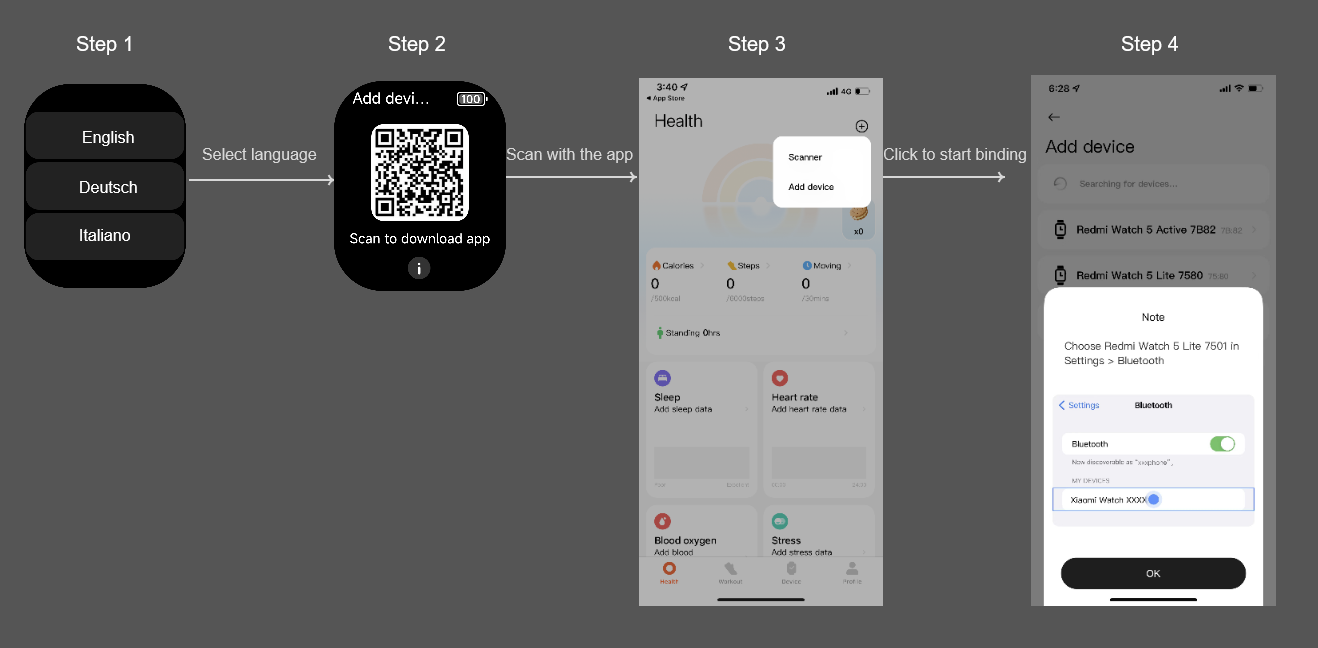
5. Pair on watch and phone;
6. The watch will automatically display the QR code page. Manually returns to the APP to scan again on the phone;
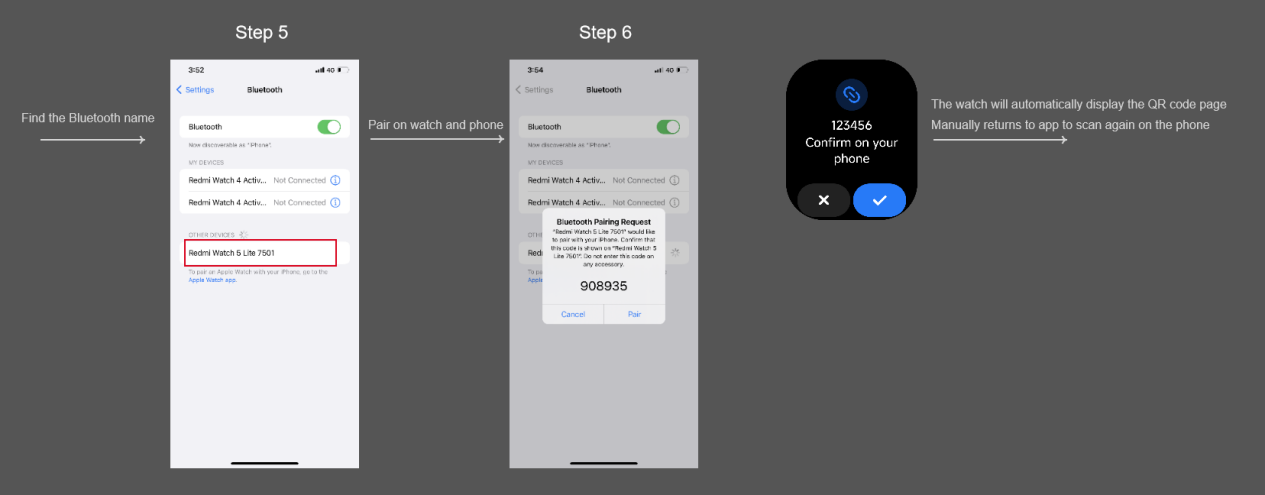
7. Scan with the APP and verify;
8. Pair on watch and phone;
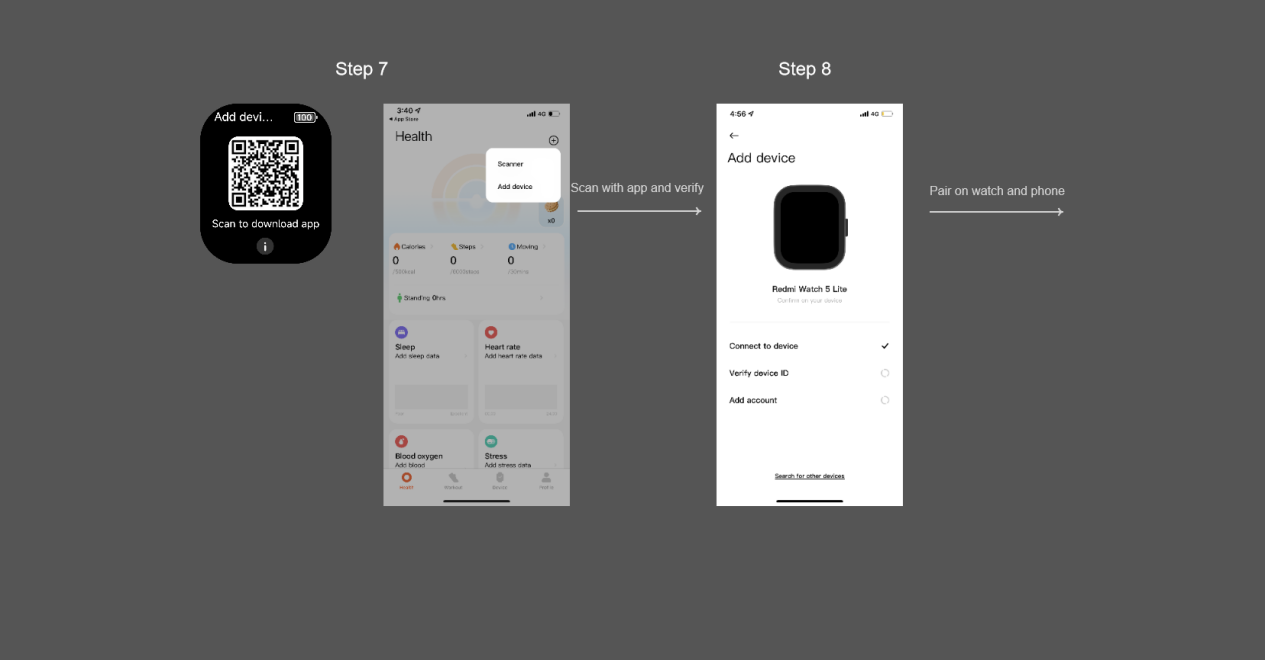
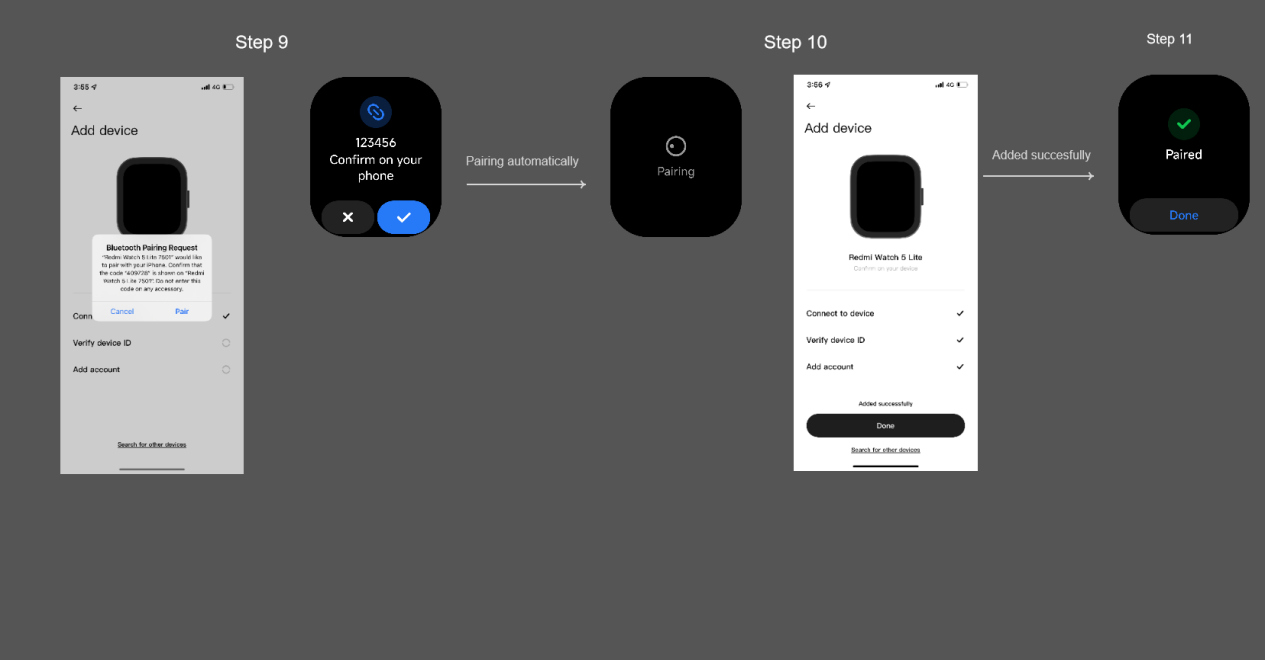
9. Pairing automatically;
10. Added successfully.
Note:
1. During the pairing process, please confirm that the Bluetooth of the mobile phone is on to ensure a normal connection between the watch and the mobile phone;
2. If the security code has popped up on the watch, however, the pop-up window for confirming pairing is not displayed on the mobile phone, please find the pairing request in the notifications of the mobile phone;
3. If the watch cannot be found during the process of adding the device, or the watch cannot be connected during use, please try to press the watch power button for 3 seconds, select reset in the system operation interface, and then add the watch again.
The binding steps of Android phones are as follows:
1. Press the power button for a long time to turn the watch on. Use your mobile phone to scan the QR code on the watch screen, or search for Mi Fitness in the APP store. Download and install the Mi Fitness APP;
2. Open the Mi Fitness APP, and allow the APP-related permissions according to the pop-up prompts. Tap [Add device], and tap [Scanner];
3. If you use Android devices other than Xiaomi smartphones to connect the watch, when the watch's Bluetooth name appears in the Bluetooth settings interface of the phone, tap to pair. When the phone displays the same security code as the watch screen, tap [Pair] to complete the pairing connection with the watch.
The binding steps of iOS phones are as follows:
1. Select language;
2. Scan with the APP;
3. Start binding;
4. Find the Bluetooth name;
5. Pair on watch and phone;
6. The watch will automatically display the QR code page. Manually returns to the APP to scan again on the phone;
7. Scan with the APP and verify;
8. Pair on watch and phone;
9. Pairing automatically;
10. Added successfully.
Note:
1. During the pairing process, please confirm that the Bluetooth of the mobile phone is on to ensure a normal connection between the watch and the mobile phone;
2. If the security code has popped up on the watch, however, the pop-up window for confirming pairing is not displayed on the mobile phone, please find the pairing request in the notifications of the mobile phone;
3. If the watch cannot be found during the process of adding the device, or the watch cannot be connected during use, please try to press the watch power button for 3 seconds, select reset in the system operation interface, and then add the watch again.
Does it help?
Yes
No