

How to use the touch control on the Redmi Buds 6 Active?
For your reference, here are some details about the touch control on the Redmi Buds 6 Active:
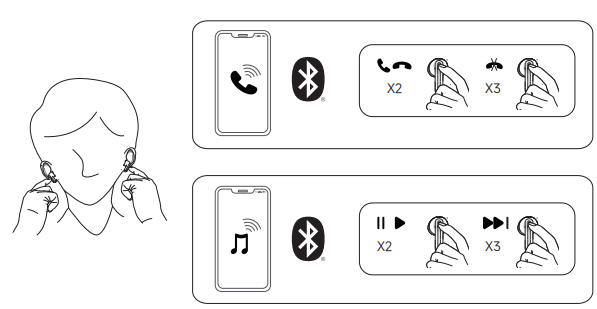
1. During a call, double-tap the button to answer or end the call, and triple-tap the button to reject the call;
2. While listening to music, double-tap the button to play or pause, and triple-tap the button to skip to the next track.
Note:
1. To prevent potential hearing damage, do not use the earbuds at high volumes for extended periods;
2. The touch control for answering, rejecting, or ending calls supports phone calls only and does not support other APPs;
3. Touch controls cannot operate short video APPs;
4. In cold outdoor weather, if your hands become dry, the touch functionality of the earbuds will become unresponsive;
5. By connecting to the Xiaomi Earbuds APP, you can use personalized features.
2. While listening to music, double-tap the button to play or pause, and triple-tap the button to skip to the next track.
Note:
1. To prevent potential hearing damage, do not use the earbuds at high volumes for extended periods;
2. The touch control for answering, rejecting, or ending calls supports phone calls only and does not support other APPs;
3. Touch controls cannot operate short video APPs;
4. In cold outdoor weather, if your hands become dry, the touch functionality of the earbuds will become unresponsive;
5. By connecting to the Xiaomi Earbuds APP, you can use personalized features.
Does it help?
Yes
No