

Xiaomi Smart Water Dispenser (Hot and Cold) FAQ
Appearance and Usage
1. Q: What is the appearance of the Xiaomi Smart Water Dispenser (Hot and Cold)?
A: The product overview of the Xiaomi Smart Water Dispenser (Hot and Cold) is listed below:
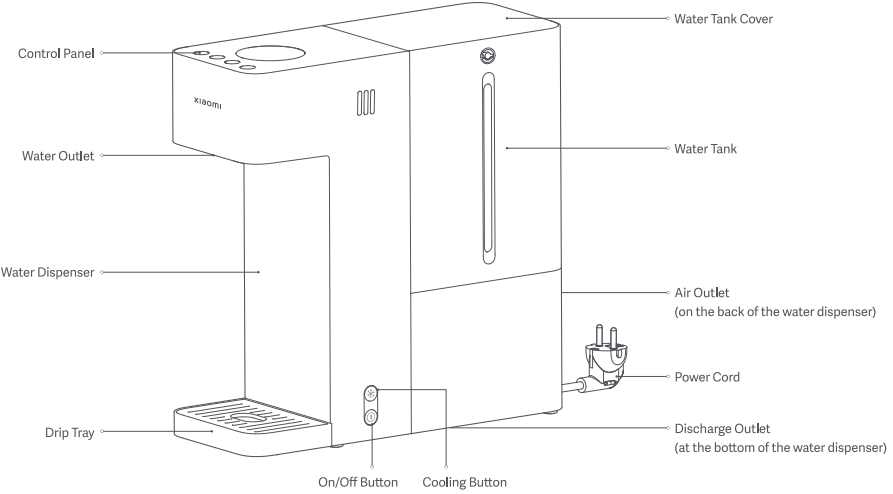
There is Control Panel, Water Outlet, Water Dispenser, Drip Tray, Water Tank Cover, Water Tank, Air Outlet, Power Cord, Discharge Outlet, On/Off button, and Cooling Button.
2. Q: What are the standard packaging contents of the Xiaomi Smart Water Dispenser (Hot and Cold)?
A: There is the Xiaomi Smart Water Dispenser (Hot and Cold), Water Tank, Drip Tray and User Manual.
3. Q: What are the buttons and indicators of the Xiaomi Smart Water Dispenser (Hot and Cold)?
A: The overview of the buttons and indicators of the Xiaomi Smart Water Dispenser (Hot and Cold) is listed below:
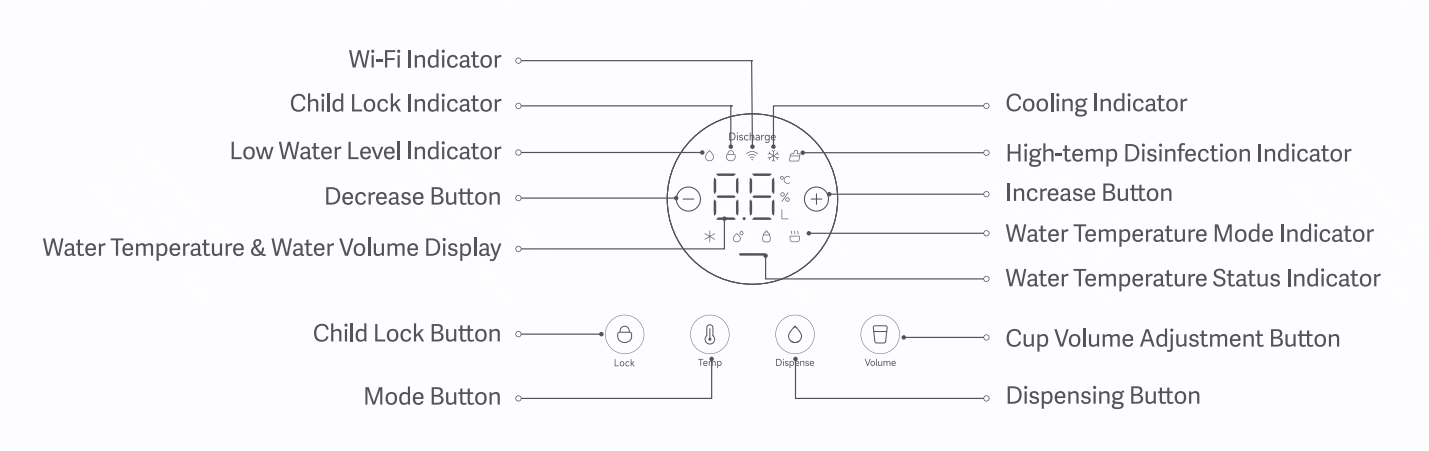
There is Decrease Button, Increase Button, Child Lock Button, Mode Button, Cup Volume Adjustment Button, Dispensing Button, Wi-Fi Indicator, Child Lock Indicator, Low Water Level Indicator, Cooling Indicator, High-temp Disinfection Indicator, Water Temperature Mode Indicator, Water Temperature Status Indicator and Water Temperature & Water Volume Display.
4. Q: Does the Xiaomi Smart Water Dispenser (Hot and Cold) have a floodlight?
A: Support. The floodlight is beside the water outlet of the dispenser.
5. Q: How to use the Xiaomi Smart Water Dispenser (Hot and Cold)?
A: To use the dispenser, please refer to the following steps:
1. Installing the drip tray: Align the clips at the bottom of the drip tray with slots in the lower part of the water dispenser, and gently press the drip tray to secure it in place. To remove the drip tray, lift it upward to detach it from the slots, and then move it outward;
2. Filling the water tank: Before using, clean the water tank, fill it with purified water, and install it on the water dispenser;
Note:
1. Do not add hot water or tap water;
2. After filling the water tank for the first time and installing it on the water dispenser, you will hear the sound of water flowing, which is normal.
3. Connecting to power and turning on/off: Remove the dust cover from the water outlet, plug the power plug into a 220V household power supply, and press and hold the on/off button for 2 seconds to turn the water dispenser on/off;
4. Enabling/Disabling cooling: Press the cooling button to enable the cooling function. The cooling indicator will blink during the cooling process and will remain on once cooling is finished. Press the cooling button again to disable the cooling function, and the cooling indicator will go off.
6. Q: How to use the child lock of the Xiaomi Smart Water Dispenser (Hot and Cold)?
A: Please refer to the following details to use the child lock of the water dispenser:
1. Water temperature below 50℃: The child lock function is off, but the child lock indicator is on;
2. Water temperature equal to or above 50℃: The child lock function is on by default, and press and hold the child lock button for 2 seconds to unlock the child lock. Press the child lock button again to lock the child lock, or wait for the child lock to be locked automatically after no operation for 3 minutes;
3. When the child lock is unlocked, press and hold the child lock button for 5 seconds until a buzzer sound is heard to cancel the child lock function. Press and hold the child lock button for 5 seconds again until the child lock indicator blinks 3 times to enable the function.
7. Q: Why does the child lock of the Xiaomi Smart Water Dispenser (Hot and Cold) need to be unlocked when dispensing the water?
A: The child lock function is designed to prevent the children from being burned. When the water is above 50℃, and there is no operation for 3 minutes, the child lock will be locked automatically. Press and hold the child lock button to unlock it. You can refer to the user manual to delete according to your needs.
8. Q: How to select the mode of the Xiaomi Smart Water Dispenser (Hot and Cold)?
A: Press the mode button to switch among room temp mode, warm mode, boiling mode and cold mode.
Please refer to the following details to select the mode of the water dispenser:
1. Room temp mode: The default water temperature is the actual water temperature in the water tank, with a cup volume of 0.3L;
2. Warm mode: The default water temperature is 55℃, with a cup volume of 0.3L. You can adjust it from 40℃ to 90℃ by pressing the increase or decrease button to adjust it by 1℃, or pressing and holding the increase or decrease button to adjust it by 5℃;
3. Boiling mode: The default water temperature is 95℃, with a cup volume of 0.3L;
4. Cold mode: The cooling temperature is between 7℃ and 15℃ and can be adjusted, with a cup volume of 0.3L.
9. Q: How to adjust the cup volume of the Xiaomi Smart Water Dispenser (Hot and Cold)?
A: Press the cup volume adjustment button to adjust the cup volume from 0.1L to 3.0L.
Please refer to the following details to adjust the cup volume of the water dispenser:
1. Press the increase or decrease button to adjust the cup volume by 0.1L;
2. Press and hold the increase or decrease button to adjust the cup volume by 0.3L.
10. Q: How does the Xiaomi Smart Water Dispenser (Hot and Cold) dispense water?
A: After selecting the mode and cup volume, press the dispensing button to dispense water. The display will automatically switch to flow rate statistics until the water dispensing ends.
11. Q: Does the Xiaomi Smart Water Dispenser (Hot and Cold) support disinfecting?
A: Support. Press and hold the dispensing and cup volume adjustment buttons for 3 seconds to enable the high-temp disinfection function for the pipelines. Then, the high-temp disinfection indicator will be on and the display will show the disinfection progress. During high-temp disinfection, press and hold the dispensing and cup volume adjustment button for 3 seconds to exit the disinfection process.
Note:
1. Before using the high-temp disinfection function, put a container with a capacity greater than 2L at the water outlet to collect the discharged high-temperature water, as overflow will occur during high water level disinfection. This is normal;
2. When not in use for a long time, high-temperature water can be used to flow back into all the pipes of the dispenser (including the ice liner) for high-temperature sterilization to prevent stagnant water from breeding bacteria and becoming spoiled and smelly.
12. Q: Does the Xiaomi Smart Water Dispenser (Hot and Cold) support emptying pipelines?
A: Support. Press and hold the mode and dispensing buttons for 5 seconds to empty the pipelines. During pipeline emptying, press the dispensing button to exit the emptying process.
Note:
After the pipelines are emptied and refilled, if you dispense hot water (in the warm mode or boiling mode), the dispenser will automatically stop after dispensing approximately 100mL of unheated water. It will resume the heating function when you dispense water again.
13. Q: Why does the water temperature indicator of the Xiaomi Smart Water Dispenser (Hot and Cold) blink when it is turned on?
A: The water dispenser is triggering an alert due to a water shortage. Please add purified water to the water tank.
14. Q: How long does the Xiaomi Smart Water Dispenser (Hot and Cold) take for the first cooling?
A: Under the conditions of 230V voltage and initial water temperature of 25℃, the Xiaomi Smart Water Dispenser (Hot and Cold) takes about 45 minutes to reach the minimum cooling temperature of 7℃ for the first cooling.
FAQs
1. Q: What characteristics does the Xiaomi Smart Water Dispenser (Hot and Cold) have?
A: The characteristics of the Xiaomi Smart Water Dispenser (Hot and Cold) are listed below:
1. With the built-in electronic cooling technology, the dispenser can produce refreshing ice water;
2. A quartz tube heating module and nano heating film technology make the dispenser dispense hot water in 3 seconds;
3. It sterilizes the pipeline at high temperatures and uses hot water reflux technology to sterilize the internal pipeline system at high temperatures.
2. Q: Does the Xiaomi Smart Water Dispenser (Hot and Cold) need to be installed?
A: The Xiaomi Smart Water Dispenser (Hot and Cold) does not need to be installed. You can use it after being powered on and added water, which is convenient.
3. Q: What is the length of power cord of the Xiaomi Smart Water Dispenser (Hot and Cold)?
A: The external length of the power cord of the Xiaomi Smart Water Dispenser (Hot and Cold) is 900mm.
Note:
The power cord includes European standard plug, English standard plug, Korean standard plug, Thai standard plug and American standard plug, which is determined by the region where you buy the dispenser.
4. Q: Why does the inner part of the Xiaomi Smart Water Dispenser (Hot and Cold) have residual water when opening the package?
A: The Xiaomi Smart Water Dispenser (Hot and Cold) has been inspected in terms of aging, which requires access to pure water and is vacuumed before leaving the factory. Due to the long water path inside the machine, there will be some pure water residue, which is completely normal.
5. Q: Why does the Xiaomi Smart Water Dispenser (Hot and Cold) dispense room-temperature water before dispensing boiling water for first-time use?
A: In order to ensure that the pipes are filled with water and prevent boil dry, each time the dispenser is powered on again, the system will force out 10 seconds of room-temperature water, while achieving the effect of cleaning the internal water circuit.
6. Q: Does the Xiaomi Smart Water Dispenser (Hot and Cold) support filtering?
A: Not support.
7. Q: What water type requirements does the Xiaomi Smart Water Dispenser (Hot and Cold) have?
A: The Xiaomi Smart Water Dispenser (Hot and Cold) needs to use purified water. Do not use tap water or add other liquids. The water in the water tank is not recommended for long-term drinking.
Note:
The heating system pipes of the dispenser are relatively thin. Impurities and scale in tap water can easily clog the pipes and affect the normal operation of the dispenser. Therefore, this dispenser is only suitable for purified water, which matters to your and your family’s health.
8. Q: Why is the temperature of the boiling water dispensed by the Xiaomi Smart Water Dispenser (Hot and Cold) lower than 100℃?
A: The reasons for the lower temperature of boiling water are listed below:
1. The altitude is high and the boiling point is low;
2. The voltage is unstable and the power of the heater fluctuates, resulting in unstable water temperature;
3. When the ambient temperature is low, water will lose some heat when it flows through the pipes, resulting in low temperature of water dispensed. Under normal circumstances, the water dispensed in the boiling mode is not lower than 90℃, so please feel free to use it.
9. Q: Will the Xiaomi Smart Water Dispenser (Hot and Cold) consume a large amount of power? What is the standby power consumption?
A: The rated power of the Xiaomi Smart Water Dispenser (Hot and Cold) is 2250W, which will consume a certain amount of power. In the standby mode, the power consumption is low, approximately 0.04KWh per day.
10. Q: Will the heater the Xiaomi Smart Water Dispenser (Hot and Cold) be boiled dry and broken after the water tank is empty?
A: After the water tank is empty, the dispenser will sense that there is no water in the water tank. At this time, the dispenser will automatically stop working and the water-dispensing function cannot be turned on. Until water is added and the water level switch determines that there is water in the water tank, the dispenser can then dispense water and heat water.
11. Q: Does the Xiaomi Smart Water Dispenser (Hot and Cold) support boil dry protection?
A: Support. Please feel free to use it in this regard.
12. Q: Does the Xiaomi Smart Water Dispenser (Hot and Cold) support keep-warm function?
A: You can directly drink the water dispensed by the dispenser in the warm mode and boiling mode, in which the keep-warm function is not necessary. There is keep-warm function in the cold mode.
13. Q: What is the capacity of the water tank of the Xiaomi Smart Water Dispenser (Hot and Cold)?
A: The Xiaomi Smart Water Dispenser (Hot and Cold) has a 3L water tank with a water tank window. The large capacity of 3L can satisfy the daily drinking water demands of 2 to 3 people. You can also observe the water capacity through the water tank window. The water tank cover is moveable, which is convenient to clean. A handle in the inner part of the water tank makes it easier to lift up the water tank when adding water.
14. Q: What is dispensing hot water in 3 seconds in the Xiaomi Smart Water Dispenser (Hot and Cold)?
A: The Xiaomi Smart Water Dispenser (Hot and Cold) comes with a quartz tube heating module, which allows dispensing hot water in 3 seconds. It takes 3 to 10 seconds to make the room-temperature reach the required temperature.
15. Q: How does the Xiaomi Smart Water Dispenser (Hot and Cold) cool the water?
A: The Xiaomi Smart Hot Water Dispenser (Hot and Cold) comes with an electronic cooling liner with a capacity of 0.5L. Cooling water only takes 30 minutes, with the temperature range from 7℃ to 15℃. The cooling liner adopts mature semiconductor electronic refrigeration technology. The semiconductor cold end absorbs heat to cool the water, and the hot end has a heat sink and a cooling fan to dissipate the heat into the ambient air.
16. Q: Will the Xiaomi Smart Water Dispenser (Hot and Cold) make noise when using?
A: When cooling the water, the cooling fan needs to dissipate the heat into the environment, and there will be the sound of the fan working. After the cooling is completed, the fan will stop working and the dispenser will be silent.
17. Q: Does the Xiaomi Smart Water Dispenser (Hot and Cold) need refrigerating fluid?
A: No necessary.
Wi-Fi and About APP
1. Q: Can the Xiaomi Smart Water Dispenser (Hot and Cold) be connected to the Mi Home/Xiaomi Home APP?
A: The Xiaomi Smart Water Dispenser (Hot and Cold) supports being connected to the Wi-Fi network, which needs to be operated in the Mi Home/Xiaomi Home APP. Wi-Fi IEEE802.11b/g/n 2.4GHz is supported.
2. Q: How to reset the Wi-Fi of the Xiaomi Smart Water Dispenser (Hot and Cold)?
A: Press and hold the mode button and cup volume adjustment button for 7 seconds to reset the Wi-Fi.
3. Q: How to connect the Xiaomi Smart Water Dispenser (Hot and Cold) to the Mi Home/Xiaomi Home APP?
A: Please refer to the following steps to connect the dispenser to the APP:
1. Open the [Mi Home/Xiaomi Home] APP;
2. Tap [+] on the right top of the screen;
3. Tap [Add device];
4. Select [Xiaomi Smart Water Dispenser (Hot and Cold)];
5. Select Wi-Fi networks and tap [Next];
6. Wait for connection;
7. Set the room according to your needs and tap [Next];
8. Set the name of the device according to your needs and tap [Next].
4. Q: What functions does the Xiaomi Smart Water Dispenser (Hot and Cold) support after connecting to the Mi Home/Xiaomi Home APP?
A: After connecting to the APP, you can turn on or turn off the dispenser, turn on or turn off Cooling, adjust Device’s modes, check Drinking record, configure High-temp sterilization, Child lock, Device notification sound and Water drinking reminder.
5. Q: Does the Xiaomi Smart Water Dispenser (Hot and Cold) support High-temp sterilization on the Mi Home/Xiaomi Home APP?
A: Support.
Please refer to the following steps to turn on High-temp sterilization:
1. Open the [Mi Home/Xiaomi Home] APP;
2. Tap [Xiaomi Smart Water Dispenser (Hot and Cold)];
3. Tap the three-dot icon on the right top of the screen;
4. Tap [High-temp sterilization];
5. Tap [Start cleaning].
Note:
In the conditions of water shortage or lack of water, the high-temp sterilization cannot be turned on.
6. Q: Does the Xiaomi Smart Water Dispenser (Hot and Cold) support turning on or turning off the Child lock on the Mi Home/Xiaomi Home APP?
A: Support.
Please refer to the following steps to turn on or turn off the Child lock:
1. Open the [Mi Home/Xiaomi Home] APP;
2. Tap [Xiaomi Smart Water Dispenser (Hot and Cold)];
3. Tap the three-dot icon on the right top of the screen;
4. Tap [Child lock] to turn on or turn off it.
7. Q: Does the Xiaomi Smart Water Dispenser (Hot and Cold) support turning on or turning off the Device notification sound on the Mi Home/Xiaomi Home APP?
A: Support.
Please refer to the following steps to turn on or turn off the Device notification sound:
1. Open the [Mi Home/Xiaomi Home] APP;
2. Tap [Xiaomi Smart Water Dispenser (Hot and Cold)];
3. Tap the three-dot icon on the right top of the screen;
4. Tap [Device notification sound] to turn on or turn off it.
8. Q: Does the Xiaomi Smart Water Dispenser (Hot and Cold) support Water drinking reminder on the Mi Home/Xiaomi Home APP?
A: Support.
Please refer to the following steps to configure Water drinking reminder:
1. Open the [Mi Home/Xiaomi Home] APP;
2. Tap [Xiaomi Smart Water Dispenser (Hot and Cold)];
3. Tap the three-dot icon on the right top of the screen;
4. Tap [Water drinking reminder];
5. Tap [+] at the right bottom of the screen;
6. Select [Scheduled reminder] or [Time period reminder], select the relevant options according to your needs, and tap [OK].
After the configuration, the Mi Home/Xiaomi Home APP will remind you of drinking water.
9. Q: Does the Xiaomi Smart Water Dispenser (Hot and Cold) support firmware update?
A: Support. You can update the firmware in the plugin interface of the Xiaomi Smart Water Dispenser (Hot and Cold) in the Mi Home/Xiaomi Home APP.
10. Q: Does the Xiaomi Smart Water Dispenser (Hot and Cold) support the alert of water shortage?
A: Support. When the water level of the dispenser is too low, the APP will display Water shortage and you can add water to the water tank.
Troubleshooting
1. Q: Why cannot the Xiaomi Smart Water Dispenser (Hot and Cold) be connected to the Mi Home/Xiaomi Home APP?
A: Please refer to the following details to check out the issue:
1. Check whether your phone can connect to the Wi-Fi network and use it;
2. When you discover that the dispenser is disconnected from the Wi-Fi network for over 1 hour, you can press the mode button and cup volume adjustment button, wait for the Wi-Fi indicator blinking in orange and reconnect the dispenser to the Wi-Fi network;
3. Check whether the location permission is prohibited. You can turn on the location permission in Settings;
4. Check whether the password is correct;
5. Check whether the Wi-Fi hotspot uses decoding methods like WEP or EAP 802.1x. Please change it to WPA/WPA2 and try again;
6. The Wi-Fi networks that need web authentication are not supported;
7. Check whether the router is connected to too many devices, resulting in the slow network or no response of the router;
8. Please name the Wi-Fi hotspot of the router in English, with no other characters like %, -, _, etc other than letters and numbers;
9. Uninstall and reinstall the Mi Home/Xiaomi Home APP in the Google Play Store and try to reconnect;
10. If the distance from the router is too far, there are many obstacles, or the signal is insufficient, you can use another mobile phone as a hotspot to try to connect;
11. Please check whether the router firewall is turned off.
Note:
Please press and hold the mode button and cup volume adjustment button to reset the Wi-Fi, wait for the Wi-Fi indicator to blink in orange and reconnect it to the Wi-Fi network.
2. Q: Why cannot the Xiaomi Smart Water Dispenser (Hot and Cold) be turned on?
A: Check whether the dispenser is connected to the power supply and whether the power socket is supplying power in the normal condition.
Note:
Low-temperature water can be used in the dispenser, which needs to be above zero degrees Celsius.
3. Q: Can the Xiaomi Smart Water Dispenser (Hot and Cold) dispense cold water continuously?
A: Not support. The cold water in the Xiaomi Smart Water Dispenser (Hot and Cold) is cooled by the ice liner. The water in the ice liner is limited. The water can be dispensed continuously, however, the temperature of the cold water will gradually change. The temperature of the water will become higher and higher until it reaches the temperature of the water tank.
4. Q: Why does the water temperature status indicator of the Xiaomi Smart Water Dispenser (Hot and Cold) blink when turned on?
A: It means the dispenser is lack of water. Please add purified water to the water tank.
5. Q: Why is the temperature of the water dispensed by the Xiaomi Smart Water Dispenser (Hot and Cold) high?
A: The water in the water tank is above 30℃. Please add roo-temperature water to the water tank.
6. Q: What temperature does the Xiaomi Smart Water Dispenser support?
A: You can adjust the cooling temperature from 7℃ to 15℃.
1. Q: What is the appearance of the Xiaomi Smart Water Dispenser (Hot and Cold)?
A: The product overview of the Xiaomi Smart Water Dispenser (Hot and Cold) is listed below:
There is Control Panel, Water Outlet, Water Dispenser, Drip Tray, Water Tank Cover, Water Tank, Air Outlet, Power Cord, Discharge Outlet, On/Off button, and Cooling Button.
2. Q: What are the standard packaging contents of the Xiaomi Smart Water Dispenser (Hot and Cold)?
A: There is the Xiaomi Smart Water Dispenser (Hot and Cold), Water Tank, Drip Tray and User Manual.
3. Q: What are the buttons and indicators of the Xiaomi Smart Water Dispenser (Hot and Cold)?
A: The overview of the buttons and indicators of the Xiaomi Smart Water Dispenser (Hot and Cold) is listed below:
There is Decrease Button, Increase Button, Child Lock Button, Mode Button, Cup Volume Adjustment Button, Dispensing Button, Wi-Fi Indicator, Child Lock Indicator, Low Water Level Indicator, Cooling Indicator, High-temp Disinfection Indicator, Water Temperature Mode Indicator, Water Temperature Status Indicator and Water Temperature & Water Volume Display.
4. Q: Does the Xiaomi Smart Water Dispenser (Hot and Cold) have a floodlight?
A: Support. The floodlight is beside the water outlet of the dispenser.
5. Q: How to use the Xiaomi Smart Water Dispenser (Hot and Cold)?
A: To use the dispenser, please refer to the following steps:
1. Installing the drip tray: Align the clips at the bottom of the drip tray with slots in the lower part of the water dispenser, and gently press the drip tray to secure it in place. To remove the drip tray, lift it upward to detach it from the slots, and then move it outward;
2. Filling the water tank: Before using, clean the water tank, fill it with purified water, and install it on the water dispenser;
Note:
1. Do not add hot water or tap water;
2. After filling the water tank for the first time and installing it on the water dispenser, you will hear the sound of water flowing, which is normal.
3. Connecting to power and turning on/off: Remove the dust cover from the water outlet, plug the power plug into a 220V household power supply, and press and hold the on/off button for 2 seconds to turn the water dispenser on/off;
4. Enabling/Disabling cooling: Press the cooling button to enable the cooling function. The cooling indicator will blink during the cooling process and will remain on once cooling is finished. Press the cooling button again to disable the cooling function, and the cooling indicator will go off.
6. Q: How to use the child lock of the Xiaomi Smart Water Dispenser (Hot and Cold)?
A: Please refer to the following details to use the child lock of the water dispenser:
1. Water temperature below 50℃: The child lock function is off, but the child lock indicator is on;
2. Water temperature equal to or above 50℃: The child lock function is on by default, and press and hold the child lock button for 2 seconds to unlock the child lock. Press the child lock button again to lock the child lock, or wait for the child lock to be locked automatically after no operation for 3 minutes;
3. When the child lock is unlocked, press and hold the child lock button for 5 seconds until a buzzer sound is heard to cancel the child lock function. Press and hold the child lock button for 5 seconds again until the child lock indicator blinks 3 times to enable the function.
7. Q: Why does the child lock of the Xiaomi Smart Water Dispenser (Hot and Cold) need to be unlocked when dispensing the water?
A: The child lock function is designed to prevent the children from being burned. When the water is above 50℃, and there is no operation for 3 minutes, the child lock will be locked automatically. Press and hold the child lock button to unlock it. You can refer to the user manual to delete according to your needs.
8. Q: How to select the mode of the Xiaomi Smart Water Dispenser (Hot and Cold)?
A: Press the mode button to switch among room temp mode, warm mode, boiling mode and cold mode.
Please refer to the following details to select the mode of the water dispenser:
1. Room temp mode: The default water temperature is the actual water temperature in the water tank, with a cup volume of 0.3L;
2. Warm mode: The default water temperature is 55℃, with a cup volume of 0.3L. You can adjust it from 40℃ to 90℃ by pressing the increase or decrease button to adjust it by 1℃, or pressing and holding the increase or decrease button to adjust it by 5℃;
3. Boiling mode: The default water temperature is 95℃, with a cup volume of 0.3L;
4. Cold mode: The cooling temperature is between 7℃ and 15℃ and can be adjusted, with a cup volume of 0.3L.
9. Q: How to adjust the cup volume of the Xiaomi Smart Water Dispenser (Hot and Cold)?
A: Press the cup volume adjustment button to adjust the cup volume from 0.1L to 3.0L.
Please refer to the following details to adjust the cup volume of the water dispenser:
1. Press the increase or decrease button to adjust the cup volume by 0.1L;
2. Press and hold the increase or decrease button to adjust the cup volume by 0.3L.
10. Q: How does the Xiaomi Smart Water Dispenser (Hot and Cold) dispense water?
A: After selecting the mode and cup volume, press the dispensing button to dispense water. The display will automatically switch to flow rate statistics until the water dispensing ends.
11. Q: Does the Xiaomi Smart Water Dispenser (Hot and Cold) support disinfecting?
A: Support. Press and hold the dispensing and cup volume adjustment buttons for 3 seconds to enable the high-temp disinfection function for the pipelines. Then, the high-temp disinfection indicator will be on and the display will show the disinfection progress. During high-temp disinfection, press and hold the dispensing and cup volume adjustment button for 3 seconds to exit the disinfection process.
Note:
1. Before using the high-temp disinfection function, put a container with a capacity greater than 2L at the water outlet to collect the discharged high-temperature water, as overflow will occur during high water level disinfection. This is normal;
2. When not in use for a long time, high-temperature water can be used to flow back into all the pipes of the dispenser (including the ice liner) for high-temperature sterilization to prevent stagnant water from breeding bacteria and becoming spoiled and smelly.
12. Q: Does the Xiaomi Smart Water Dispenser (Hot and Cold) support emptying pipelines?
A: Support. Press and hold the mode and dispensing buttons for 5 seconds to empty the pipelines. During pipeline emptying, press the dispensing button to exit the emptying process.
Note:
After the pipelines are emptied and refilled, if you dispense hot water (in the warm mode or boiling mode), the dispenser will automatically stop after dispensing approximately 100mL of unheated water. It will resume the heating function when you dispense water again.
13. Q: Why does the water temperature indicator of the Xiaomi Smart Water Dispenser (Hot and Cold) blink when it is turned on?
A: The water dispenser is triggering an alert due to a water shortage. Please add purified water to the water tank.
14. Q: How long does the Xiaomi Smart Water Dispenser (Hot and Cold) take for the first cooling?
A: Under the conditions of 230V voltage and initial water temperature of 25℃, the Xiaomi Smart Water Dispenser (Hot and Cold) takes about 45 minutes to reach the minimum cooling temperature of 7℃ for the first cooling.
FAQs
1. Q: What characteristics does the Xiaomi Smart Water Dispenser (Hot and Cold) have?
A: The characteristics of the Xiaomi Smart Water Dispenser (Hot and Cold) are listed below:
1. With the built-in electronic cooling technology, the dispenser can produce refreshing ice water;
2. A quartz tube heating module and nano heating film technology make the dispenser dispense hot water in 3 seconds;
3. It sterilizes the pipeline at high temperatures and uses hot water reflux technology to sterilize the internal pipeline system at high temperatures.
2. Q: Does the Xiaomi Smart Water Dispenser (Hot and Cold) need to be installed?
A: The Xiaomi Smart Water Dispenser (Hot and Cold) does not need to be installed. You can use it after being powered on and added water, which is convenient.
3. Q: What is the length of power cord of the Xiaomi Smart Water Dispenser (Hot and Cold)?
A: The external length of the power cord of the Xiaomi Smart Water Dispenser (Hot and Cold) is 900mm.
Note:
The power cord includes European standard plug, English standard plug, Korean standard plug, Thai standard plug and American standard plug, which is determined by the region where you buy the dispenser.
4. Q: Why does the inner part of the Xiaomi Smart Water Dispenser (Hot and Cold) have residual water when opening the package?
A: The Xiaomi Smart Water Dispenser (Hot and Cold) has been inspected in terms of aging, which requires access to pure water and is vacuumed before leaving the factory. Due to the long water path inside the machine, there will be some pure water residue, which is completely normal.
5. Q: Why does the Xiaomi Smart Water Dispenser (Hot and Cold) dispense room-temperature water before dispensing boiling water for first-time use?
A: In order to ensure that the pipes are filled with water and prevent boil dry, each time the dispenser is powered on again, the system will force out 10 seconds of room-temperature water, while achieving the effect of cleaning the internal water circuit.
6. Q: Does the Xiaomi Smart Water Dispenser (Hot and Cold) support filtering?
A: Not support.
7. Q: What water type requirements does the Xiaomi Smart Water Dispenser (Hot and Cold) have?
A: The Xiaomi Smart Water Dispenser (Hot and Cold) needs to use purified water. Do not use tap water or add other liquids. The water in the water tank is not recommended for long-term drinking.
Note:
The heating system pipes of the dispenser are relatively thin. Impurities and scale in tap water can easily clog the pipes and affect the normal operation of the dispenser. Therefore, this dispenser is only suitable for purified water, which matters to your and your family’s health.
8. Q: Why is the temperature of the boiling water dispensed by the Xiaomi Smart Water Dispenser (Hot and Cold) lower than 100℃?
A: The reasons for the lower temperature of boiling water are listed below:
1. The altitude is high and the boiling point is low;
2. The voltage is unstable and the power of the heater fluctuates, resulting in unstable water temperature;
3. When the ambient temperature is low, water will lose some heat when it flows through the pipes, resulting in low temperature of water dispensed. Under normal circumstances, the water dispensed in the boiling mode is not lower than 90℃, so please feel free to use it.
9. Q: Will the Xiaomi Smart Water Dispenser (Hot and Cold) consume a large amount of power? What is the standby power consumption?
A: The rated power of the Xiaomi Smart Water Dispenser (Hot and Cold) is 2250W, which will consume a certain amount of power. In the standby mode, the power consumption is low, approximately 0.04KWh per day.
10. Q: Will the heater the Xiaomi Smart Water Dispenser (Hot and Cold) be boiled dry and broken after the water tank is empty?
A: After the water tank is empty, the dispenser will sense that there is no water in the water tank. At this time, the dispenser will automatically stop working and the water-dispensing function cannot be turned on. Until water is added and the water level switch determines that there is water in the water tank, the dispenser can then dispense water and heat water.
11. Q: Does the Xiaomi Smart Water Dispenser (Hot and Cold) support boil dry protection?
A: Support. Please feel free to use it in this regard.
12. Q: Does the Xiaomi Smart Water Dispenser (Hot and Cold) support keep-warm function?
A: You can directly drink the water dispensed by the dispenser in the warm mode and boiling mode, in which the keep-warm function is not necessary. There is keep-warm function in the cold mode.
13. Q: What is the capacity of the water tank of the Xiaomi Smart Water Dispenser (Hot and Cold)?
A: The Xiaomi Smart Water Dispenser (Hot and Cold) has a 3L water tank with a water tank window. The large capacity of 3L can satisfy the daily drinking water demands of 2 to 3 people. You can also observe the water capacity through the water tank window. The water tank cover is moveable, which is convenient to clean. A handle in the inner part of the water tank makes it easier to lift up the water tank when adding water.
14. Q: What is dispensing hot water in 3 seconds in the Xiaomi Smart Water Dispenser (Hot and Cold)?
A: The Xiaomi Smart Water Dispenser (Hot and Cold) comes with a quartz tube heating module, which allows dispensing hot water in 3 seconds. It takes 3 to 10 seconds to make the room-temperature reach the required temperature.
15. Q: How does the Xiaomi Smart Water Dispenser (Hot and Cold) cool the water?
A: The Xiaomi Smart Hot Water Dispenser (Hot and Cold) comes with an electronic cooling liner with a capacity of 0.5L. Cooling water only takes 30 minutes, with the temperature range from 7℃ to 15℃. The cooling liner adopts mature semiconductor electronic refrigeration technology. The semiconductor cold end absorbs heat to cool the water, and the hot end has a heat sink and a cooling fan to dissipate the heat into the ambient air.
16. Q: Will the Xiaomi Smart Water Dispenser (Hot and Cold) make noise when using?
A: When cooling the water, the cooling fan needs to dissipate the heat into the environment, and there will be the sound of the fan working. After the cooling is completed, the fan will stop working and the dispenser will be silent.
17. Q: Does the Xiaomi Smart Water Dispenser (Hot and Cold) need refrigerating fluid?
A: No necessary.
Wi-Fi and About APP
1. Q: Can the Xiaomi Smart Water Dispenser (Hot and Cold) be connected to the Mi Home/Xiaomi Home APP?
A: The Xiaomi Smart Water Dispenser (Hot and Cold) supports being connected to the Wi-Fi network, which needs to be operated in the Mi Home/Xiaomi Home APP. Wi-Fi IEEE802.11b/g/n 2.4GHz is supported.
2. Q: How to reset the Wi-Fi of the Xiaomi Smart Water Dispenser (Hot and Cold)?
A: Press and hold the mode button and cup volume adjustment button for 7 seconds to reset the Wi-Fi.
3. Q: How to connect the Xiaomi Smart Water Dispenser (Hot and Cold) to the Mi Home/Xiaomi Home APP?
A: Please refer to the following steps to connect the dispenser to the APP:
1. Open the [Mi Home/Xiaomi Home] APP;
2. Tap [+] on the right top of the screen;
3. Tap [Add device];
4. Select [Xiaomi Smart Water Dispenser (Hot and Cold)];
5. Select Wi-Fi networks and tap [Next];
6. Wait for connection;
7. Set the room according to your needs and tap [Next];
8. Set the name of the device according to your needs and tap [Next].
4. Q: What functions does the Xiaomi Smart Water Dispenser (Hot and Cold) support after connecting to the Mi Home/Xiaomi Home APP?
A: After connecting to the APP, you can turn on or turn off the dispenser, turn on or turn off Cooling, adjust Device’s modes, check Drinking record, configure High-temp sterilization, Child lock, Device notification sound and Water drinking reminder.
5. Q: Does the Xiaomi Smart Water Dispenser (Hot and Cold) support High-temp sterilization on the Mi Home/Xiaomi Home APP?
A: Support.
Please refer to the following steps to turn on High-temp sterilization:
1. Open the [Mi Home/Xiaomi Home] APP;
2. Tap [Xiaomi Smart Water Dispenser (Hot and Cold)];
3. Tap the three-dot icon on the right top of the screen;
4. Tap [High-temp sterilization];
5. Tap [Start cleaning].
Note:
In the conditions of water shortage or lack of water, the high-temp sterilization cannot be turned on.
6. Q: Does the Xiaomi Smart Water Dispenser (Hot and Cold) support turning on or turning off the Child lock on the Mi Home/Xiaomi Home APP?
A: Support.
Please refer to the following steps to turn on or turn off the Child lock:
1. Open the [Mi Home/Xiaomi Home] APP;
2. Tap [Xiaomi Smart Water Dispenser (Hot and Cold)];
3. Tap the three-dot icon on the right top of the screen;
4. Tap [Child lock] to turn on or turn off it.
7. Q: Does the Xiaomi Smart Water Dispenser (Hot and Cold) support turning on or turning off the Device notification sound on the Mi Home/Xiaomi Home APP?
A: Support.
Please refer to the following steps to turn on or turn off the Device notification sound:
1. Open the [Mi Home/Xiaomi Home] APP;
2. Tap [Xiaomi Smart Water Dispenser (Hot and Cold)];
3. Tap the three-dot icon on the right top of the screen;
4. Tap [Device notification sound] to turn on or turn off it.
8. Q: Does the Xiaomi Smart Water Dispenser (Hot and Cold) support Water drinking reminder on the Mi Home/Xiaomi Home APP?
A: Support.
Please refer to the following steps to configure Water drinking reminder:
1. Open the [Mi Home/Xiaomi Home] APP;
2. Tap [Xiaomi Smart Water Dispenser (Hot and Cold)];
3. Tap the three-dot icon on the right top of the screen;
4. Tap [Water drinking reminder];
5. Tap [+] at the right bottom of the screen;
6. Select [Scheduled reminder] or [Time period reminder], select the relevant options according to your needs, and tap [OK].
After the configuration, the Mi Home/Xiaomi Home APP will remind you of drinking water.
9. Q: Does the Xiaomi Smart Water Dispenser (Hot and Cold) support firmware update?
A: Support. You can update the firmware in the plugin interface of the Xiaomi Smart Water Dispenser (Hot and Cold) in the Mi Home/Xiaomi Home APP.
10. Q: Does the Xiaomi Smart Water Dispenser (Hot and Cold) support the alert of water shortage?
A: Support. When the water level of the dispenser is too low, the APP will display Water shortage and you can add water to the water tank.
Troubleshooting
1. Q: Why cannot the Xiaomi Smart Water Dispenser (Hot and Cold) be connected to the Mi Home/Xiaomi Home APP?
A: Please refer to the following details to check out the issue:
1. Check whether your phone can connect to the Wi-Fi network and use it;
2. When you discover that the dispenser is disconnected from the Wi-Fi network for over 1 hour, you can press the mode button and cup volume adjustment button, wait for the Wi-Fi indicator blinking in orange and reconnect the dispenser to the Wi-Fi network;
3. Check whether the location permission is prohibited. You can turn on the location permission in Settings;
4. Check whether the password is correct;
5. Check whether the Wi-Fi hotspot uses decoding methods like WEP or EAP 802.1x. Please change it to WPA/WPA2 and try again;
6. The Wi-Fi networks that need web authentication are not supported;
7. Check whether the router is connected to too many devices, resulting in the slow network or no response of the router;
8. Please name the Wi-Fi hotspot of the router in English, with no other characters like %, -, _, etc other than letters and numbers;
9. Uninstall and reinstall the Mi Home/Xiaomi Home APP in the Google Play Store and try to reconnect;
10. If the distance from the router is too far, there are many obstacles, or the signal is insufficient, you can use another mobile phone as a hotspot to try to connect;
11. Please check whether the router firewall is turned off.
Note:
Please press and hold the mode button and cup volume adjustment button to reset the Wi-Fi, wait for the Wi-Fi indicator to blink in orange and reconnect it to the Wi-Fi network.
2. Q: Why cannot the Xiaomi Smart Water Dispenser (Hot and Cold) be turned on?
A: Check whether the dispenser is connected to the power supply and whether the power socket is supplying power in the normal condition.
Note:
Low-temperature water can be used in the dispenser, which needs to be above zero degrees Celsius.
3. Q: Can the Xiaomi Smart Water Dispenser (Hot and Cold) dispense cold water continuously?
A: Not support. The cold water in the Xiaomi Smart Water Dispenser (Hot and Cold) is cooled by the ice liner. The water in the ice liner is limited. The water can be dispensed continuously, however, the temperature of the cold water will gradually change. The temperature of the water will become higher and higher until it reaches the temperature of the water tank.
4. Q: Why does the water temperature status indicator of the Xiaomi Smart Water Dispenser (Hot and Cold) blink when turned on?
A: It means the dispenser is lack of water. Please add purified water to the water tank.
5. Q: Why is the temperature of the water dispensed by the Xiaomi Smart Water Dispenser (Hot and Cold) high?
A: The water in the water tank is above 30℃. Please add roo-temperature water to the water tank.
6. Q: What temperature does the Xiaomi Smart Water Dispenser support?
A: You can adjust the cooling temperature from 7℃ to 15℃.
Does it help?
Yes
No