

How to set up Night-vision on the Xiaomi Smart Camera C301?
To set up Night-vision on the camera, please refer to the following steps:
1. Open the Mi Home/Xiaomi Home APP;
2. Tap on [Device Card];
3. Tap the three-dot icon at the upper right corner;
4. Select [Camera settings];
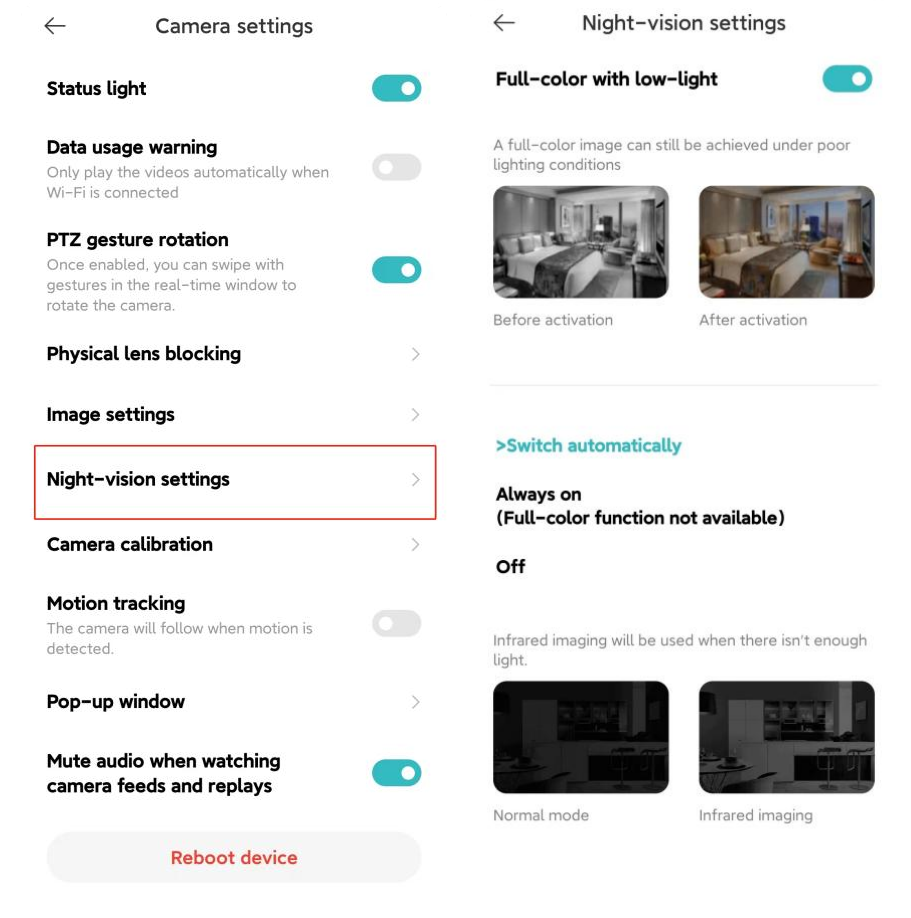
5. Tap [Night-vision settings];
6. You can choose [Full-color with low-light] or [Switch automatically] ([Always on], [Off]) as your preference. It is recommended that you choose the options from Switch automatically.
1. Open the Mi Home/Xiaomi Home APP;
2. Tap on [Device Card];
3. Tap the three-dot icon at the upper right corner;
4. Select [Camera settings];
5. Tap [Night-vision settings];
6. You can choose [Full-color with low-light] or [Switch automatically] ([Always on], [Off]) as your preference. It is recommended that you choose the options from Switch automatically.
Does it help?
Yes
No