

What are the features of the Redmi Watch 4 control panel?
The Redmi Watch 4 control panel can be accessed by swiping up on the bottom edge of the dial home screen.
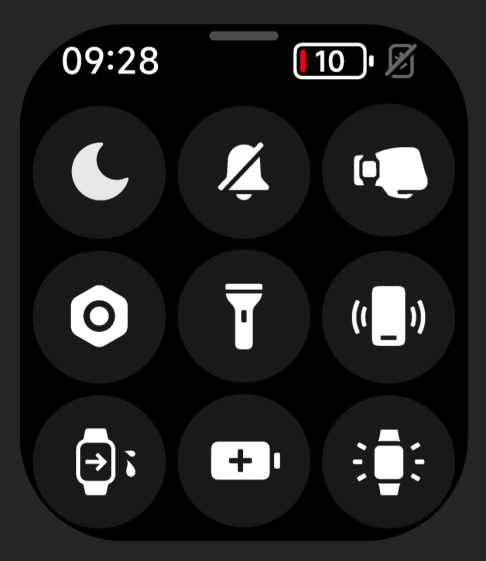
For your reference, more details of the features in the control panel from left to right and from top to bottom are as follows:
1. Tap it to enter the Do Not Disturb Mode setting quickly;
2. Tap it to turn off/on silent mode quickly;
3. Tap it to turn off/on the wrist lift mode quickly;
4. Tap it to enter the system settings interface;
5. Tap it to turn on the flashlight;
6. Tap it to enter the Find phone application;
7. Tap it to turn on the drainage function;
8. Tap it to turn on the Battery saver mode, rotate the crown or charge to exit the Battery saver mode;
9. Tap it to keep the screen always on for 5 minutes, after resting the screen to restore the resting time set by the system.
Does it help?
Yes
No