

Xiaomi Vacuum Cleaner G20 Max FAQ
Product Introduction and Usage
1. Q: What are the selling points of the Xiaomi Vacuum Cleaner G20 Max?
A: 1. The Xiaomi Vacuum Cleaner G20 Max has a strong suction force, reaching a large suction force of 180AW;
2. It is equipped with an LED screen that displays the device's status in real-time;
3. It supports whole-house cleaning and can also clean pet hair.
2. Q: How to wall mount the Xiaomi Vacuum Cleaner G20 Max?
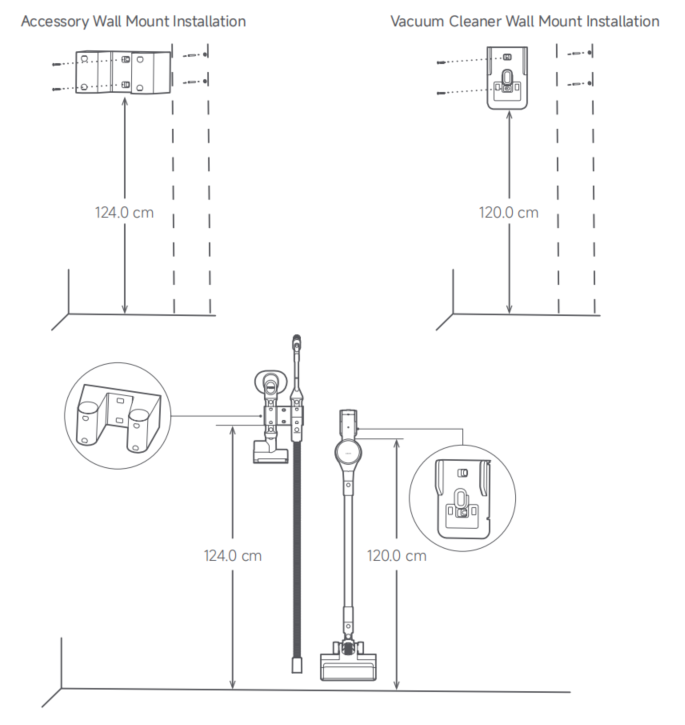
A: 1. Choose a nearby power source in a cool and dry place, and ensure that no electrical wires, pipes, or other facilities are inside the walls of the installation area;
2. The bottom of the wall organizer should be positioned 118.5cm from the floor, and the recommended distance between two wall organizers is 15cm;
3. Mark the holes on the wall in the pre-installation area according to the position of the holes in the wall organizer;
4. Use a 5mm drill bit to drill the holes to a depth of about 40mm, then place the expansion tubes in the drilled holes;
5. Align the screw holes of the wall organizer with the drilled holes on the wall, and use self-tapping screws to secure the wall organizer in place.
3. Q: How many modes does the Xiaomi Vacuum Cleaner G20 Max have? How about the power?
A: The Xiaomi Vacuum Cleaner G20 Max has 3 modes: High Power Mode (480W), Standard Mode (150W), and Energy-saving Mode (constant power at 60W).
4. Q: What are the functions of the buttons on the Xiaomi Vacuum Cleaner G20 Max?
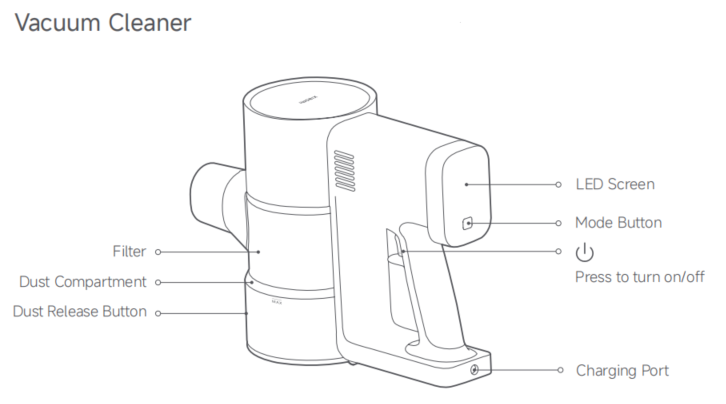
A: 1. Power On Button (Working Mode): Press the power on button and release it, the device runs continuously. Press the switch again, and the device stops working;
2. Dust Release Button: Press it to release the dust;
3. Mode Button: Switch the working modes.
5. Q: What does the Xiaomi Vacuum Cleaner G20 Max come with?
A: The standard configuration of the Xiaomi Vacuum Cleaner G20 Max includes:
The Xiaomi Vacuum Cleaner G20 Max, Extension Rod, Power Supply, Extension Hose, 2-in-1 Brush Nozzle, Mini Electric Brush, Pet Brush, Electric Brush Bar (Equipped with Headlight), Vacuum Cleaner Wall Mount, Accessory Wall Mount, Mount Kit (includes self-tapping screw *4, wall plug *4) and User Manual.
6. Q: Does the Xiaomi Vacuum Cleaner G20 Max support wet and dry use?
A: The Xiaomi Vacuum Cleaner G20 Max is a dry vacuum cleaner and it doesn’t support wet use.
Note:
If the liquid is accidentally sucked into the device, please remove the filter and cartridge of the vacuum cleaner. Put the device in a cool place to air-dry. Wash the filter, cartridge, and other parts with tap water and let them fully dry before use.
7. Q: What is the purpose of the three circles on the Xiaomi Vacuum Cleaner G20 Max suction port?
A: This is the power supply port for the electric brush of the vacuum cleaner, through which the electric brush is connected to the device to supply power to the motor in the brush.
8. Q: What does the MAX logo on the Xiaomi Vacuum Cleaner G20 Max transparent Dust Compartment mean?
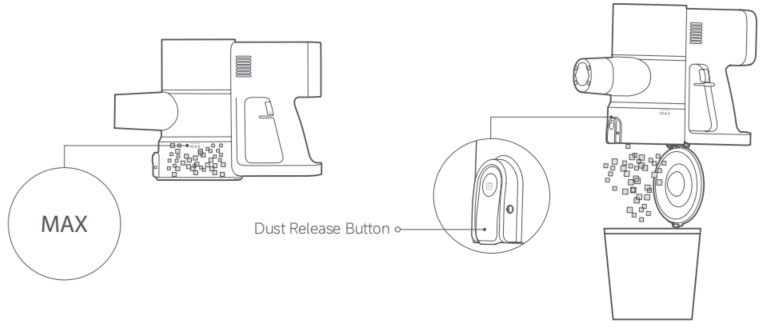
A: When the dust reaches the "MAX" mark, continued use will affect the vacuuming effect, so please clean it as soon as possible before using it again. Remove the Extension Rod before cleaning the Dust Compartment, and ensure the power adapter is disconnected.
Note:
Align the Dust Compartment cover end with the trash can and press the Dust Release Button to empty the trash.
9. Q: How does the Xiaomi Vacuum Cleaner G20 Max dump trash?
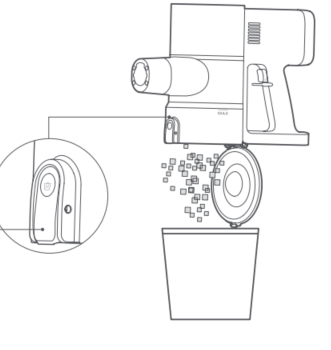
A: Before emptying the dust, please remove the Extension Rod and the accessory nozzle, align the Dust Compartment cover end with the trash can and press the Dust Release Button.
10. Q: What do the various icons on the Xiaomi Vacuum Cleaner G20 Max screen mean?
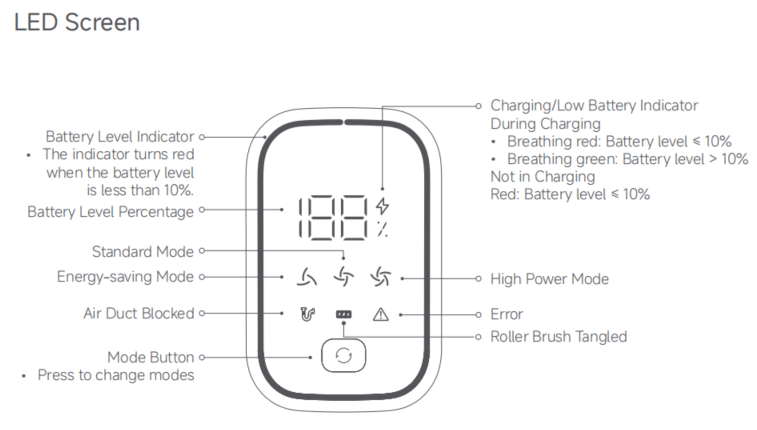
A: 1. Battery Level indicator
The indicator turns red when the battery level is less than 10%;
2. Battery Level Percentage
3. Charging/Low battery Indicator
(1). During charging:
When the indicator is breathing in red, it means that the battery level is ≤ 10%. When the indicator is breathing in green, it means that the battery level is >10%;
(2). Not in Charging:
When the indicator is red, it means that the battery level is ≤ 10%.
4. Energy-saving Mode/Standard Mode/High Power Mode
5. Air Duct Blocked/Roller Brush Tangled/Error
6. Mode Button (Press to change the modes).
Note:
If the vacuum cleaner cannot work properly, the screen will show the relevant error messages. For solutions, refer to the troubleshooting. If the issue persists, contact the after-sales service team.
11. Q: Is the Xiaomi Vacuum Cleaner G20 Max suitable for cleaning under the bed?
A: When using the Xiaomi Vacuum Cleaner G20 Max to clean, the angle should be horizontal to the ground. For environments like under the bed, as long as the space is not too low, it is easy to clean deeply.
12. Q: What is the battery capacity of the Xiaomi Vacuum Cleaner G20 Max?
A: The Xiaomi Vacuum Cleaner G20 Max is equipped with a high-performance 18650 lithium battery pack of 3000mAh.
13. Q: How long can the Xiaomi Vacuum Cleaner G20 Max work on a full charge?
A: The endurance of the Xiaomi Vacuum Cleaner G20 Max is based on cleaning with different brushes.
For your reference, here is the information below:
1. Endurance of the 2-in-1 Brush Nozzle:
Low: 60min;
Medium: 25min;
High: ≥5min;
2. Endurance of the Electric Brush Bar:
Low: 35min;
Medium: 25min;
High: ≥5min ;
3. Endurance of the Mini Electric Brush:
Low: 45min;
Medium: 25min;
High: ≥5min.
14. Q: How to charge the Xiaomi Vacuum Cleaner G20 Max?
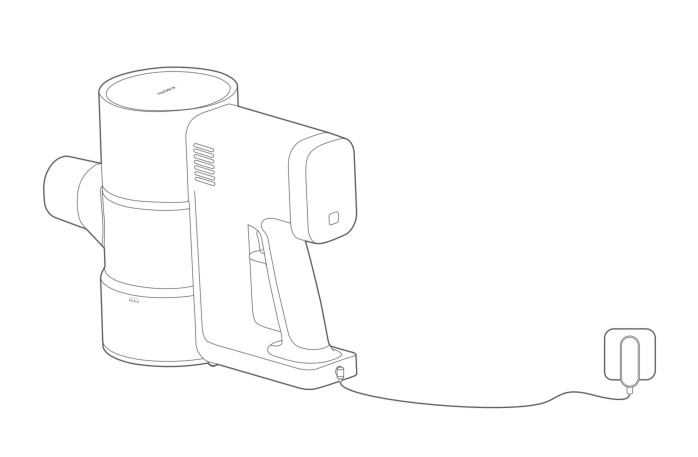
A: There is a charging port at the bottom position of the Xiaomi Vacuum Cleaner G20 Max, please use the standard charger to connect the charging port and power supply.
Note:
1. Please fully charge the vacuum cleaner before the first use and after each cleaning. The charging time is about 3.5 hours;
2. The vacuum cleaner will not start working while it is charging;
3. The indicator will turn off after 20 seconds of full charging, and the device will enter the Energy-saving Mode;
4. The battery temperature is high after continuous use in High Power Mode, so charging at this time will increase the charging time. Please let the device cool down for 60 minutes before charging;
5. Please use the Standard Mode to fully utilize the battery's performance and prolong the battery endurance.
15. Q: Can the Xiaomi Vacuum Cleaner G20 Max be charged for a long time?
A: The Xiaomi Vacuum Cleaner G20 Max can be charged for a long time. It supports overcharge protection, and the charging circuit automatically disconnects after a full charge.
16. Q: Does the Xiaomi Vacuum Cleaner G20 Max support connecting to an APP for use?
A: The Xiaomi Vacuum Cleaner G20 Max doesn’t support connecting networks or connecting to the Mi Home/Xiaomi Home APP for use.
17. Q: Does the Xiaomi Vacuum Cleaner G20 Max need to be charged if not been used for a long time?
A: This product needs to be charged in time when not in use for a long time. Please unplug the power adapter after fully charged and place it in a cool and dry place. Please charge the battery at least once every 3 months to avoid over-discharge.
18. Q: What is the sponge inside the filter of the Xiaomi Vacuum Cleaner G20 Max used for?
A: The sponge in the Xiaomi Vacuum Cleaner G20 Max filters larger particles of dust and prolongs the life of the filter.
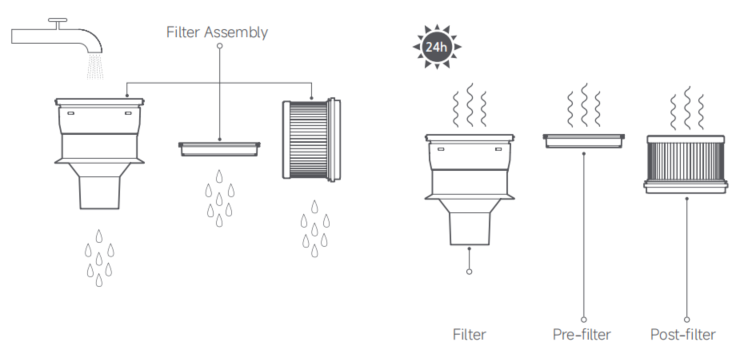
The sponge can be washed and reused. Please dry it well after washing it and put it back. The post-filter is also washable. Please dry it well after washing it and put it back.
Problems in Use
1. Q: How to clean the dust compartment and filter components of the Xiaomi Vacuum Cleaner G20 Max?
A: 1. Cleaning the Dust Compartment
Before cleaning the dust compartment, turn off the vacuum cleaner, disconnect the power supply, and remove the extension rod. The vacuum's cleaning ability will be reduced if the dust compartment is filled to the "MAX" mark. To regain performance, empty the dust compartment.
Empty the dust compartment: Hold the dust compartment over a trash bin, then press the dust release button to empty the contents.
2. Cleaning the Filter Assembly
(1). As illustrated, release the dust compartment latch to remove the dust compartment outwards;
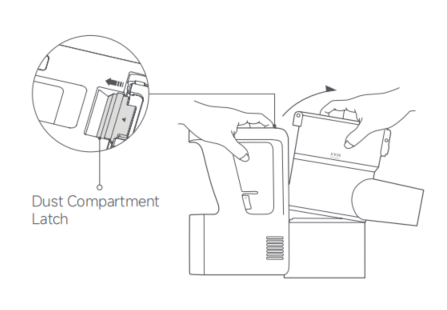
(2). Remove the pre-filter, lift the handle, and twist counterclockwise to take out the filter;
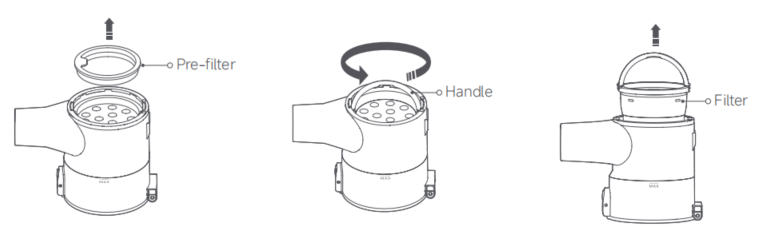
(3). Rotate counterclockwise to remove the post-filter.
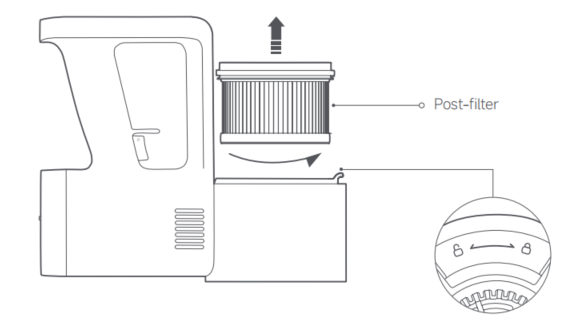
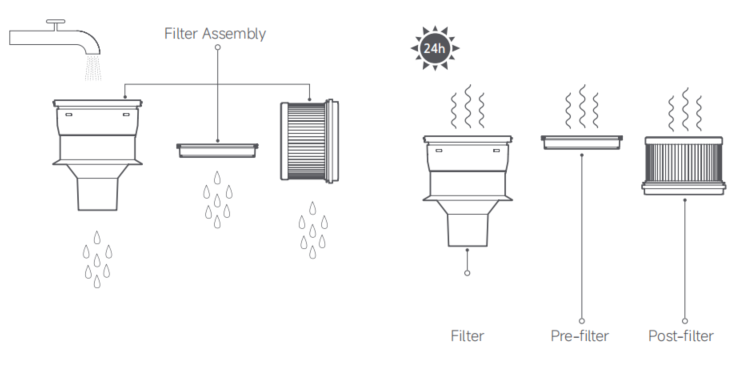
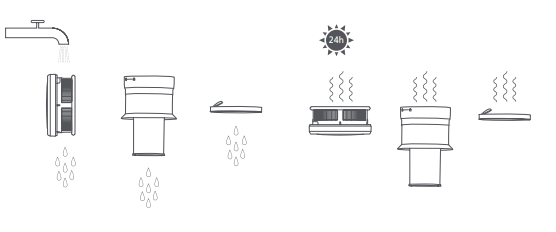
(4). Rinse the filter, pre-filter, and post-filter under running tap water until clean, then set them aside to fully dry for at least 24 hours.
Note:
1. The pre-filter and post-filter can only be rinsed, do not soak them;
2. When cleaning the post-filter, it is recommended to repeatedly rinse and tap its edges to gently remove dirt until it is clean;
3. Do not use hands, brushes, or other sharp objects to clean the pre-filter and post-filter to avoid damage;
4. If the suction power still significantly decreases after cleaning the pre-filter and post-filter, consider purchasing a compatible set of genuine replacement filters.
Note:
1. When cleaning the filter, rinse and tap the edges of the filter repeatedly until the dirt is gently knocked out and it is clean;
2. Do not touch the filter or sponge surface with hands, brushes, or sharp objects to avoid damaging the filter;
3. Do not soak the filter in water;
4. After cleaning the filter component. If suction still significantly decreases. Consider purchasing genuine replacement filters.
2. Q: How to clean the electric brush bar of the Xiaomi Vacuum Cleaner G20 Max?
A: 1. Place the brush upside down, press the roller brush release button to open the roller brush lock, and take out the roller brush;
1. Q: What are the selling points of the Xiaomi Vacuum Cleaner G20 Max?
A: 1. The Xiaomi Vacuum Cleaner G20 Max has a strong suction force, reaching a large suction force of 180AW;
2. It is equipped with an LED screen that displays the device's status in real-time;
3. It supports whole-house cleaning and can also clean pet hair.
2. Q: How to wall mount the Xiaomi Vacuum Cleaner G20 Max?
A: 1. Choose a nearby power source in a cool and dry place, and ensure that no electrical wires, pipes, or other facilities are inside the walls of the installation area;
2. The bottom of the wall organizer should be positioned 118.5cm from the floor, and the recommended distance between two wall organizers is 15cm;
3. Mark the holes on the wall in the pre-installation area according to the position of the holes in the wall organizer;
4. Use a 5mm drill bit to drill the holes to a depth of about 40mm, then place the expansion tubes in the drilled holes;
5. Align the screw holes of the wall organizer with the drilled holes on the wall, and use self-tapping screws to secure the wall organizer in place.
3. Q: How many modes does the Xiaomi Vacuum Cleaner G20 Max have? How about the power?
A: The Xiaomi Vacuum Cleaner G20 Max has 3 modes: High Power Mode (480W), Standard Mode (150W), and Energy-saving Mode (constant power at 60W).
4. Q: What are the functions of the buttons on the Xiaomi Vacuum Cleaner G20 Max?
A: 1. Power On Button (Working Mode): Press the power on button and release it, the device runs continuously. Press the switch again, and the device stops working;
2. Dust Release Button: Press it to release the dust;
3. Mode Button: Switch the working modes.
5. Q: What does the Xiaomi Vacuum Cleaner G20 Max come with?
A: The standard configuration of the Xiaomi Vacuum Cleaner G20 Max includes:
The Xiaomi Vacuum Cleaner G20 Max, Extension Rod, Power Supply, Extension Hose, 2-in-1 Brush Nozzle, Mini Electric Brush, Pet Brush, Electric Brush Bar (Equipped with Headlight), Vacuum Cleaner Wall Mount, Accessory Wall Mount, Mount Kit (includes self-tapping screw *4, wall plug *4) and User Manual.
6. Q: Does the Xiaomi Vacuum Cleaner G20 Max support wet and dry use?
A: The Xiaomi Vacuum Cleaner G20 Max is a dry vacuum cleaner and it doesn’t support wet use.
Note:
If the liquid is accidentally sucked into the device, please remove the filter and cartridge of the vacuum cleaner. Put the device in a cool place to air-dry. Wash the filter, cartridge, and other parts with tap water and let them fully dry before use.
7. Q: What is the purpose of the three circles on the Xiaomi Vacuum Cleaner G20 Max suction port?
A: This is the power supply port for the electric brush of the vacuum cleaner, through which the electric brush is connected to the device to supply power to the motor in the brush.
8. Q: What does the MAX logo on the Xiaomi Vacuum Cleaner G20 Max transparent Dust Compartment mean?
A: When the dust reaches the "MAX" mark, continued use will affect the vacuuming effect, so please clean it as soon as possible before using it again. Remove the Extension Rod before cleaning the Dust Compartment, and ensure the power adapter is disconnected.
Note:
Align the Dust Compartment cover end with the trash can and press the Dust Release Button to empty the trash.
9. Q: How does the Xiaomi Vacuum Cleaner G20 Max dump trash?
A: Before emptying the dust, please remove the Extension Rod and the accessory nozzle, align the Dust Compartment cover end with the trash can and press the Dust Release Button.
10. Q: What do the various icons on the Xiaomi Vacuum Cleaner G20 Max screen mean?
A: 1. Battery Level indicator
The indicator turns red when the battery level is less than 10%;
2. Battery Level Percentage
3. Charging/Low battery Indicator
(1). During charging:
When the indicator is breathing in red, it means that the battery level is ≤ 10%. When the indicator is breathing in green, it means that the battery level is >10%;
(2). Not in Charging:
When the indicator is red, it means that the battery level is ≤ 10%.
4. Energy-saving Mode/Standard Mode/High Power Mode
5. Air Duct Blocked/Roller Brush Tangled/Error
6. Mode Button (Press to change the modes).
Note:
If the vacuum cleaner cannot work properly, the screen will show the relevant error messages. For solutions, refer to the troubleshooting. If the issue persists, contact the after-sales service team.
11. Q: Is the Xiaomi Vacuum Cleaner G20 Max suitable for cleaning under the bed?
A: When using the Xiaomi Vacuum Cleaner G20 Max to clean, the angle should be horizontal to the ground. For environments like under the bed, as long as the space is not too low, it is easy to clean deeply.
12. Q: What is the battery capacity of the Xiaomi Vacuum Cleaner G20 Max?
A: The Xiaomi Vacuum Cleaner G20 Max is equipped with a high-performance 18650 lithium battery pack of 3000mAh.
13. Q: How long can the Xiaomi Vacuum Cleaner G20 Max work on a full charge?
A: The endurance of the Xiaomi Vacuum Cleaner G20 Max is based on cleaning with different brushes.
For your reference, here is the information below:
1. Endurance of the 2-in-1 Brush Nozzle:
Low: 60min;
Medium: 25min;
High: ≥5min;
2. Endurance of the Electric Brush Bar:
Low: 35min;
Medium: 25min;
High: ≥5min ;
3. Endurance of the Mini Electric Brush:
Low: 45min;
Medium: 25min;
High: ≥5min.
14. Q: How to charge the Xiaomi Vacuum Cleaner G20 Max?
A: There is a charging port at the bottom position of the Xiaomi Vacuum Cleaner G20 Max, please use the standard charger to connect the charging port and power supply.
Note:
1. Please fully charge the vacuum cleaner before the first use and after each cleaning. The charging time is about 3.5 hours;
2. The vacuum cleaner will not start working while it is charging;
3. The indicator will turn off after 20 seconds of full charging, and the device will enter the Energy-saving Mode;
4. The battery temperature is high after continuous use in High Power Mode, so charging at this time will increase the charging time. Please let the device cool down for 60 minutes before charging;
5. Please use the Standard Mode to fully utilize the battery's performance and prolong the battery endurance.
15. Q: Can the Xiaomi Vacuum Cleaner G20 Max be charged for a long time?
A: The Xiaomi Vacuum Cleaner G20 Max can be charged for a long time. It supports overcharge protection, and the charging circuit automatically disconnects after a full charge.
16. Q: Does the Xiaomi Vacuum Cleaner G20 Max support connecting to an APP for use?
A: The Xiaomi Vacuum Cleaner G20 Max doesn’t support connecting networks or connecting to the Mi Home/Xiaomi Home APP for use.
17. Q: Does the Xiaomi Vacuum Cleaner G20 Max need to be charged if not been used for a long time?
A: This product needs to be charged in time when not in use for a long time. Please unplug the power adapter after fully charged and place it in a cool and dry place. Please charge the battery at least once every 3 months to avoid over-discharge.
18. Q: What is the sponge inside the filter of the Xiaomi Vacuum Cleaner G20 Max used for?
A: The sponge in the Xiaomi Vacuum Cleaner G20 Max filters larger particles of dust and prolongs the life of the filter.
The sponge can be washed and reused. Please dry it well after washing it and put it back. The post-filter is also washable. Please dry it well after washing it and put it back.
Problems in Use
1. Q: How to clean the dust compartment and filter components of the Xiaomi Vacuum Cleaner G20 Max?
A: 1. Cleaning the Dust Compartment
Before cleaning the dust compartment, turn off the vacuum cleaner, disconnect the power supply, and remove the extension rod. The vacuum's cleaning ability will be reduced if the dust compartment is filled to the "MAX" mark. To regain performance, empty the dust compartment.
Empty the dust compartment: Hold the dust compartment over a trash bin, then press the dust release button to empty the contents.
2. Cleaning the Filter Assembly
(1). As illustrated, release the dust compartment latch to remove the dust compartment outwards;
(2). Remove the pre-filter, lift the handle, and twist counterclockwise to take out the filter;
(3). Rotate counterclockwise to remove the post-filter.
(4). Rinse the filter, pre-filter, and post-filter under running tap water until clean, then set them aside to fully dry for at least 24 hours.
Note:
1. The pre-filter and post-filter can only be rinsed, do not soak them;
2. When cleaning the post-filter, it is recommended to repeatedly rinse and tap its edges to gently remove dirt until it is clean;
3. Do not use hands, brushes, or other sharp objects to clean the pre-filter and post-filter to avoid damage;
4. If the suction power still significantly decreases after cleaning the pre-filter and post-filter, consider purchasing a compatible set of genuine replacement filters.
Note:
1. When cleaning the filter, rinse and tap the edges of the filter repeatedly until the dirt is gently knocked out and it is clean;
2. Do not touch the filter or sponge surface with hands, brushes, or sharp objects to avoid damaging the filter;
3. Do not soak the filter in water;
4. After cleaning the filter component. If suction still significantly decreases. Consider purchasing genuine replacement filters.
2. Q: How to clean the electric brush bar of the Xiaomi Vacuum Cleaner G20 Max?
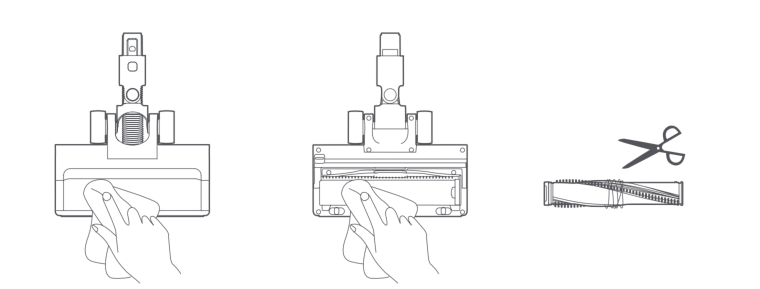
A: 1. Place the brush upside down, press the roller brush release button to open the roller brush lock, and take out the roller brush;
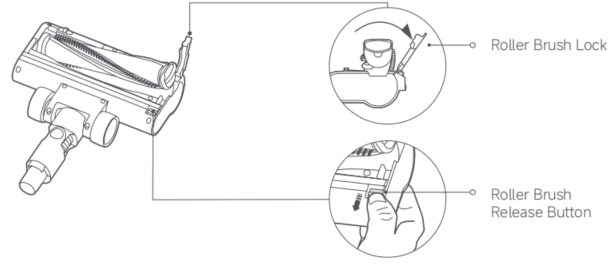
2. Use a dry cloth or tissue to wipe away the dust adhered to the suction port and the transparent cover;
Note:
The electric brush bar contains a built-in motor. Please do not wash it with water.
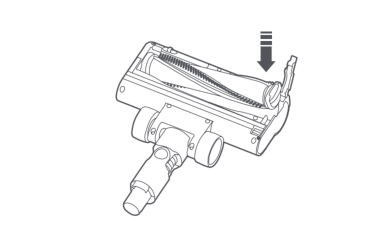
3. Reinstall the roller brush in the correct direction. Press down the locking button until it is in a locked state.
3. Q: How to choose the appropriate mode for the Xiaomi Vacuum Cleaner G20 Max?
A: For daily floor cleaning, use the standard mode. For stubborn stains, you can use the high-power mode.
4. Q: Does the Xiaomi Vacuum Cleaner G20 Max have motor overload protection?
A: The motor of the vacuum cleaner is equipped with overload protection. If it encounters foreign objects or severe blockages leading to overload. It will automatically shut down for protection.
5. Q: What are the precautions for using the Xiaomi Vacuum Cleaner G20 Max?
A: For your reference, here are the precautions for using the device:
1. Please do not allow individuals with reduced physical, perception, and intelligence, or those lacking experience and common sense, to use this product without supervision or guidance;
2. Do not let young children consider this product as a toy;
3. It is only used on indoor dry surfaces. Installation, charging, and use of this product are prohibited outdoors, in the bathroom, or around swimming pools;
4. Do not touch the plug or any part of the product with wet hands;
5. Please use the original power adapter with the model number GC32-310100-2A;
6. To prevent fire, explosion, or injury, check the lithium battery and power adapter for damage before use. Do not use the vacuum cleaner if the lithium battery or power adapter is damaged;
7. The electric brush bar, extension rod, and vacuum cleaner are electrified components. Do not immerse them in water or other liquids for cleaning. After regular cleaning, make sure the filter cone and filter are thoroughly dry;
8. When cleaning and maintaining, please turn off the vacuum cleaner first, remove the electric brush bar, and prevent the rotating roller brush from causing harm. Do not use the product if the electric brush bar, dust compartment, filter component, filter, and built-in sponge are not installed;
9. Check the extension rod regularly, do not use it if it is damaged.
10. Do not use the product to suck water, gasoline, or other flammable or explosive liquids. Do not inhale toxic solutions, such as chlorine bleach, ammonia, drain cleaners, or other liquids;
11. Do not use the vacuum cleaner to clean plaster dust, fireplace ash, or ashes. Do not inhale smoke or burning materials, such as charcoal, cigarette butts, or matches;
12. Do not use the vacuum cleaner to clean sharp or hard objects, such as glass, nails, screws, and coins, as this will damage the vacuum cleaner;
13. When using the product, ensure that the airflow passages and moving parts are kept away from hair, loose clothing, fingers, and other body parts. Additionally, avoid aiming the vacuum cleaner suction port, connecting rod, or other accessories at the eyes, ears, or mouth;
14. Do not place any objects at the suction port;
15. Do not use the vacuum cleaner when any suction port is blocked. Please clean if dust, cotton fluff, hair, or other items can cause reduced airflow;
16. Do not place the vacuum cleaner near unstable objects such as chairs or tables to prevent damage to the vacuum cleaner or injury to you if it falls. In case of falling, damage, or other abnormalities, please contact an authorized official for repairs, and do not disassemble it yourself;
17. Charge the device according to the instructions in the manual. Incorrect charging beyond the specified temperature range will cause battery damage;
18. Do not charge or store in areas near heat sources or damp areas (such as radiators, kitchens, bathrooms);
19. Please use the recommended accessories and replacement parts;
20. The electric brush bar and two-in-one brush are prohibited for use on power lines to avoid danger;
21. In case of battery leakage, do not touch the liquid. Hand it over to the government-designated recycling organization for processing. If the liquid accidentally enters the eyes, rinse immediately with clean water and seek medical attention promptly;
22. Please unplug the power supply when not in use for a long time or before maintenance or repair;
23. Please pay attention to personal safety when cleaning stairs with this product;
24. Fire Hazard Warning: Do not apply any type of fragrance to the vacuum cleaner's pre-filter and post-filter. These types of products are known to contain flammable chemicals which can cause the vacuum cleaner to catch fire;
25. Please strictly follow the instructions in this instruction manual when using the vacuum cleaner. You are responsible for any loss or damage that can arise from improper use of the vacuum cleaner.
6. Q: What to do if the bristles of the Xiaomi Vacuum Cleaner G20 Max become deformed?
A: The bristles of the brush head on the vacuum cleaner are made of special material with strong self-recovery ability. Slight deformation can occur during use or transportation due to manual squeezing, but it will recover after staying still for some time. This deformation will not affect normal usage.
7. Q: Why does the battery status light on the Xiaomi Vacuum Cleaner G20 Max go out after fully charging?
A: To ensure safety during charging, the Xiaomi Vacuum Cleaner G20 Max will automatically disconnect power and stop charging after reaching a full charge to avoid damage to the device caused by overcharging.
8. Q: Why does the electric brush bar tilt when the Xiaomi Vacuum Cleaner G20 Max is hung up?
A: It is normal for the electric brush bar to tilt when the Xiaomi Vacuum Cleaner G20 Max is placed on the wall mount. The electric brush bar includes motor components on one side of the transparent window, causing an imbalance in the center of gravity when suspended, resulting in the tilt. Please feel free to use it as intended.
9. Q: Is it normal that there are vertical lines ("cracks") on the side of the dust compartment of the Xiaomi Vacuum Cleaner G20 Max?
A: The lines in the middle of the dust compartment of the vacuum cleaner are parting lines. It is not a crack. These parting lines do not affect the strength and performance of the dust compartment.
10. Q: What is the gray soft rubber on the edge of the dust compartment lid of the Xiaomi Vacuum Cleaner G20 Max?
A: The gray soft rubber is a sealing material designed to ensure airtightness during vacuuming, preventing air leakage and ensuring effective dust suction.
11. Q: What to do if the dust falls out after the Xiaomi Vacuum Cleaner G20 Max is in operation?
A: After vacuuming, let the vacuum cleaner continuously run for a few seconds to ensure the dust inside the pipes enters the dust compartment. Remove any debris stuck at the dust baffle.
12. Q: What issues should be aware of when using the Xiaomi Vacuum Cleaner G20 Max?
A: 1. When using the electric brush bar of the vacuum cleaner for cleaning. Some carpets will produce lint. If this occurs, it is recommended to use the crevice brush head during vacuuming;
2. Before vacuuming high-polished floors, wooden floors, or polished tiles, please inspect the electric brush bar for any foreign objects to avoid scratching the floor;
3. Before using the vacuum cleaner, ensure that the dust compartment and filter are properly installed;
4. Do not block the exhaust port during vacuuming;
5. For fine dust such as flour, use the vacuum cleaner only when the dust amount is minimal;
6. Do not use the vacuum cleaner to suck up sharp and hard objects, small toys, or large-headed pins to avoid damaging the vacuum cleaner and the floor;
7. The movement of the electric brush bar can cause uneven surface gloss on waxed floors. You can wipe the floor with a damp cloth and polish it with floor wax;
8. If a large amount of foreign objects is sucked in, it will cause the roller to stop rotating. Pay attention to cleaning it in time;
9. When cleaning the roller brush, ensure the brush head is detached from the vacuum cleaner to prevent accidental device startup, resulting in personal injury.
13. Q: Is it normal for the connection between the extension rod and the main unit of the Xiaomi Vacuum Cleaner G20 Max to be loose?
A: The product is designed with a reasonable gap in mind to ensure smooth insertion and removal. This gap also allows for easy insertion and removal even if there is a small amount of dust.
14. Q: Which accessories of the Xiaomi Vacuum Cleaner G20 Max are washable?
A: Before washing, please ensure the following parts are separated from the main unit or components. After washing, let them air dry for at least 24 hours to ensure they are fully dry.
15. Q: Is it normal for the main unit of the Xiaomi Vacuum Cleaner G20 Max to make a rattling noise?
A: The dust flap at the suction port of the main unit is a movable structure. When the main unit shakes, the dust flap will open and close, making a noise. This is a normal phenomenon.
Installation and Maintenance
1. Q: Does the Xiaomi Vacuum Cleaner G20 Max come with a car charger?
A: Currently, there is no car charger available for configuration.
2. Q: Can the battery of the Xiaomi Vacuum Cleaner G20 Max be replaced?
A: The battery is integrated with the device and does not support self-replacement of batteries.
3. Q: Does the Xiaomi Vacuum Cleaner G20 Max need to be fully charged for 12 hours for the first time?
A: The vacuum cleaner features a built-in lithium-ion battery pack, and this type of battery does not need to be filled for 12 hours for the first time.
4. Q: Does the trigger require to be held down continuously while using the Xiaomi Vacuum Cleaner G20 Max?
A: The switch is designed as a trigger. Press it once to start the operation, and press it again to stop.
5. Q: Can the Xiaomi Vacuum Cleaner G20 Max be used while charging?
A: The Xiaomi Vacuum Cleaner G20 Max is designed as a handheld portable vacuum cleaner. It has charging protection, and cannot be used while charging.
6. Q: How to install the accessories onto the Xiaomi Vacuum Cleaner G20 Max?
A: The vacuum cleaner can be combined and installed with various brush heads and metal tubes in any configuration. You will hear a "click" sound when they are properly installed in place.
7. Q: What kind of garbage can the Xiaomi Vacuum Cleaner G20 Max clean?
A: 1. Only for indoor dry surfaces;
2. Do not use the product to vacuum flammable or explosive liquids such as water or gasoline. Avoid inhaling toxic solutions, such as those containing chlorine bleach, ammonia, drain cleaners, or other liquids;
3. Do not use the vacuum cleaner to clean plaster dust, fireplace ash, or ashes. Avoid inhaling smoke or burning materials, such as charcoal, cigarette butts, or matches. Do not use the vacuum cleaner to clean sharp objects such as glass, nails, screws, or coins, as this will damage the vacuum cleaner.
8. Q: Can detergent or disinfectant be used during daily maintenance and cleaning of the Xiaomi Vacuum Cleaner G20 Max?
A: Please use tap water for cleaning. Some detergents and disinfectants will affect the sealing performance of the soft rubber, so it is advised not to use them.
9. Q: How often should the Xiaomi Vacuum Cleaner G20 Max be maintained?
A: It is recommended for normal usage to empty the dust compartment once a week, clean the filter once a month, and clean the brush roller once a month. Additionally, it is advised to promptly clean the dust and debris inside the dust compartment when it exceeds the MAX line to maintain suction efficiency. In a house with an area of 100 square meters, cleaning the house 3 times a week, filters should be cleaned approximately once every three months.
10. Q: Can the Xiaomi Vacuum Cleaner G20 Max be stored in the trunk of a car?
A: The trunk of a car is a closed environment, and the temperature inside the trunk can become very high, especially in the summer sun. To ensure the battery's lifespan and safety, it is not recommended to place the vacuum cleaner in the trunk of a car.
11. Q: Is it normal for the gap of the dust compartment on the Xiaomi Vacuum Cleaner G20 Max to be bigger?
A: It's normal, there's no need to worry about dust falling out. The motor creates a vacuum when in use, naturally sealing it shut.
FAQ
1. Q: What should do if the Xiaomi Vacuum Cleaner G20 Max is not working?
A: If the device is not working, please troubleshoot the issue by the following methods:
1. Check whether the battery is out of power. Connect the device to the adapter for charging. If the battery cannot charge, please contact with after-sales service center promptly;
2. Check if the vacuum cleaner airway and filter are blocked. If there is a blockage in the vacuum cleaner, clean the dust inlet, airway and filter;
3. Check if the filter is not installed or the dust compartment is not properly closed. Correctly install the filter and close the dust compartment;
4. If the motor is damaged, please contact the after-sales service center;
5. If the vacuum cleaner has sucked in liquids, liquid entering the motor can cause the device to stop working. If this occurs, contact customer support promptly.
2. Q: What to do if the suction power of the Xiaomi Vacuum Cleaner G20 Max decreases?
A: For your reference, please follow the below steps to troubleshoot the issue:
1. Check if there is too much debris in the dust compartment. If so, clean the dust compartment promptly;
2. Check if foreign blocking the extension rob or the vacuum cleaner hole. If so, remove the foreign objects promptly;
3. Check if the filter assembly is clogged with too much dust. If so, clean it promptly;
4. Check if the filter has been washed. If washed, ensure it is thoroughly dried before using it again;
5. If there are no issues of blockages, it could be a motor problem. Please contact the after-sales service center promptly.
3. Q: What to do if the battery endurance of the Xiaomi Vacuum Cleaner G20 Max is short?
A: If the battery endurance is short, please refer to the following steps for troubleshooting:
1. Please check if the vacuum cleaner battery is fully charged. If the battery level is low, charge it promptly;
2. Check if the dust compartment is full or if the filter components are clogged with too much dust. If so, clean the dust cup and wash the filter components promptly;
3. Confirm if the brush or brush head is blocked. If so, clean the accessories to remove any blockages.
4. Q: What to do if the electric brush bar of the Xiaomi Vacuum Cleaner G20 Max is not rotating?
A: If the electric brush bar is not rotating, please refer to the below steps to troubleshoot:
1. Please check if there is any entanglement on the roller brush. If so, clean the foreign objects promptly;
2. Check if the working temperature is too high, as the motor has a high-temperature protection feature. Please wait for the brush head to cool down before use again.
5. Q: What should do if the Xiaomi Vacuum Cleaner G20 Max gets hot after working for a short time?
A: Please refer to the following steps to troubleshoot:
1. Please check if any foreign are blocking the nozzle or the vacuum cleaner. If so, please clean the foreign objects promptly;
2. Check if the filter is too dirty and hasn't been cleaned. If so, please clean the filter in time;
3. It is normal for the vacuum cleaner to heat up quickly when working with high power mode.
6. Q: Why does the Xiaomi Vacuum Cleaner G20 Max take 5 hours to charge and still not be fully charged?
A: Using the vacuum cleaner continuously in high power mode will cause the battery pack temperature to rise, resulting in slower charging speeds. The device will resume charging once the battery pack temperature has cooled down.
7. Q: Is it normal for the Xiaomi Vacuum Cleaner G20 Max's exhaust port to have a strange odor?
A: The vacuum cleaner uses sealing materials that contain rubber components, so there will be a slight odor when the new device is first used. However, it will not harm the human body, and the odor will gradually fade away with regular use. Please feel free to use it.
8. Q: Why does the Xiaomi Vacuum Cleaner G20 Max’s electric brush bar automatically stop during use?
A: The electric brush bar of the Xiaomi Vacuum Cleaner G20 Max comes with over-current and over-temperature protection. If there is an obstruction or entanglement, or the motor temperature becomes too high, it will automatically stop as a protective measure to prevent potential dangers.
9. Q: What should do if the charging indicator doesn't light up when charging the Xiaomi Vacuum Cleaner G20 Max?
A: If the charging indicator doesn't light up, please refer to the following steps to troubleshoot:
1. Check if the battery is already fully charged;
2. Check if the adapter is properly connected to the vacuum cleaner. If not connected, please connect it properly and recheck. If the charging issue persists, please contact the after-sales service center for further assistance.
10. Q: What to do if the Xiaomi Vacuum Cleaner G20 Max cannot be charged?
A: If the device is unable to charge, please perform the following troubleshooting:
Note:
Please use the original adapter to charge in an environment with temperatures between 7-40℃. Extreme temperatures, either too high or too low, can cause battery protection and prevent charging.
1. Check if the power plug is properly inserted into the outlet. If not, insert it securely before use;
2. Check if the power outlet indicator is lit. If not, turn on the outlet switch;
3. Check if the adapter is connected to the vacuum cleaner properly. If not connected, please establish the connection and recheck. If the charging issue persists, please require after-sales promptly.
11. Q: What to do if the noise of the electric brush bar on the Xiaomi Vacuum Cleaner G20 Max is louder?
A: Remove and clean any debris wrapped around the sides of the brush head, then reinstall the roller brush and try again.
12. Q: Why does the bottom cover of the dust compartment on the Xiaomi Vacuum Cleaner G20 Max show signs of use?
A: To ensure that there is no dust exposure after closing the dust compartment, there are fixing devices at the contact points between the main unit and the dust compartment. Friction between the fixing device and the dust compartment cover can leave marks, but this does not affect performance or durability. Please use it with confidence.
13. Q: What to do if the Xiaomi Vacuum Cleaner G20 Max malfunctions?
A: Common Issue:
1. The vacuum cleaner does not work:
(1). Check if the battery is depleted. If it is, please charge the vacuum cleaner before use;
(2). Check if the suction opening, air duct, pre-filter, or post-filter is blocked. If it is, please clean it immediately;
(3). Check if the battery temperature protection is triggered, wait until the battery temperature returns to normal, then resume use.
2. The suction power reduces:
(1). Check if the suction opening, air duct, pre-filter, or post-filter is blocked. If it is, please clean it immediately;
(2). Check if the brush head is clogged. If it is, please clean it.
3. The low battery endurance:
(1). Check if the battery is not fully charged. If it is, please charge the vacuum cleaner before use;
(2). Check if the suction opening, air duct, pre-filter, or post-filter is blocked. If it is, please clean it immediately;
(3). Check if the brush head is clogged. If it is, please clean it.
4. The roller brush does not rotate:
(1). Check if the roller brush is stuck by foreign objects. If it is, remove any foreign object, and then resume use;
(2). Check if the conductive contacts on the brush head or extension rod are dirty. If it is, please turn the vacuum cleaner off, and remove the brush head. Wipe the conductive contacts with a soft, dry cloth, then try again.
5. The vacuum cleaner does not charge:
It is recommended to use the original power supply to charge the vacuum cleaner.
6. The battery charges slowly:
Check if the battery overheat protection is triggered. Wait until the battery temperature returns to normal, and then try to use it again.
Note:
If the solutions above do not resolve the issue, please contact the after-sales service center.
Troubleshooting:
If the vacuum cleaner is not working properly, the screen will show an error message. Refer to the below steps to troubleshoot:
1. Air Duct Blocked:
Check and clean the dust compartment, filter, pre-filter, post-filter, extension rod, extension hose, or brush head;
2. Roller Brush Tangled:
Check and clean the brush head;
3. Error:
(1). The battery overheat protection is triggered. Wait until the battery temperature returns to normal, and then try to use it again;
(2). If the screen displays the error code E0, E1, E2, E3, or E4, please contact the after-sales service center.
14. Q: How to check the SN information on the Xiaomi Vacuum Cleaner G20 Max?
A: You can check the SN information on the bottom of the vacuum cleaner.
15. Q: How to clean the hair entangled in the electric brush bar of the Xiaomi Vacuum Cleaner G20 Max?
A: To clean the hair entangled in the electric brush bar, please refer to the following steps:
1. Place the electric brush bar upside down, press the roller brush release button, open the roller brush lock, and take out the roller brush;
2. Use a dry cloth or paper towel to wipe dust and debris from the suction opening and the transparent cover;
3. Cut any hair tangled around the roller brush, and then clean it;
4. Reinstall the roller brush in the correct direction as illustrated, and then press the roller brush lock to secure the roller brush into place.
Note:
Do not clean the electric brush bar with water as it has a built-in motor.
16. Q: Is it normal for the electric brush bar of the Xiaomi Vacuum Cleaner G20 Max to be difficult to move?
A: Due to the strong suction of the electric brush bar during use, it is hard to control. It is a normal phenomenon. In this case, it is necessary to hold the vacuum cleaner steadily to control the direction. Additionally, a strong suction is essential for a good cleaning effect.
17. Q: Why is the headlight on the electric brush bar of the Xiaomi Vacuum Cleaner G20 Max always on?
A: The structural design of the light cannot be controlled, but it does not affect use.
18. Q: How long does it take to fully charge the Xiaomi Vacuum Cleaner G20 Max?
A: It takes approximately 3.5 hours to fully charge.
19. Q: Can the Xiaomi Vacuum Cleaner G20 Max be upright during use?
A: The Xiaomi Vacuum Cleaner G20 Max cannot stand upright while using. When you need to stand it up, please turn off the device and place it against the wall for support.
20. Q: What to do if the Xiaomi Vacuum Cleaner G20 Max produces loud noise?
A: If the Xiaomi Vacuum Cleaner G20 Max produces a loud noise, please remove and clean the roller brush. Remove the filter to clean the filter mesh. After troubleshooting with these steps, try again.
21. Q: How to retract the 2-in-1 brush nozzle of the Xiaomi Vacuum Cleaner G20 Max?
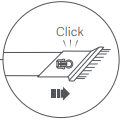
A: When retracting the 2-in-1 brush nozzle press the locking button and pull it downwards to retract the brush.
If the locking button is not pressed and the brush is forcibly pushed or pulled, it will damage the locking mechanism, causing the 2-in-1 brush to loosen.

22. Q: What to do if the suction of the Xiaomi Vacuum Cleaner G20 Max weakens?
A: Before using a new device, it is recommended to fully charge the vacuum cleaner before using it.
23. Q: Is there any crack/scratch on the bottom shell of the Xiaomi Vacuum Cleaner G20 Max’s dust compartment?
A: The seemingly cracked lines on the dust compartment are fusion marks formed during the normal production process of the dust cup, not cracks or abnormalities. Please use it with confidence.
24. Q: Why does the breathing light of the Xiaomi Vacuum Cleaner G20 Max flash without displaying the battery level while charging?
A: When the battery level is very low and the vacuum cleaner is charging to replenish it, the breathing light will only flash without displaying the battery level. Please be patient until the battery is sufficiently charged to a safe level, at which point the battery level will display normally. This phenomenon is not a malfunction, so please continue to use it with confidence.
25. Q: What are the instructions for using the pet brush of the Xiaomi Vacuum Cleaner G20 Max?
A: 1. Different pets have varying sensitivity to noise, depending on their fur characteristics. It is recommended to adjust the usage accordingly based on your pet's reactions;
2. It is advised to start with the Energy-saving Mode for longer-lasting operation, followed by the Standard Mode. Choose based on your pet's condition and the cleaning requirements of their fur.
Note:
To see if the pet is afraid of the noise from the vacuum cleaner before using it. It is recommended to operate the device at a noise level your pet is comfortable with when cleaning their fur. If your pet is not accustomed to the noise of this product, consider using the pet brush when the device is turned off or stop using it.
Does it help?
Yes
No