

Xiaomi Smart Tower Fan (European standard) FAQ
Overview
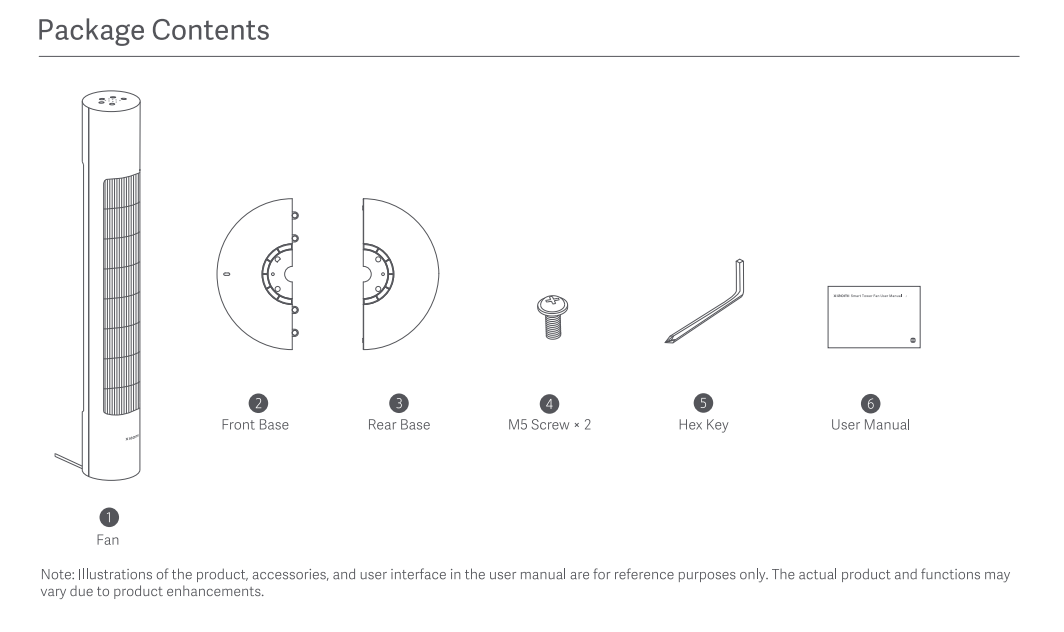
Q: What does the Xiaomi Smart Tower Fan (European standard) come with?
A: The packaging list of the Xiaomi Smart Tower Fan (European standard) includes:
The Fan, Front Base, Rear Base, M5 Screw x 2, Hex Key and User Manual.
Introductions and Usage
1. How to turn on the Xiaomi Smart Tower Fan (European standard)?
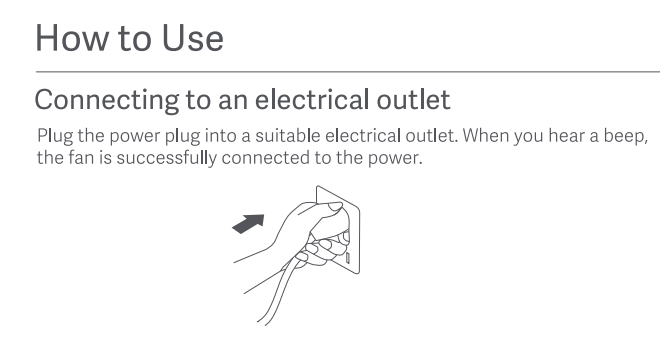
A: 1. Plug the power plug into a suitable electrical outlet. When you hear a beep, the fan is successfully connected to the power;
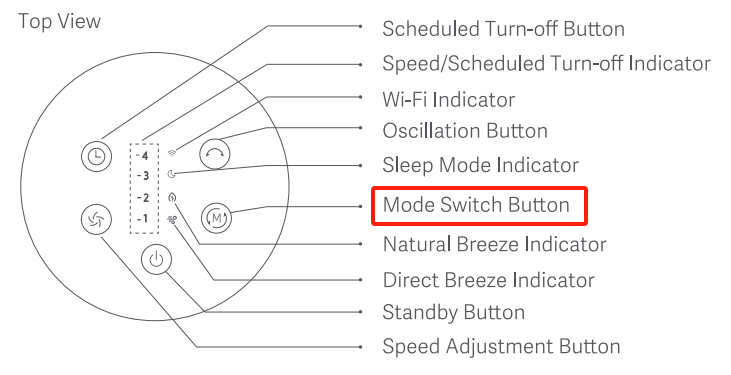
2. Press the Standby Button to start the fan. When turned on for the first time, the fan is at the direct breeze mode with speed 1 by default. Tap the Standby Button to stop the fan while it is running.
2. Q: How to switch the modes on the Xiaomi Smart Tower Fan (European standard)?
A: To switch the modes of the Xiaomi Smart Tower Fan (European standard), please refer to the following steps:
1. Press the Mode Switch Button to switch the direct breeze, the natural breeze, and the sleep mode, and the corresponding indicator will light up. After the fan is turned off and turned back on again, the mode will be the last used one;
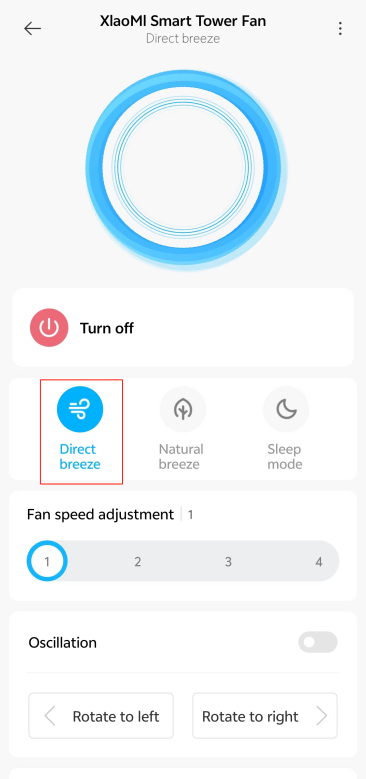
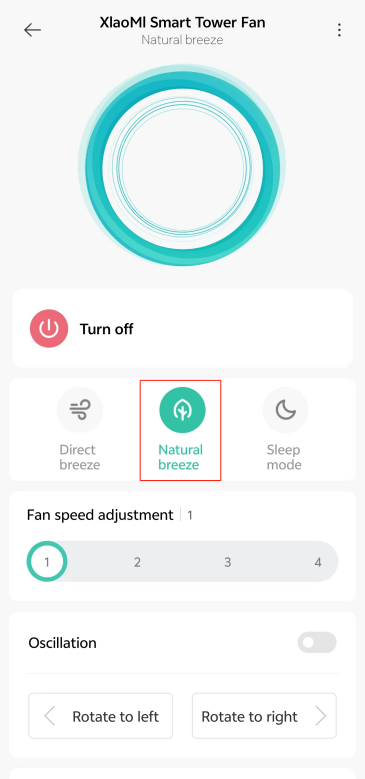
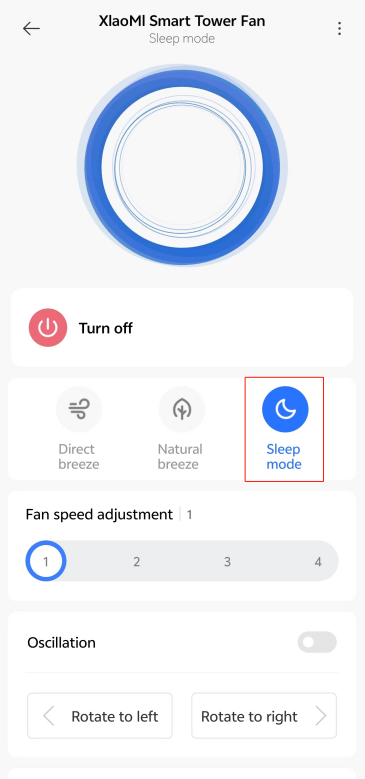
2. Open the [Mi Home]/[Xiaomi Home] APP >> tap [Device card] >> choose from [Direct breeze], [Natural breeze], and [Sleep mode].
3. Q: How to switch the speed on the Xiaomi Smart Tower Fan (European standard)?
A: To switch the speed of the Xiaomi Smart Tower Fan (European standard), please refer to the following steps:
1. Press the Speed Adjustment Button to adjust the speed, and the corresponding speed indicators will light up. After the fan is turned off and turned back on again, the speed will be the last one;
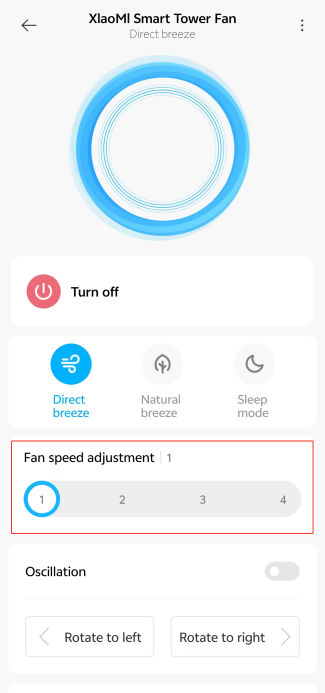
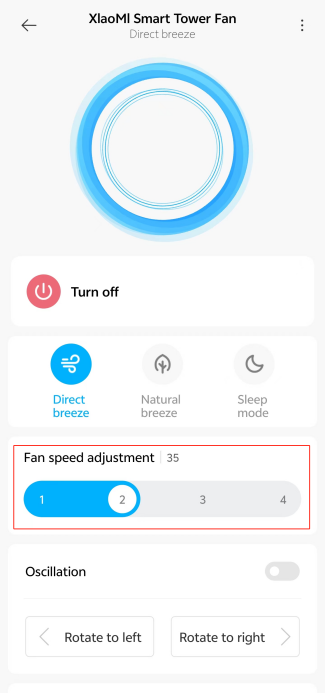
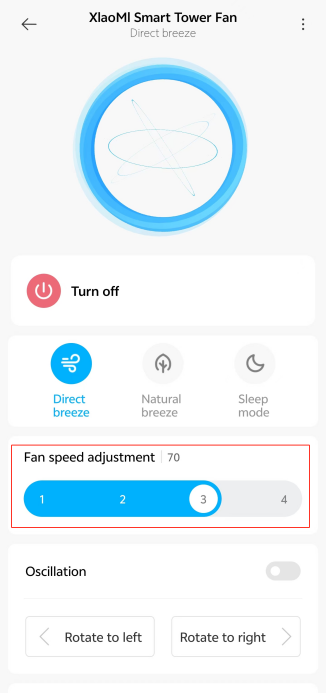
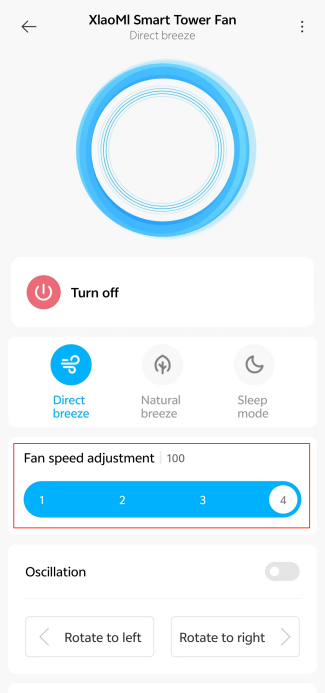
2. Open the [Mi Home]/[Xiaomi Home] APP >> tap [Device card] >> [Fan speed adjustment] >> select from the options [Slow], [Medium], [Fast] and [Turbo].
4. Q: How to enable the Child lock on the Xiaomi Smart Tower Fan (European standard)?
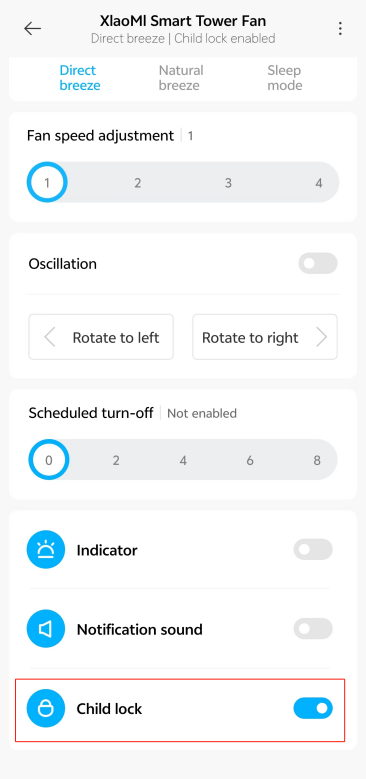
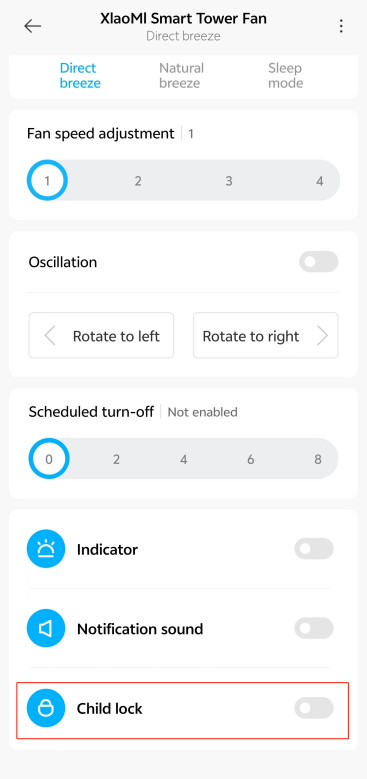
A: To enable the function of Child lock, simultaneously press and hold on the Oscillation Button and Scheduled Turn-off Button until you hear a long beep. You can also enable this function in the Mi Home/Xiaomi Home APP. When the Child lock is activated, pressing any button will cause all indicator lights to flash twice, and a "beep" sound will be heard. The fan will not respond to any button operations.
5. Q: How to disable the Child lock on the Xiaomi Smart Tower Fan (European standard)?
A: To disable the function of Child lock, simultaneously press and hold on the Oscillation Button and Scheduled Turn-off Button until you hear a long beep. You can also disable this function in the Mi Home/Xiaomi Home APP.
Note:
Resetting the Wi-Fi connection or unplugging and re-plugging the fan again can also disable this function.
6. Q: How to reset the Wi-Fi connection on the Xiaomi Smart Tower Fan (European standard)?
A: Simultaneously press and hold the Standby Button and Mode Switch Button. Once you hear a long beep, the Wi-Fi connection has been reset successfully and the fan is awaiting a connection. You can pair the device according to the prompts of the Mi Home/Xiaomi Home APP.
The Wi-Fi connection needs to be reset under the circumstances listed below:
1. The Xiaomi account that the fan is paired with has been changed;
2. The router that the fan is connected to has been changed;
3. The account or password of the router that the fan is connected to has been changed;
4. The Mi Home/Xiaomi Home APP is unable to control the fan.
Wi-Fi status and indicator description:
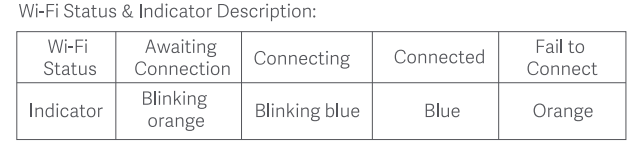
1. When the indicator is flashing in orange, it means that the Wi-Fi is awaiting connection;
2. When the indicator is flashing in blue, it means that the Wi-Fi is connecting;
3. When the indicator is blue, it means that the Wi-Fi is connected;
4. When the indicator is orange, it means the Wi-Fi fails to connect.
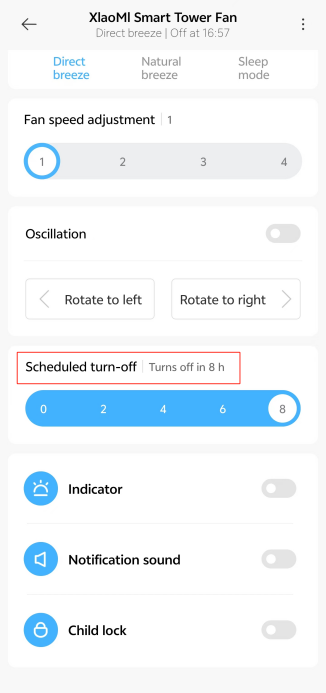
7. Q: How to set the Scheduled Turn-off on the Xiaomi Smart Tower Fan (European standard)?
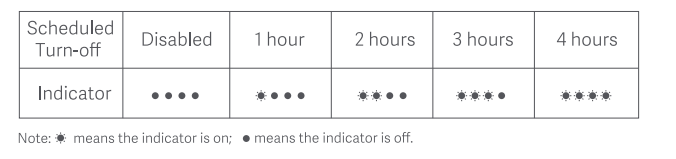
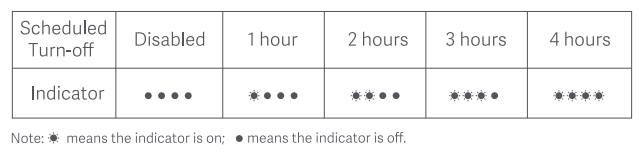
A: Press the Scheduled Turn-off Button to cycle through the scheduled turn-off times: 1 hour, 2 hours, 3 hours, 4 hours, and disabled, and the corresponding indicators will light up. Five seconds after using the scheduled turn-off function, the indicators resume to indicate the corresponding status of the current speed.
Note:
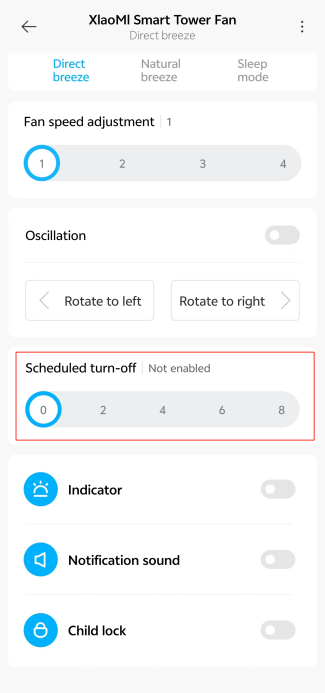
You can also bind your device to the Mi Home/Xiaomi Home APP and set the function.
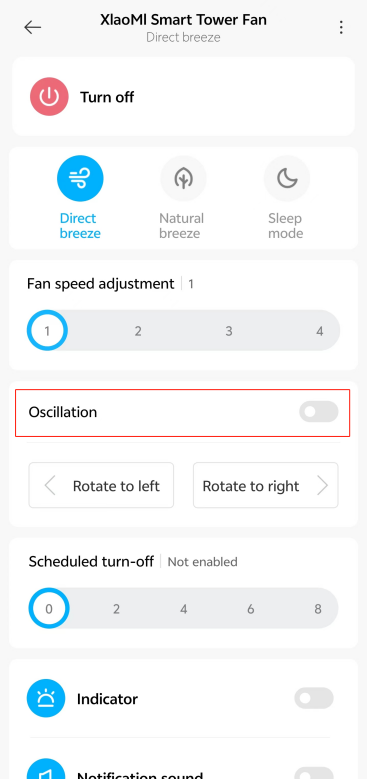
8. Q: How to set the Oscillation on the Xiaomi Smart Tower Fan (European standard)?
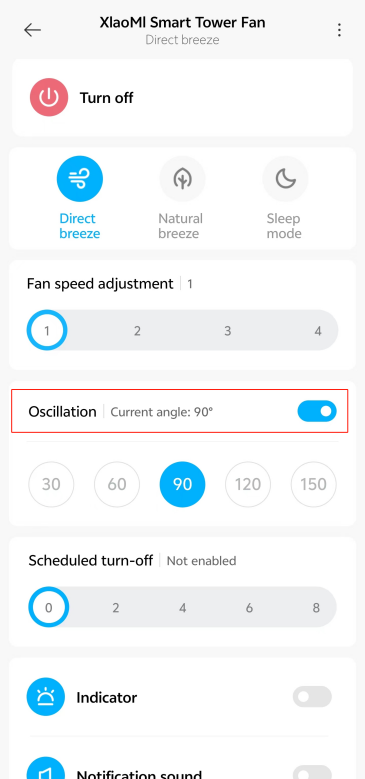
A: Press the Oscillation Button to enable or disable oscillation. You can set the oscillation angle range in the Mi Home/Xiaomi Home APP. After the fan is turned off and turned back on again, the oscillation setting will be the last used one. Unplug the fan and plug it back in, or reset the Wi-Fi connection before turning on the fan. If the oscillation function is enabled, the fan will automatically oscillate. The oscillation time varies depending on the different angles, please wait with patience.
Note:
When the Wi-Fi connection is reset, the oscillation angle range will change to the default angle of 90°.
9. Q: Which setting will be lost after resetting the Wi-Fi on the Xiaomi Smart Tower Fan (European standard)?
A: After resetting the Wi-Fi, the settings configured in the Mi Home/Xiaomi Home APP, including speed level, oscillation angle, child lock, and scheduled power on/off, will all be lost and need to be reconfigured.
10. Q: Does the Xiaomi Smart Tower Fan (European standard) support power-off memory?
A: Yes. When turned off without cutting the power, it will retain the previous mode or wind speed setting when turned back on.
11. Q: Can the Xiaomi Smart Tower Fan (European standard) be placed horizontally?
A: It should not be placed horizontally. If the air intake and exhaust ports are blocked or pressed, it decreases the airflow. The fan blades in constant oscillation will increase the temperature of the motor of the machine thus reducing the life of the device and increasing the danger during use.
12. Q: How to place the Xiaomi Smart Tower Fan (European standard)?
A: 1. Place it in the living room for family gatherings or watching TV, enjoying moments of togetherness in a cool environment;
2. It is suitable for bedrooms to provide gentle airflow without directly blowing on the body, avoiding discomfort during night sleep or rest;
3. The fan features fine grilles to prevent children's fingers from reaching inside, ensuring safe use and peace of mind for parents;
4. It is ideal for environments like hospital wards, especially in maternity and child health centers, where precise airflow control is necessary.
Note:
Do not use it in industrial environments to prevent dust from entering the device and causing malfunctions.
13. Q: How should the Xiaomi Smart Tower Fan (European standard) be stored when not in use?
A: First separate the front base and rear base, then separate them from the fan. Use the provided sealed bag to store them to prevent dust accumulation.
Q: What does the Xiaomi Smart Tower Fan (European standard) come with?
A: The packaging list of the Xiaomi Smart Tower Fan (European standard) includes:
The Fan, Front Base, Rear Base, M5 Screw x 2, Hex Key and User Manual.
Introductions and Usage
1. How to turn on the Xiaomi Smart Tower Fan (European standard)?
A: 1. Plug the power plug into a suitable electrical outlet. When you hear a beep, the fan is successfully connected to the power;
2. Press the Standby Button to start the fan. When turned on for the first time, the fan is at the direct breeze mode with speed 1 by default. Tap the Standby Button to stop the fan while it is running.
2. Q: How to switch the modes on the Xiaomi Smart Tower Fan (European standard)?
A: To switch the modes of the Xiaomi Smart Tower Fan (European standard), please refer to the following steps:
1. Press the Mode Switch Button to switch the direct breeze, the natural breeze, and the sleep mode, and the corresponding indicator will light up. After the fan is turned off and turned back on again, the mode will be the last used one;
2. Open the [Mi Home]/[Xiaomi Home] APP >> tap [Device card] >> choose from [Direct breeze], [Natural breeze], and [Sleep mode].
3. Q: How to switch the speed on the Xiaomi Smart Tower Fan (European standard)?
A: To switch the speed of the Xiaomi Smart Tower Fan (European standard), please refer to the following steps:
1. Press the Speed Adjustment Button to adjust the speed, and the corresponding speed indicators will light up. After the fan is turned off and turned back on again, the speed will be the last one;
2. Open the [Mi Home]/[Xiaomi Home] APP >> tap [Device card] >> [Fan speed adjustment] >> select from the options [Slow], [Medium], [Fast] and [Turbo].
4. Q: How to enable the Child lock on the Xiaomi Smart Tower Fan (European standard)?
A: To enable the function of Child lock, simultaneously press and hold on the Oscillation Button and Scheduled Turn-off Button until you hear a long beep. You can also enable this function in the Mi Home/Xiaomi Home APP. When the Child lock is activated, pressing any button will cause all indicator lights to flash twice, and a "beep" sound will be heard. The fan will not respond to any button operations.
5. Q: How to disable the Child lock on the Xiaomi Smart Tower Fan (European standard)?
A: To disable the function of Child lock, simultaneously press and hold on the Oscillation Button and Scheduled Turn-off Button until you hear a long beep. You can also disable this function in the Mi Home/Xiaomi Home APP.
Note:
Resetting the Wi-Fi connection or unplugging and re-plugging the fan again can also disable this function.
6. Q: How to reset the Wi-Fi connection on the Xiaomi Smart Tower Fan (European standard)?
A: Simultaneously press and hold the Standby Button and Mode Switch Button. Once you hear a long beep, the Wi-Fi connection has been reset successfully and the fan is awaiting a connection. You can pair the device according to the prompts of the Mi Home/Xiaomi Home APP.
The Wi-Fi connection needs to be reset under the circumstances listed below:
1. The Xiaomi account that the fan is paired with has been changed;
2. The router that the fan is connected to has been changed;
3. The account or password of the router that the fan is connected to has been changed;
4. The Mi Home/Xiaomi Home APP is unable to control the fan.
Wi-Fi status and indicator description:
1. When the indicator is flashing in orange, it means that the Wi-Fi is awaiting connection;
2. When the indicator is flashing in blue, it means that the Wi-Fi is connecting;
3. When the indicator is blue, it means that the Wi-Fi is connected;
4. When the indicator is orange, it means the Wi-Fi fails to connect.
7. Q: How to set the Scheduled Turn-off on the Xiaomi Smart Tower Fan (European standard)?
A: Press the Scheduled Turn-off Button to cycle through the scheduled turn-off times: 1 hour, 2 hours, 3 hours, 4 hours, and disabled, and the corresponding indicators will light up. Five seconds after using the scheduled turn-off function, the indicators resume to indicate the corresponding status of the current speed.
Note:
You can also bind your device to the Mi Home/Xiaomi Home APP and set the function.
8. Q: How to set the Oscillation on the Xiaomi Smart Tower Fan (European standard)?
A: Press the Oscillation Button to enable or disable oscillation. You can set the oscillation angle range in the Mi Home/Xiaomi Home APP. After the fan is turned off and turned back on again, the oscillation setting will be the last used one. Unplug the fan and plug it back in, or reset the Wi-Fi connection before turning on the fan. If the oscillation function is enabled, the fan will automatically oscillate. The oscillation time varies depending on the different angles, please wait with patience.
Note:
When the Wi-Fi connection is reset, the oscillation angle range will change to the default angle of 90°.
9. Q: Which setting will be lost after resetting the Wi-Fi on the Xiaomi Smart Tower Fan (European standard)?
A: After resetting the Wi-Fi, the settings configured in the Mi Home/Xiaomi Home APP, including speed level, oscillation angle, child lock, and scheduled power on/off, will all be lost and need to be reconfigured.
10. Q: Does the Xiaomi Smart Tower Fan (European standard) support power-off memory?
A: Yes. When turned off without cutting the power, it will retain the previous mode or wind speed setting when turned back on.
11. Q: Can the Xiaomi Smart Tower Fan (European standard) be placed horizontally?
A: It should not be placed horizontally. If the air intake and exhaust ports are blocked or pressed, it decreases the airflow. The fan blades in constant oscillation will increase the temperature of the motor of the machine thus reducing the life of the device and increasing the danger during use.
12. Q: How to place the Xiaomi Smart Tower Fan (European standard)?
A: 1. Place it in the living room for family gatherings or watching TV, enjoying moments of togetherness in a cool environment;
2. It is suitable for bedrooms to provide gentle airflow without directly blowing on the body, avoiding discomfort during night sleep or rest;
3. The fan features fine grilles to prevent children's fingers from reaching inside, ensuring safe use and peace of mind for parents;
4. It is ideal for environments like hospital wards, especially in maternity and child health centers, where precise airflow control is necessary.
Note:
Do not use it in industrial environments to prevent dust from entering the device and causing malfunctions.
13. Q: How should the Xiaomi Smart Tower Fan (European standard) be stored when not in use?
A: First separate the front base and rear base, then separate them from the fan. Use the provided sealed bag to store them to prevent dust accumulation.
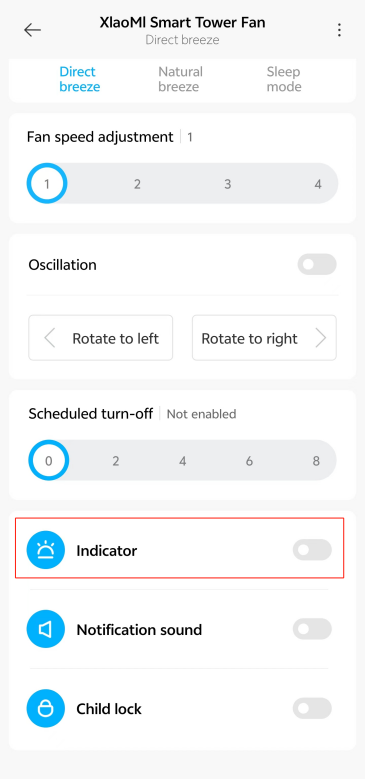
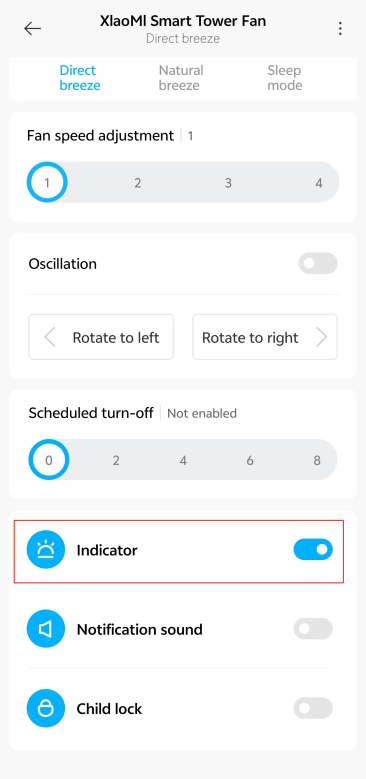
14. Q: Does the Xiaomi Smart Tower Fan (European standard) support an indicator switch?
A: Yes, it supports switching the indicator.
To switch the indicator, please refer to the following steps:
Open the [Mi Home]/[Xiaomi Home] APP >> tap [Device card] >> select [Indicator] to turn it on.
Note:
The brightness of the indicators cannot be adjusted.
A: Yes, it supports switching the indicator.
To switch the indicator, please refer to the following steps:
Open the [Mi Home]/[Xiaomi Home] APP >> tap [Device card] >> select [Indicator] to turn it on.
Note:
The brightness of the indicators cannot be adjusted.
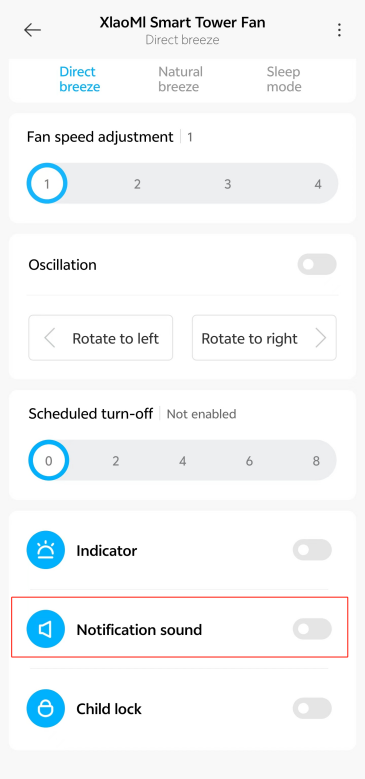
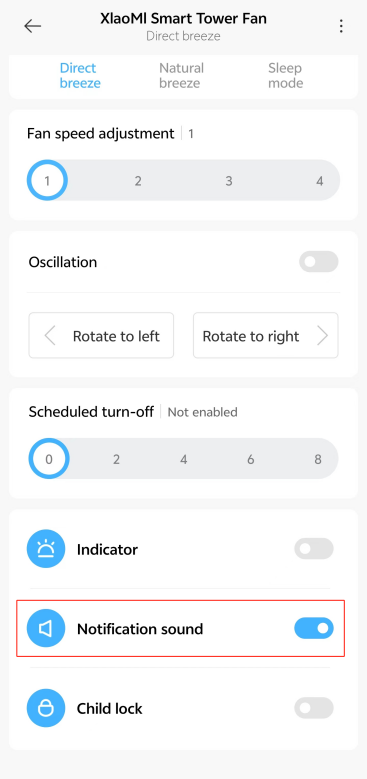
15. Q: Does the Xiaomi Smart Tower Fan (European standard) support setting Notification sound?
A: Yes, it supports setting Notification sound.
To set Notification sound on your fan, please refer to the following steps:
Open the [Mi Home]/[Xiaomi Home] APP >> tap [Device card] >> turn on/off [Notification sound].
Note:
The volume is not adjustable.
16. Q: How to clean the Xiaomi Smart Tower Fan (European standard)?
A: The tower fan is divided into parts that can be cleaned and parts that cannot be cleaned.
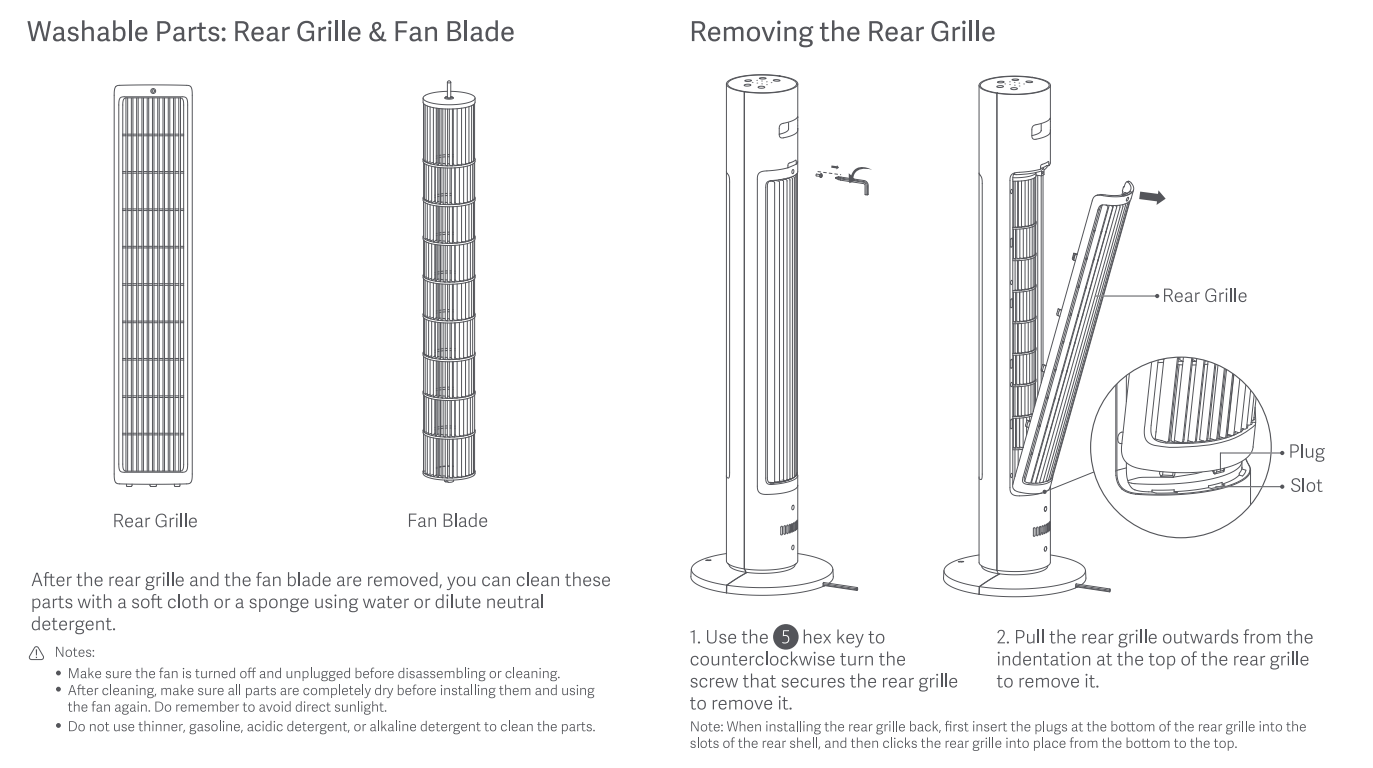
1. Washable parts: Rear Grilled and Fan Blade
Removing the Rear Grille:
(1). Use the hex key to turn counterclockwise the screw that secures the rear grille to remove it;
(2). Pull the rear grille outwards from the indentation at the top of the rear grille to remove it.
Note:
When installing the rear grille back, first insert the plugs at the bottom of the rear grille into the slots of the rear shell, and then click the rear grille into place from the bottom to the top.
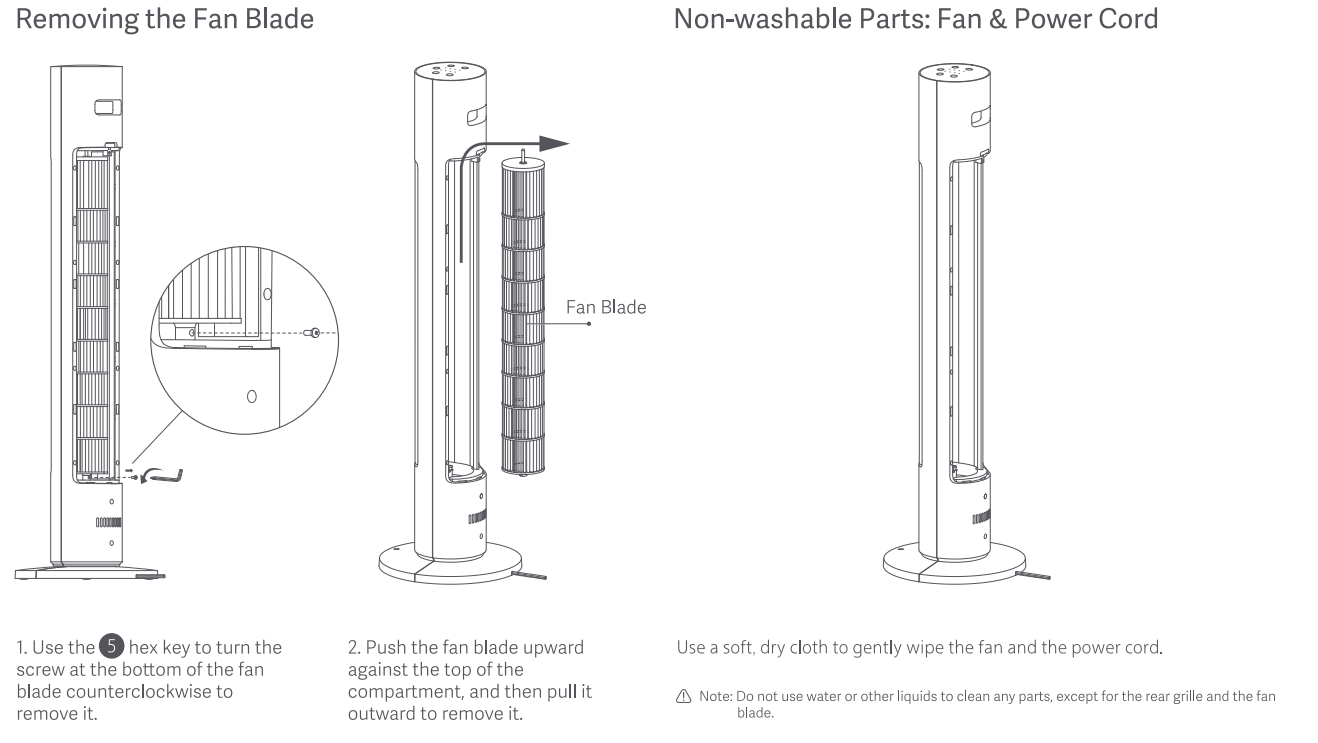
Removing the Fan Blade:
(1). Use the hex key to turn the screw at the bottom of the fan blade counterclockwise to remove it;
(2). Push the fan blade upward against the top of the compartment, and then pull it outward to remove it.
After the rear grille and the fan blade are removed, you can clean these parts with a soft cloth or a sponge using water or dilute neutral detergent.
Note:
1. Make sure the fan is turned off and unplugged before disassembling or cleaning;
2. After cleaning, make sure all parts are completely dried before installing them and using the fan again. Do remember to avoid direct sunlight;
3. Do not use thinner, gasoline, acidic detergent, or alkaline to clean the parts of the fan.
2. Non-washable parts: Fan and Power Cord
Use a soft, dry cloth to gently wipe the fan and the power cord.
Note:
Do not use water or other liquids to clean any parts, except for the grille and the fan blade.
APP related
1. Q: How to connect the Xiaomi Smart Tower Fan (European standard) to the Mi Home/Xiaomi Home APP?
A: For your reference, please refer to the following steps:
1. Find the QR code of the APP in the Quick Guide of the tower fan or Play Store to download the Mi Home/Xiaomi Home APP;
2. After the Mi Home/Xiaomi Home APP download is completed, log in/register the account before connecting the device;
3. Press and hold on the Standby Button and the Mode Switch Button of the tower fan, and then the device can be connected after you hear the beep.
Note:
Wi-Fi, Bluetooth and Location need to be switched on before connecting the device.
2. Q: What are the precautions for the Xiaomi Smart Tower Fan (European standard) to be connected to the Wi-Fi?
A: The Xiaomi Smart Tower Fan (European standard) supports wireless connection and is compatible with the vast majority of personal routers on the market.
Here are the following requirements for the router's wireless network:
1. The Xiaomi Smart Tower Fan (European standard) can only be connected to 2.4G Wi-Fi and does not support 5G Wi-Fi;
2. Wi-Fi encryption needs to be WPA, WPA2 and does not support WEP;
3. The router needs to enable DHCP, it does not support the designation of static IP, web authentication and enterprise-oriented 802.1X.
Note:
To control the Xiaomi Smart Tower Fan (European standard), you need to download the Mi Home/Xiaomi Home APP first.
3. Q: How to remotely control the Xiaomi Smart Tower Fan (European standard) with a mobile phone?
A: For your reference, please refer to the following steps:
1. Scan the QR code on the Quick Guide with your mobile phone or install the Mi Home/Xiaomi Home APP through the Play Store and bind your Xiaomi account to ensure that the home Wi-Fi can be connected to the tower fan normally;
2. Connect your mobile phone to Wi-Fi, turn on the tower fan;
3. Open the Mi Home/Xiaomi Home APP and the APP will Auto-detecting nearby devices, you can also [Add device] at the upper right corner to manually add a device;
4. After adding the Xiaomi Smart Tower Fan (European standard) according to the prompts, you can switch the fan on or off, switch the operating mode, or set the shaking angle, etc. through the Mi Home//Xiaomi Home APP.
4. Q: How to solve the problem that the Xiaomi Smart Tower Fan (European standard) has not been bound to the Mi Home/Xiaomi Home APP for a long time and the device cannot be searched suddenly?
A: When the fan is not bound to the Mi Home/Xiaomi Home APP for about 30 minutes, the Wi-Fi will automatically turn off the Auto-detecting function. In this situation, you need to reset the Wi-Fi only and connect the device again.
Troubleshooting
1. Q: What to do if the Xiaomi Smart Tower Fan (European standard) cannot be turned on?
A: To troubleshoot the issue, please refer to the following steps:
1. Check if the outlet has power, and then make sure the power cord is plugged properly;
2. Check and press down the Standby Button;
3. Check whether the power cord is compliant;
4. If the problem still exists, it is recommended to go to the after-sales service center for inspection.
2. Q: Is it normal to hear a clicking sound from the motor when the Xiaomi Smart Tower Fan (European standard) oscillates?
A: The clicking sound is the sound of the gears turning. There will be a sound when the new device is running, and it will disappear naturally after the device has been used for some time. It is a normal sound.
3. Q: Why the physical buttons of the Xiaomi Smart Tower Fan (European standard) are unresponsive?
A: To troubleshoot the issue, please refer to the following steps:
1. Check whether the tower fan is powered on;
2. Check whether the child lock is turned on;
3. If the issue still exists, please go to the after-sales service center for inspection.
4. Q: Why is there no wind blowing out of the Xiaomi Smart Tower Fan (European standard)?
A: To troubleshoot the issue, please refer to the following steps:
1. Check whether the tower fan is powered on;
2. Check whether the sleep mode is turned on(The air volume is low in sleep mode);
3. If the problem still exists, please go to the after-sales service center for inspection.
5. Q: Why can't the Xiaomi Smart Tower Fan (European standard) oscillation in place?
A: To troubleshoot the issue, please refer to the following steps:
1. It will take some time to find the oscillation angle when the tower fan is turned on for the first time, it can be completed after oscillating about 3 times usually;
2. Check whether the oscillation angle is turned on in the Mi Home/Xiaomi Home APP;
3. If the problem still exists, it is recommended to go to the after-sales service center for inspection.
6. Q: Why does the body of the Xiaomi Smart Tower Fan (European standard) shake?
A: To troubleshoot the issue, please refer to the following steps:
1. Check whether the tower fan chassis is installed in place;
2. Check whether the tower fan base is placed in a stable position;
3. It is normal for a tower fan to sway slightly when oscillating. Since the fan blades are long and the overall center of gravity of the tower fan is at the bottom, the top of the fan will sway slightly due to the oscillating of the fan blades;
4. If the problem still exists, it is recommended to go to the after-sales service center for inspection.
7. Q: Why does the Xiaomi Smart Tower Fan (European standard) automatically switch off after powering on?
A: To troubleshoot the issue, please refer to the following steps:
1. Check whether the power cord is plugged properly;
2. Check whether the power cord at the base is plugged properly;
3. Check whether the Scheduled Turn-off function is enabled;
4. If the problem still exists, it is recommended to go to the after-sales service center for inspection.
8. Q: Why can't the Xiaomi Smart Tower Fan (European standard) connect to Wi-Fi?
A: To troubleshoot the issue, please refer to the following steps:
1. Check whether the fan is continuously offline for more than half an hour. If so, the fan needs to be reset to Wi-Fi;
2. Check whether the router band is 2.4G band. If not, adjust the router band to 2.4G band;
3. If the problem still exists, it is recommended to go to the after-sales service center for inspection.
9. Q: What to do if the Xiaomi Smart Tower Fan (European standard) loses power unexpectedly during the firmware upgrade?
A: Please re-power the tower fan, the device will automatically re-upgrade after powering on.
10. Q: How to solve the problem of hearing a "beep" prompt sound and 7 white indicators flashing after turning on the Xiaomi Smart Tower Fan (European standard)?
A: To troubleshoot the issue, please refer to the following steps:
1. Observe whether the fan blades are operating normally from the air outlet grille. If not, unplug the power plug and wait for 30 seconds before plugging it in and turning it on again;
2. Check whether the child lock is turned on. If so, you can turn off the child lock and try again;
3. If the problem still exists after performing the above steps, it is recommended to go to the after-sales service center for inspection.
11. Q: What are the precautions for installing the Xiaomi Smart Tower Fan (European standard)?
A: To troubleshoot the issue, please refer to the following steps:
1. Pay attention to the installation of the bottom screws to be fixed properly. Or it will lead to the tower fan the risk of falling;
2. The device as a whole is relatively light, pay attention not to place the tower fan too close to the wall. As oscillating function will create wind resistance and cause the tower fan to wobble when it enables the oscillating function;
3. Do not place objects on the tower fan, as this will cause the device to become unstable and shake.
A: Yes, it supports setting Notification sound.
To set Notification sound on your fan, please refer to the following steps:
Open the [Mi Home]/[Xiaomi Home] APP >> tap [Device card] >> turn on/off [Notification sound].
Note:
The volume is not adjustable.
16. Q: How to clean the Xiaomi Smart Tower Fan (European standard)?
A: The tower fan is divided into parts that can be cleaned and parts that cannot be cleaned.
1. Washable parts: Rear Grilled and Fan Blade
Removing the Rear Grille:
(1). Use the hex key to turn counterclockwise the screw that secures the rear grille to remove it;
(2). Pull the rear grille outwards from the indentation at the top of the rear grille to remove it.
Note:
When installing the rear grille back, first insert the plugs at the bottom of the rear grille into the slots of the rear shell, and then click the rear grille into place from the bottom to the top.
Removing the Fan Blade:
(1). Use the hex key to turn the screw at the bottom of the fan blade counterclockwise to remove it;
(2). Push the fan blade upward against the top of the compartment, and then pull it outward to remove it.
After the rear grille and the fan blade are removed, you can clean these parts with a soft cloth or a sponge using water or dilute neutral detergent.
Note:
1. Make sure the fan is turned off and unplugged before disassembling or cleaning;
2. After cleaning, make sure all parts are completely dried before installing them and using the fan again. Do remember to avoid direct sunlight;
3. Do not use thinner, gasoline, acidic detergent, or alkaline to clean the parts of the fan.
2. Non-washable parts: Fan and Power Cord
Use a soft, dry cloth to gently wipe the fan and the power cord.
Note:
Do not use water or other liquids to clean any parts, except for the grille and the fan blade.
APP related
1. Q: How to connect the Xiaomi Smart Tower Fan (European standard) to the Mi Home/Xiaomi Home APP?
A: For your reference, please refer to the following steps:
1. Find the QR code of the APP in the Quick Guide of the tower fan or Play Store to download the Mi Home/Xiaomi Home APP;
2. After the Mi Home/Xiaomi Home APP download is completed, log in/register the account before connecting the device;
3. Press and hold on the Standby Button and the Mode Switch Button of the tower fan, and then the device can be connected after you hear the beep.
Note:
Wi-Fi, Bluetooth and Location need to be switched on before connecting the device.
2. Q: What are the precautions for the Xiaomi Smart Tower Fan (European standard) to be connected to the Wi-Fi?
A: The Xiaomi Smart Tower Fan (European standard) supports wireless connection and is compatible with the vast majority of personal routers on the market.
Here are the following requirements for the router's wireless network:
1. The Xiaomi Smart Tower Fan (European standard) can only be connected to 2.4G Wi-Fi and does not support 5G Wi-Fi;
2. Wi-Fi encryption needs to be WPA, WPA2 and does not support WEP;
3. The router needs to enable DHCP, it does not support the designation of static IP, web authentication and enterprise-oriented 802.1X.
Note:
To control the Xiaomi Smart Tower Fan (European standard), you need to download the Mi Home/Xiaomi Home APP first.
3. Q: How to remotely control the Xiaomi Smart Tower Fan (European standard) with a mobile phone?
A: For your reference, please refer to the following steps:
1. Scan the QR code on the Quick Guide with your mobile phone or install the Mi Home/Xiaomi Home APP through the Play Store and bind your Xiaomi account to ensure that the home Wi-Fi can be connected to the tower fan normally;
2. Connect your mobile phone to Wi-Fi, turn on the tower fan;
3. Open the Mi Home/Xiaomi Home APP and the APP will Auto-detecting nearby devices, you can also [Add device] at the upper right corner to manually add a device;
4. After adding the Xiaomi Smart Tower Fan (European standard) according to the prompts, you can switch the fan on or off, switch the operating mode, or set the shaking angle, etc. through the Mi Home//Xiaomi Home APP.
4. Q: How to solve the problem that the Xiaomi Smart Tower Fan (European standard) has not been bound to the Mi Home/Xiaomi Home APP for a long time and the device cannot be searched suddenly?
A: When the fan is not bound to the Mi Home/Xiaomi Home APP for about 30 minutes, the Wi-Fi will automatically turn off the Auto-detecting function. In this situation, you need to reset the Wi-Fi only and connect the device again.
Troubleshooting
1. Q: What to do if the Xiaomi Smart Tower Fan (European standard) cannot be turned on?
A: To troubleshoot the issue, please refer to the following steps:
1. Check if the outlet has power, and then make sure the power cord is plugged properly;
2. Check and press down the Standby Button;
3. Check whether the power cord is compliant;
4. If the problem still exists, it is recommended to go to the after-sales service center for inspection.
2. Q: Is it normal to hear a clicking sound from the motor when the Xiaomi Smart Tower Fan (European standard) oscillates?
A: The clicking sound is the sound of the gears turning. There will be a sound when the new device is running, and it will disappear naturally after the device has been used for some time. It is a normal sound.
3. Q: Why the physical buttons of the Xiaomi Smart Tower Fan (European standard) are unresponsive?
A: To troubleshoot the issue, please refer to the following steps:
1. Check whether the tower fan is powered on;
2. Check whether the child lock is turned on;
3. If the issue still exists, please go to the after-sales service center for inspection.
4. Q: Why is there no wind blowing out of the Xiaomi Smart Tower Fan (European standard)?
A: To troubleshoot the issue, please refer to the following steps:
1. Check whether the tower fan is powered on;
2. Check whether the sleep mode is turned on(The air volume is low in sleep mode);
3. If the problem still exists, please go to the after-sales service center for inspection.
5. Q: Why can't the Xiaomi Smart Tower Fan (European standard) oscillation in place?
A: To troubleshoot the issue, please refer to the following steps:
1. It will take some time to find the oscillation angle when the tower fan is turned on for the first time, it can be completed after oscillating about 3 times usually;
2. Check whether the oscillation angle is turned on in the Mi Home/Xiaomi Home APP;
3. If the problem still exists, it is recommended to go to the after-sales service center for inspection.
6. Q: Why does the body of the Xiaomi Smart Tower Fan (European standard) shake?
A: To troubleshoot the issue, please refer to the following steps:
1. Check whether the tower fan chassis is installed in place;
2. Check whether the tower fan base is placed in a stable position;
3. It is normal for a tower fan to sway slightly when oscillating. Since the fan blades are long and the overall center of gravity of the tower fan is at the bottom, the top of the fan will sway slightly due to the oscillating of the fan blades;
4. If the problem still exists, it is recommended to go to the after-sales service center for inspection.
7. Q: Why does the Xiaomi Smart Tower Fan (European standard) automatically switch off after powering on?
A: To troubleshoot the issue, please refer to the following steps:
1. Check whether the power cord is plugged properly;
2. Check whether the power cord at the base is plugged properly;
3. Check whether the Scheduled Turn-off function is enabled;
4. If the problem still exists, it is recommended to go to the after-sales service center for inspection.
8. Q: Why can't the Xiaomi Smart Tower Fan (European standard) connect to Wi-Fi?
A: To troubleshoot the issue, please refer to the following steps:
1. Check whether the fan is continuously offline for more than half an hour. If so, the fan needs to be reset to Wi-Fi;
2. Check whether the router band is 2.4G band. If not, adjust the router band to 2.4G band;
3. If the problem still exists, it is recommended to go to the after-sales service center for inspection.
9. Q: What to do if the Xiaomi Smart Tower Fan (European standard) loses power unexpectedly during the firmware upgrade?
A: Please re-power the tower fan, the device will automatically re-upgrade after powering on.
10. Q: How to solve the problem of hearing a "beep" prompt sound and 7 white indicators flashing after turning on the Xiaomi Smart Tower Fan (European standard)?
A: To troubleshoot the issue, please refer to the following steps:
1. Observe whether the fan blades are operating normally from the air outlet grille. If not, unplug the power plug and wait for 30 seconds before plugging it in and turning it on again;
2. Check whether the child lock is turned on. If so, you can turn off the child lock and try again;
3. If the problem still exists after performing the above steps, it is recommended to go to the after-sales service center for inspection.
11. Q: What are the precautions for installing the Xiaomi Smart Tower Fan (European standard)?
A: To troubleshoot the issue, please refer to the following steps:
1. Pay attention to the installation of the bottom screws to be fixed properly. Or it will lead to the tower fan the risk of falling;
2. The device as a whole is relatively light, pay attention not to place the tower fan too close to the wall. As oscillating function will create wind resistance and cause the tower fan to wobble when it enables the oscillating function;
3. Do not place objects on the tower fan, as this will cause the device to become unstable and shake.
Does it help?
Yes
No