

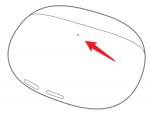
For Xiaomi Buds 3, the red arrow position in the picture below is the position of the charging case indicator light.
1. Charging: When charging the charging case: the indicator light turns red when the charging case is 0-95% charged, and turns green when it is over 95% charged.
2. Pairing: press and hold the function button for 2 seconds after opening the cover, the indicator light of the charging case will enter white blinking state and the headset is waiting to be connected; if there is no connection for 1 minute, the headset will go into hibernation and the indicator light will turn off;
3. Clear Connection Record : Press and hold the box button for 10 seconds, the white light of the charging box will be on, release the button; the headset will restart, the old connection record will be cleared, the charging box light will be flashing white, and the headset will re-enter the pairing mode.
4. In-box detection: When the headset is put into the box, the green light of the charging box will be always on for 7 seconds.
1. Charging: When charging the charging case: the indicator light turns red when the charging case is 0-95% charged, and turns green when it is over 95% charged.
2. Pairing: press and hold the function button for 2 seconds after opening the cover, the indicator light of the charging case will enter white blinking state and the headset is waiting to be connected; if there is no connection for 1 minute, the headset will go into hibernation and the indicator light will turn off;
3. Clear Connection Record : Press and hold the box button for 10 seconds, the white light of the charging box will be on, release the button; the headset will restart, the old connection record will be cleared, the charging box light will be flashing white, and the headset will re-enter the pairing mode.
4. In-box detection: When the headset is put into the box, the green light of the charging box will be always on for 7 seconds.