

Xiaomi Smart Air Fryer 6.5L supports Google voice control (Google Assistant). Before use, please make sure Mi Home and Google Home have been installed on your mobile phone, and then link Mi Home in the Google home app.
6.1
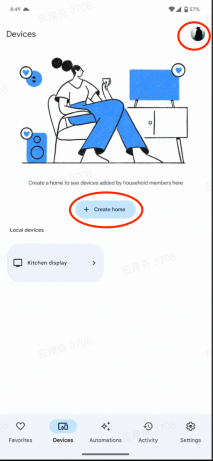
Log in to Google Home and complete the settings for your Google account and home.
6.2
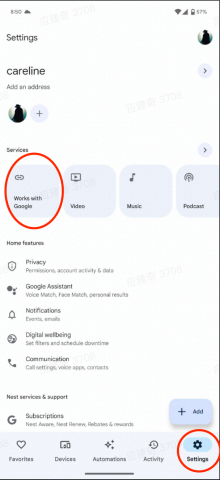
Click work with google in the settings page to enter the link to third-party service page
6.3
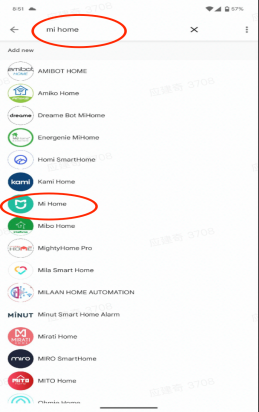
Find Mi home and select click on the service
6.4
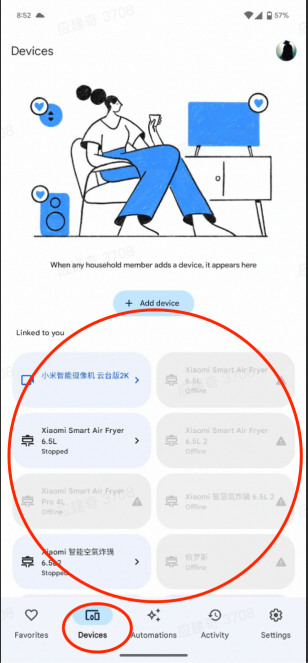
After the link is successful, you can see the corresponding device under the Devices page, and the binding is completed. At the same time, log in to the Google account consistent with step 1 on the Google voice control device to complete the binding. Voice control is now available.
6.1
Log in to Google Home and complete the settings for your Google account and home.
6.2
Click work with google in the settings page to enter the link to third-party service page
6.3
Find Mi home and select click on the service
6.4
After the link is successful, you can see the corresponding device under the Devices page, and the binding is completed. At the same time, log in to the Google account consistent with step 1 on the Google voice control device to complete the binding. Voice control is now available.