

Xiaomi Smart Kids Watch supports receiving SMS messages:
1. When the watch receives a text message, you can view it in the watch's inbox and reply to it.
2. Currently, only family members can reply to SMS messages, other SMS messages do not support replies (only voice/emotion replies are supported)
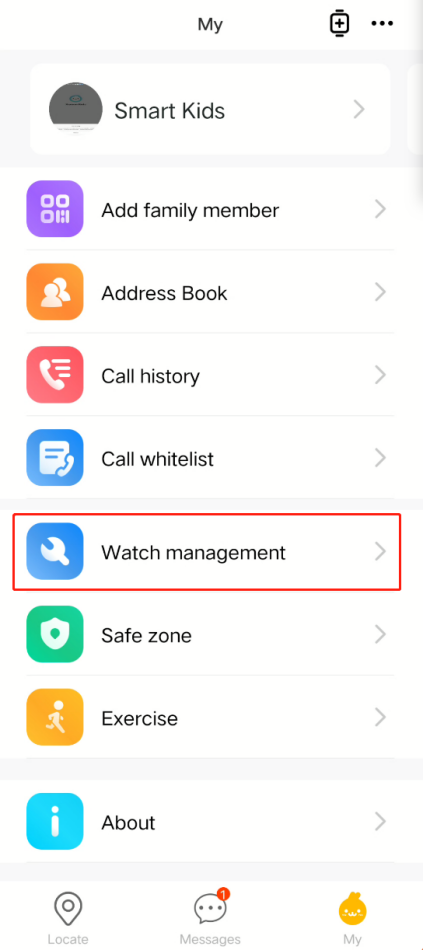
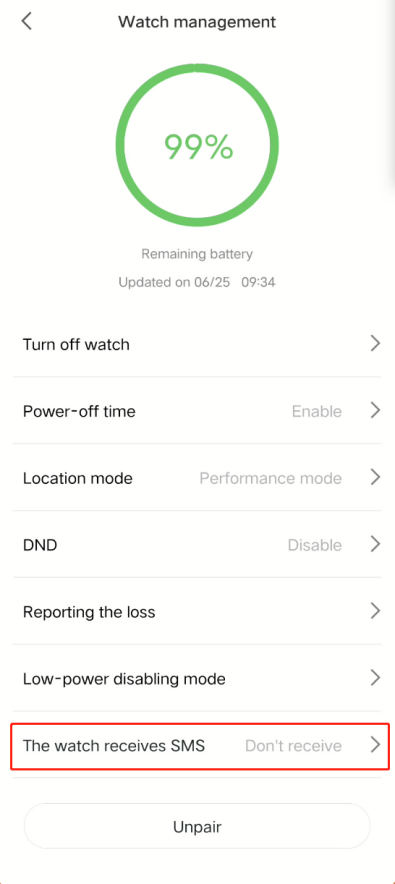
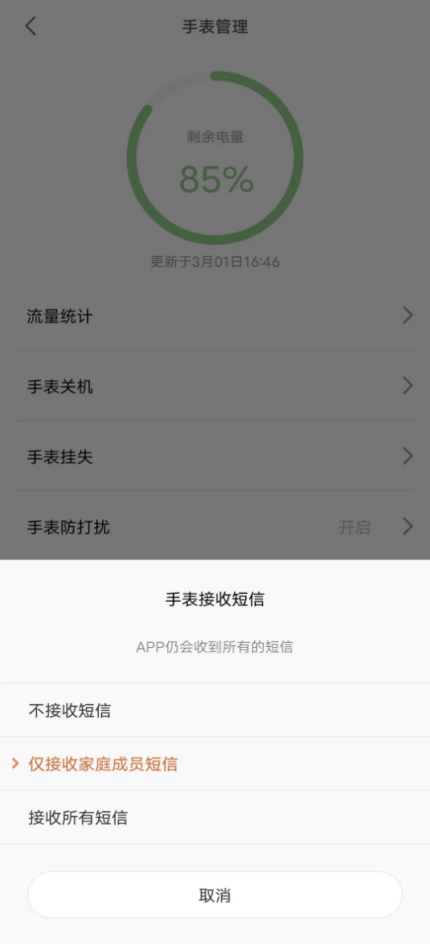
To manage SMS messages more conveniently, the Xiaomi Kids app can set up a whitelist of SMS messages in the Xiaomi Kids app → My → Watch management → The watch receives SMS. When whitelisting is enabled, the watch can only display whitelisted SMS messages, the app can still view non-whitelisted SMS messages.
1. When the watch receives a text message, you can view it in the watch's inbox and reply to it.
2. Currently, only family members can reply to SMS messages, other SMS messages do not support replies (only voice/emotion replies are supported)
To manage SMS messages more conveniently, the Xiaomi Kids app can set up a whitelist of SMS messages in the Xiaomi Kids app → My → Watch management → The watch receives SMS. When whitelisting is enabled, the watch can only display whitelisted SMS messages, the app can still view non-whitelisted SMS messages.