

You can use Portrait mode to apply Cinematic , Beautify and Filters effects. You can enable this feature to add a blurred background to your photos.
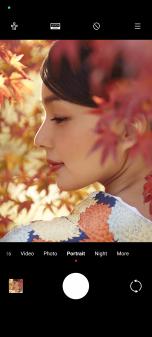
1. Open
 Camera.
2. Select Portrait mode.
3. Choose to add effects.
• Tap
 to enable Full body mode. The feature uses suitable lenses when you take a full body photo. The feature may not be available to some
models.
• Tap
 to enable Smart HD portrait. The feature may not be available to some models.
• Tap
 to apply a cinematic effect. The feature may not be available to some models.
• Tap
 to apply a Pro lenses style. The feature provides 35mm to 90mm lenses styles to fit your photographical needs. The feature may not be
available to some models.
• Tap
 and drag the slider to adjust the aperture. A lower aperture value creates a more blurred background behind the portrait.
• Tap
 to beautify the portrait and add filters.
4. Tap o to take a photo.
Tip
You can tap
 to take photos with the front camera.