

You can quickly access the feature shortcuts on the Control center.
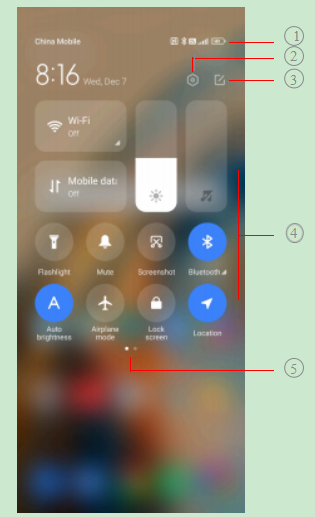
| 1. View notification icons and status icons | 2. Go to Settings | 3. Add or delete toggles |
| 4. Tap to enable or disable the feature/ Touch and hold to access the feature settings | 5. Swipe left or right to re- veal more shortcut toggles |
Toggles on the Control center
 | Bluetooth |  | Aeroplane mode |
 | Auto brightness |  | Mute |
 | Screenshot |  | Flashlight |
 | Lock orientation |  | Lock screen |
 | Screen Recorder |  | Scanner |
 | Reading mode |  | Dark mode |
 | DND |  | Battery saver |
 | Ultra battery saver |  | Cast |
 | Mi Share |  | Floating windows |
 | Vibrate |  | Hotspot |
 | Nearby Share |  | NFC |
 | Dolby Atmos |  | Location |
 | Focus mode |  | Bedtime mode |
 | Performance mode |  | Mi Remote |
 | Reverse wireless charging |
Note
The toggles may not be available to some models.
Open the Control center
When you use New version of the Control center, pull down the status bar on the right to the Control center. When you use the Old version of the Control center, pull down status bar to open the Control center. See How to choose Control center style for more information.