

The Mi Smart Projector incorporates a language selection setting to broaden global accessibility, allowing users to navigate and comprehend instructions in their preferred language, thereby enhancing usability and user satisfaction. This feature caters to diverse linguistic preferences, facilitating localization efforts for different markets and accommodating multilingual users. By offering a customizable experience, the projector ensures ease of use and adoption across various regions, contributing to its appeal and market reach. Ultimately, the inclusion of language selection underscores Xiaomi's commitment to providing an inclusive, user-centric product experience for a wide range of customers worldwide.
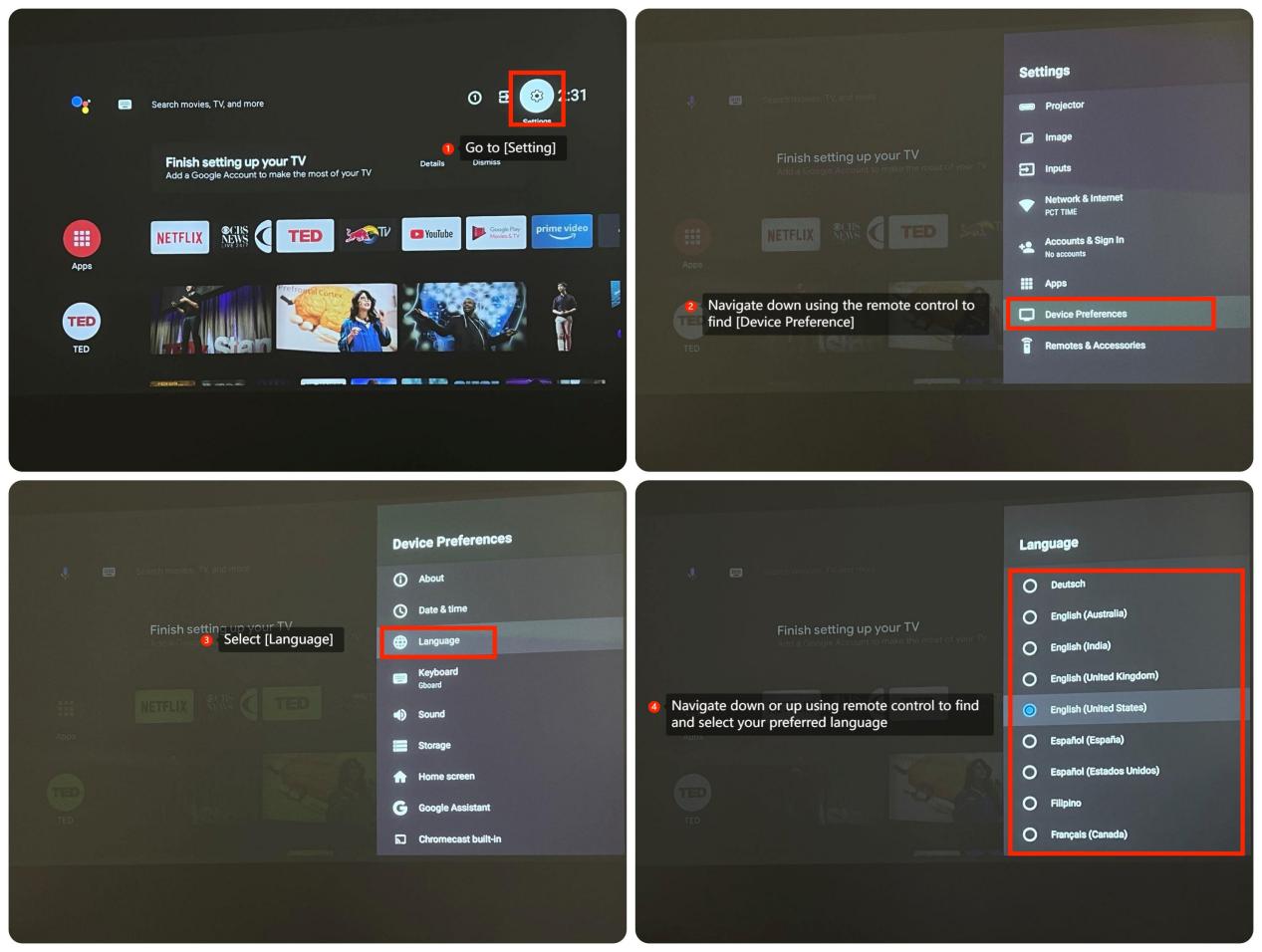
If you want to select the different language on your MI Smart Projector, you may follow the below steps:
1. Go to [Setting];
2. Navigate down using the remote control to find [Device Preference];
3. Select [Language];
4. Navigate down or up using remote control to find and select your preferred language
If you want to select the different language on your MI Smart Projector, you may follow the below steps:
1. Go to [Setting];
2. Navigate down using the remote control to find [Device Preference];
3. Select [Language];
4. Navigate down or up using remote control to find and select your preferred language